Grok Bot
Updated
Current Version
1.13.0
Offered By

Stop worrying about high battery drain when using Grok Bot on your phone. Free yourself from the tiny screen and enjoy the app on a much larger display. From now on, get a full-screen experience of your app with the convenience of a keyboard and mouse. MEmu offers you all the surprising features you’d expect: quick installation and easy setup, intuitive controls, and no more worries about battery life, mobile data, or unexpected calls. The all-new MEmu 9 is the choice for using Grok Bot on your computer. With the MEmu multi-instance manager, you can run two or more accounts at the same time. Most importantly, our exclusive emulation engine unlocks your PC’s full potential, delivering smooth and enjoyable performance.
Show more
Enjoy superb experience of using Grok Bot on PC with MEMU App Player. It's a powerful free Android emulator which provides you with thousands of android apps for their desktop version. Enjoy connecting with friends and polishing your work with higher efficiency! Meet Grok Bot, AI teammates and AI coworkers you can hand real work to.
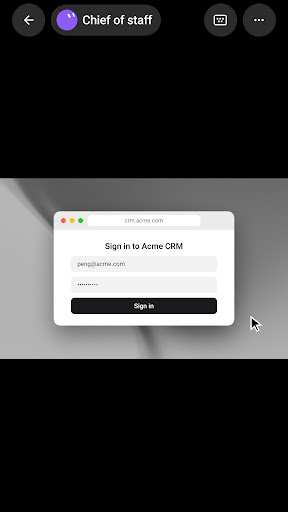
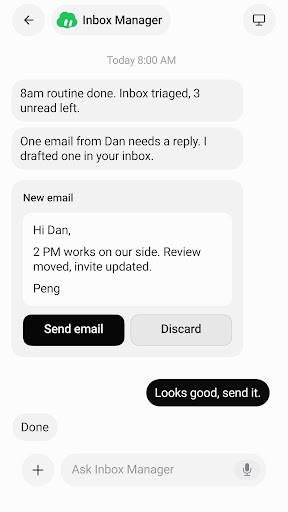
Meet Grok Bot, AI teammates and AI coworkers you can hand real work to. Grok Bots sign in, work across your tools and websites, and keep going even after you close your laptop.
Message an AI agent from your phone or desktop like a coworker, and it takes projects from start to finish instead of leaving you with another chat draft.
GROK BOT WORKS WHERE YOU WORK
Log Grok Bot in once. It uses your apps and websites just like you would, including tools that are harder to navigate: vendor portals, ad managers, CRMs, inboxes, and older ops tools. Your AI agent finishes work in the same places you already work, so automation is not a separate system you babysit. Hand off sales outbound, inbox triage, recruiting, expenses, or account follow-ups, and the work lands where a human coworker would put it.
MESSAGE BOTS LIKE TEAMMATES
Give tasks to Grok Bots like you would an AI coworker, on desktop or Android. They keep context on how you work, remember preferences across handoffs, and get smarter over time. Text from your phone or pick up the same thread on desktop. Each AI agent finishes multi-step workflows end to end and only comes back when your approval is needed.
WORK WITH MANY BOTS AT ONCE
Create a Bot, give it a task, and add another AI agent when the work grows. One owns a project, one runs outbound, one keeps systems moving. They work in parallel, collaborate where it makes sense, and keep working 24/7. Put a few Bots in the same thread and they pass work between themselves. Stand up a specialist AI coworker for each lane, then promote one to coordinate when you need a single update.
SHOW A BOT HOW IT'S DONE
Ask an AI agent to follow along as you complete a workflow once. It saves the steps as a routine and runs it on its own next time. Show it how you want email drafted, candidates sourced, or invoices pulled, and corrections stick. Your AI coworker learns your judgment instead of starting from zero.
Grok Bot helps you:
▶ Hand off real work to an AI agent across the tools and websites you already use
▶ Automate multi-step workflows without living in a chat window
▶ Message an AI coworker from your phone or desktop
▶ Run many AI agents in parallel on different jobs
▶ Show a workflow once so it runs as a routine next time
▶ Stay in the loop only when something needs your yes
WORK YOU CAN HAND OFF
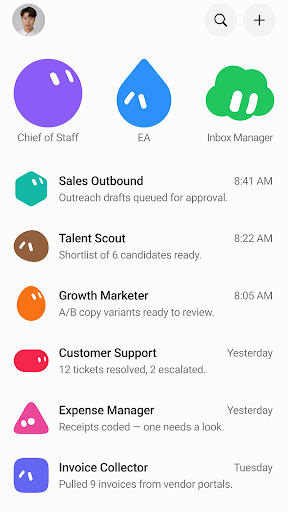
· Sales Outbound: research, outreach drafts, CRM updates, queue only until you approve
· Talent Scout: source candidates, skip anyone in your ATS, draft LinkedIn in your voice
· Inbox Manager: triage email, flag what's urgent, draft replies, never send without you
· Expense Manager: pull receipts, code expenses, chase missing items across portals
· Invoice Collector: log into vendor portals, download invoices, park for review
· Account Health: digests, risk flags, and next-step drafts so accounts stay warm
· Bug Reproduction: recreate issues and hand eng a clean write-up
· Competitive Intelligence: overnight watch for launches and stale messaging
MEET YOUR FIRST BOT
Teammates you can trust to get work done.
Support: https://cursor.com/help
Terms of Service: https://cursor.com/terms-of-service
Grok Bot Terms: https://cursor.com/terms/grok-bot
Privacy Policy: https://cursor.com/privacy
© 2026 Anysphere, Inc.
Show more

1. Download MEmu installer and finish the setup

2. Start MEmu then open Google Play on the desktop

3. Search Grok Bot in Google Play
Install
4. Download and Install Grok Bot
5. On install completion click the icon to start

6. Enjoy using Grok Bot on PC with MEmu
MEmu Play is the best Android emulator, and 100 million users already enjoy its superb Android app experience. Powered by advanced virtualization technology, it lets you enjoy thousands of Android apps smoothly on your PC—including the most graphics-intensive ones.
Bigger screen with better graphics; Long duration, without limitation of battery or mobile data.
Full Keymapping support for precise control of keyboard and mouse or gamepad.
Multiple game accounts or tasks on single PC at one time with Multi-Instance manager.
Use Grok Bot on PC by following steps: