Korea Broadcast Live - Fun TV
Ενημερώθηκε
Τρέχουσα έκδοση
1.10.7
Προσφέρεται από

Σταματήστε να ανησυχείτε για υπερβολικές χρεώσεις όταν χρησιμοποιείτε το Korea Broadcast Live - Fun TV στο κινητό σας, απελευθερώστε τον εαυτό σας από τη μικροσκοπική οθόνη και απολαύστε τη χρήση της εφαρμογής σε μια πολύ μεγαλύτερη οθόνη. Από τώρα και στο εξής, αποκτήστε εμπειρία πλήρους οθόνης της εφαρμογής σας με πληκτρολόγιο και ποντίκι. Το MEmu σας προσφέρει όλες τις εκπληκτικές δυνατότητες που περιμένατε: γρήγορη εγκατάσταση και εύκολη εγκατάσταση, διαισθητικά χειριστήρια, όχι περισσότερους περιορισμούς μπαταρίας, δεδομένα κινητής τηλεφωνίας και ενοχλητικές κλήσεις. Το ολοκαίνουργιο MEmu 9 είναι η καλύτερη επιλογή για χρήση του Korea Broadcast Live - Fun TV στον υπολογιστή σας. Κωδικοποιημένο με την απορρόφηση μας, ο διαχειριστής πολλαπλών παρουσιών καθιστά δυνατό το άνοιγμα 2 ή περισσότερων λογαριασμών ταυτόχρονα. Και το πιο σημαντικό, ο αποκλειστικός κινητήρας εξομοίωσης μπορεί να απελευθερώσει όλες τις δυνατότητες του υπολογιστή σας, να κάνει τα πάντα ομαλά και ευχάριστα.
Show more
Απολαύστε την υπέροχη εμπειρία αναπαραγωγής του Korea Broadcast Live - Fun TV σε υπολογιστή με το MEMU Play. Πρόκειται για έναν ισχυρό δωρεάν εξομοιωτή Android που σας επιτρέπει να παίζετε χιλιάδες παιχνίδια Android. Looking for Korean TV and radio?
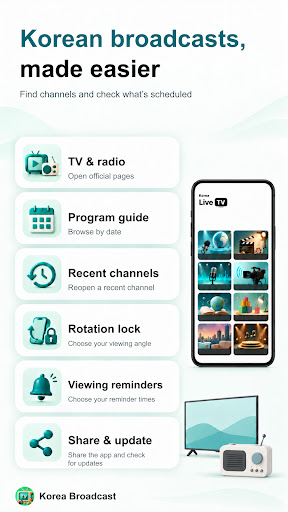
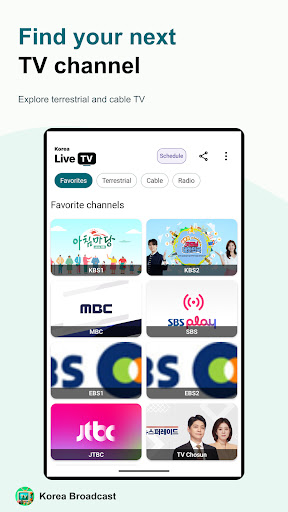
Looking for Korean TV and radio? Korea Broadcast is an Android app for finding official broadcaster websites, including KBS, MBC and SBS, in one place.
Browse terrestrial TV, cable TV and KBS or MBC radio by group. Select a channel to open its official page inside the app. Video playback and radio listening are provided by each broadcaster’s web player.
Find broadcasts more easily
• Browse Favorites, terrestrial TV, cable TV and radio groups
• Jump directly to a broadcast group
• Reopen up to six recently opened channels
• View representative channel images and pull to refresh
Favorites is a fixed collection provided by the app, not a user-editable list. Preview images may show branding or promotional artwork rather than the current broadcast.
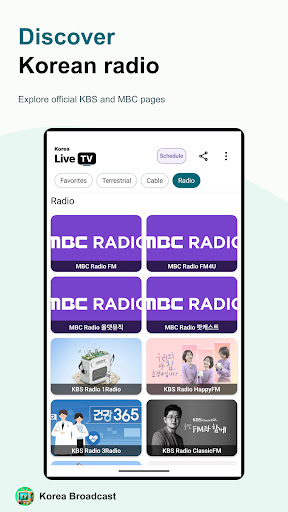
Explore KBS and MBC radio
Access official pages for MBC FM, FM4U, All That Music and Podcasts, plus KBS 1Radio, HappyFM, 3Radio, ClassicFM, CoolFM, Hanminjok, MULTILINGUAL and ENGLISH.
The app provides 12 radio and podcast pages. Podcasts is a separate service, not a live radio channel.
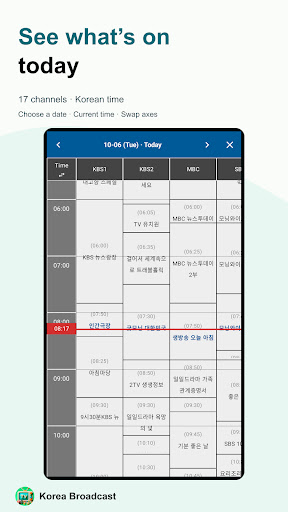
Plan your viewing with a program guide
Check schedules for 17 channels: KBS1, KBS2, MBC and SBS TV, eight KBS radio channels, three live MBC radio channels, and SBS Love FM and Power FM.
• Choose a date or move to the previous or next day
• See the current time and on-air highlights for today
• Switch the time and channel axes to browse your way
All schedule times use Korean time. Some listings may be unavailable or change depending on the source and retrieval status. The two SBS radio channels appear only in the guide, not in the home playback directory. Podcasts are not included in the guide. Program cells are read-only: program playback links, guide search and program alerts are not provided.
Viewing tools and seven interface languages
• Fullscreen on supported broadcaster players
• Screen rotation and orientation lock
• Three viewing reminders with editable times
• Share the app’s Google Play link from home or settings
• Start an update from the home New badge when a newer version is confirmed
• Korean, English, Japanese, Indonesian, Simplified Chinese, Spanish and Russian interfaces
Choose a language in settings and tap Apply. The app does not translate broadcaster websites, channel names or program titles.
Before you use the app
Korea Broadcast is not an official broadcaster app. It helps you find official websites and does not supply or retransmit broadcast streams.
An internet connection is required, and mobile data charges may apply. Playback regions, sign-in, fees, programs and player features depend on broadcaster policies and network conditions. Free access or successful playback is not guaranteed.
Ads may appear at startup, on app screens and on broadcaster websites. Viewing reminders depend on app settings, Android permissions and delivery availability, and may be delayed by power-saving modes. They are not alerts for the start of individual programs.
Downloads, offline playback, background listening and an independent video library are not provided.
Source download for the open-source library desugar 2.1.5:
https://github.com/bcodeit/third-party-sources/releases/tag/desugar-jdk-libs-2.1.5
Show more

1. Κατεβάστε το πρόγραμμα εγκατάστασης MEmu και ολοκληρώστε την εγκατάσταση

2. Ξεκινήστε το MEmu και στη συνέχεια ανοίξτε το Google Play στην επιφάνεια εργασίας

3. Αναζητήστε τον Korea Broadcast Live - Fun TV στο Google Play
Install
4. Λήψη και εγκατάσταση του Korea Broadcast Live - Fun TV
5. Μόλις ολοκληρωθεί η εγκατάσταση, κάντε κλικ στο εικονίδιο για να ξεκινήσετε

6. Απολαύστε τη χρήση του Korea Broadcast Live - Fun TV σε υπολογιστή με το MEmu
Το MEmu Play είναι ο καλύτερος δωρεάν εξομοιωτής Android, που χρησιμοποιείται αυτήν τη στιγμή από πάνω από 50 εκατομμύρια χρήστες που απολαμβάνουν την εμπειρία εφαρμογών που προσφέρει. Μέσω της τεχνολογίας εικονικοποίησης MEmu 9, οι χρήστες μπορούν να δοκιμάσουν εφαρμογές Android στους υπολογιστές τους, ακόμα και σε εκείνους που απαιτούν υψηλή ισχύ επεξεργασίας γραφικών, οι οποίες λειτουργούν ομαλά σαν να λειτουργούν στα κινητά τηλέφωνα τελευταίας γενιάς, χωρίς να θυσιάζεται η ποιότητα της εικόνας και η εμπειρία χρήστη.
Μεγαλύτερη οθόνη με καλύτερα γραφικά. Μεγάλη διάρκεια ζωής, χωρίς περιορισμό μπαταρίας ή δεδομένων κινητής τηλεφωνίας.
Πλήρης υποστήριξη αντιστοίχισης πλήκτρων για ακριβή έλεγχο του πληκτρολογίου και του ποντικιού ή του gamepad.
Πολλαπλοί λογαριασμοί παιχνιδιών ή εργασίες σε έναν υπολογιστή ταυτόχρονα με τον διαχειριστή πολλαπλών περιπτώσεων.
Use Korea Broadcast Live - Fun TV on PC by following steps: