NumBuster
Ενημερώθηκε
Τρέχουσα έκδοση
8.1
Προσφέρεται από

Σταματήστε να ανησυχείτε για υπερβολικές χρεώσεις όταν χρησιμοποιείτε το NumBuster στο κινητό σας, απελευθερώστε τον εαυτό σας από τη μικροσκοπική οθόνη και απολαύστε τη χρήση της εφαρμογής σε μια πολύ μεγαλύτερη οθόνη. Από τώρα και στο εξής, αποκτήστε εμπειρία πλήρους οθόνης της εφαρμογής σας με πληκτρολόγιο και ποντίκι. Το MEmu σας προσφέρει όλες τις εκπληκτικές δυνατότητες που περιμένατε: γρήγορη εγκατάσταση και εύκολη εγκατάσταση, διαισθητικά χειριστήρια, όχι περισσότερους περιορισμούς μπαταρίας, δεδομένα κινητής τηλεφωνίας και ενοχλητικές κλήσεις. Το ολοκαίνουργιο MEmu 9 είναι η καλύτερη επιλογή για χρήση του NumBuster στον υπολογιστή σας. Κωδικοποιημένο με την απορρόφηση μας, ο διαχειριστής πολλαπλών παρουσιών καθιστά δυνατό το άνοιγμα 2 ή περισσότερων λογαριασμών ταυτόχρονα. Και το πιο σημαντικό, ο αποκλειστικός κινητήρας εξομοίωσης μπορεί να απελευθερώσει όλες τις δυνατότητες του υπολογιστή σας, να κάνει τα πάντα ομαλά και ευχάριστα.
Show more
Απολαύστε την υπέροχη εμπειρία αναπαραγωγής του NumBuster σε υπολογιστή με το MEMU Play. Πρόκειται για έναν ισχυρό δωρεάν εξομοιωτή Android που σας επιτρέπει να παίζετε χιλιάδες παιχνίδια Android. 1.
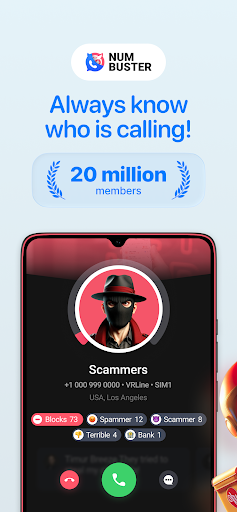
1. Default Phone Call Manager and Call Blocker
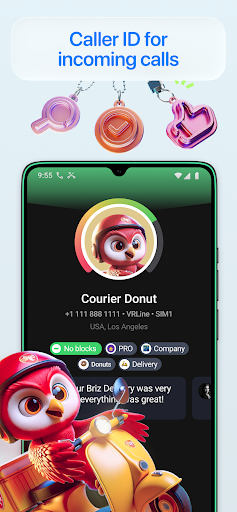
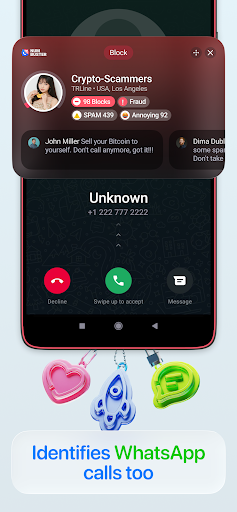
NumBuster app can act as your default phone call manager (you may change this option at any time in the app) that enhances your safety and security - you will see possible caller names and SPAM or robocaller warnings right on your screen before you answer the call.
And block any unwanted callers.
2. Default SMS Manager and SMS Blocker
You also can use NumBuster app as a default SMS app in your smartphone (you may choose this option in SMS section of the app at any time) that sends and receives SMS and permanently protects you from SMS spam and fraud.
3. Other options to use NumBuster.
You may use NumBuster as a Caller ID app with names for unfamiliar strangers phone numbers
Prevent ruffling or endangering the safety of your family right now using our help.
Blocklist app that blocks unwanted or embarrassing calls or SMS and saves your time, energy, and money since 2014.
You can block SPAM and scam and any incoming calls and SMS which you don't need under your criteria.
Since 2014, NumBuster has been available in 22 countries for millions of its Users. Now it is an industry standard and an example to be followed by hundreds of similar mobile applications.
Thanks to NumBuster, you can see all the necessary phone number details on your device's display to decide whether to answer the call. The option is free.
There are two modes available in NumBuster:
- Full-screen mode. NumBuster call window replaces your device's default dialer and operates as a DEFAULT CALL APP that enhances your safety and security.
- On-screen window mode. You can move it to a proper position by finger and set its size and colour theme.
You can set NumBuster as a DEFAULT SMS APP that sends and receives SMS under the NumBuster protection and permanently protects you from fraud.
You can rely on tags and reviews left for phone numbers by other users or check how many users have blocked a certain phone number. This option is free.
You can check the NumBuster Phone Numbers Trust Rating and improve it as well. This option is also free.
You can purchase subscriptions (add-ons) to enable additional app options, such as checking how other users identify or tag any phone number, including your one.
Fortunately, it is impossible to find out who has tagged or left a review to a certain phone number since, under the NumBuster Terms and Conditions, all users share their knowledge and opinions on an anonymous basis.
Please note that in NumBuster, there is —
- No sensitive or personal data transfer to third parties or for any collective interests
- No cooperation with other entities or users information share. It is strictly prohibited by the NumBuster Terms and Conditions since the NumBuster team does not consider such actions appropriate or fair.
Show more

1. Κατεβάστε το πρόγραμμα εγκατάστασης MEmu και ολοκληρώστε την εγκατάσταση

2. Ξεκινήστε το MEmu και στη συνέχεια ανοίξτε το Google Play στην επιφάνεια εργασίας

3. Αναζητήστε τον NumBuster στο Google Play
Install
4. Λήψη και εγκατάσταση του NumBuster
5. Μόλις ολοκληρωθεί η εγκατάσταση, κάντε κλικ στο εικονίδιο για να ξεκινήσετε

6. Απολαύστε τη χρήση του NumBuster σε υπολογιστή με το MEmu
Το MEmu Play είναι ο καλύτερος δωρεάν εξομοιωτής Android, που χρησιμοποιείται αυτήν τη στιγμή από πάνω από 50 εκατομμύρια χρήστες που απολαμβάνουν την εμπειρία εφαρμογών που προσφέρει. Μέσω της τεχνολογίας εικονικοποίησης MEmu 9, οι χρήστες μπορούν να δοκιμάσουν εφαρμογές Android στους υπολογιστές τους, ακόμα και σε εκείνους που απαιτούν υψηλή ισχύ επεξεργασίας γραφικών, οι οποίες λειτουργούν ομαλά σαν να λειτουργούν στα κινητά τηλέφωνα τελευταίας γενιάς, χωρίς να θυσιάζεται η ποιότητα της εικόνας και η εμπειρία χρήστη.
Μεγαλύτερη οθόνη με καλύτερα γραφικά. Μεγάλη διάρκεια ζωής, χωρίς περιορισμό μπαταρίας ή δεδομένων κινητής τηλεφωνίας.
Πλήρης υποστήριξη αντιστοίχισης πλήκτρων για ακριβή έλεγχο του πληκτρολογίου και του ποντικιού ή του gamepad.
Πολλαπλοί λογαριασμοί παιχνιδιών ή εργασίες σε έναν υπολογιστή ταυτόχρονα με τον διαχειριστή πολλαπλών περιπτώσεων.
Use NumBuster on PC by following steps: