ReShoot: AI Photos & Edits
Ενημερώθηκε
Τρέχουσα έκδοση
1.4.31
Προσφέρεται από

Σταματήστε να ανησυχείτε για υπερβολικές χρεώσεις όταν χρησιμοποιείτε το ReShoot: AI Photos & Edits στο κινητό σας, απελευθερώστε τον εαυτό σας από τη μικροσκοπική οθόνη και απολαύστε τη χρήση της εφαρμογής σε μια πολύ μεγαλύτερη οθόνη. Από τώρα και στο εξής, αποκτήστε εμπειρία πλήρους οθόνης της εφαρμογής σας με πληκτρολόγιο και ποντίκι. Το MEmu σας προσφέρει όλες τις εκπληκτικές δυνατότητες που περιμένατε: γρήγορη εγκατάσταση και εύκολη εγκατάσταση, διαισθητικά χειριστήρια, όχι περισσότερους περιορισμούς μπαταρίας, δεδομένα κινητής τηλεφωνίας και ενοχλητικές κλήσεις. Το ολοκαίνουργιο MEmu 9 είναι η καλύτερη επιλογή για χρήση του ReShoot: AI Photos & Edits στον υπολογιστή σας. Κωδικοποιημένο με την απορρόφηση μας, ο διαχειριστής πολλαπλών παρουσιών καθιστά δυνατό το άνοιγμα 2 ή περισσότερων λογαριασμών ταυτόχρονα. Και το πιο σημαντικό, ο αποκλειστικός κινητήρας εξομοίωσης μπορεί να απελευθερώσει όλες τις δυνατότητες του υπολογιστή σας, να κάνει τα πάντα ομαλά και ευχάριστα.
Show more
Απολαύστε την υπέροχη εμπειρία αναπαραγωγής του ReShoot: AI Photos & Edits σε υπολογιστή με το MEMU Play. Πρόκειται για έναν ισχυρό δωρεάν εξομοιωτή Android που σας επιτρέπει να παίζετε χιλιάδες παιχνίδια Android. Transform One Selfie into Stunning Photoshoots with ReShoot: AI Photos & Edits Completely Free!
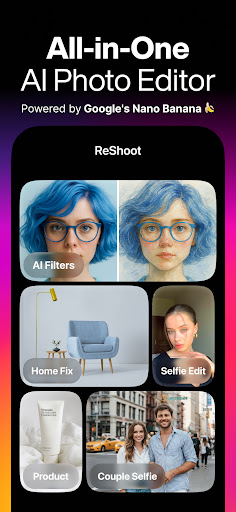
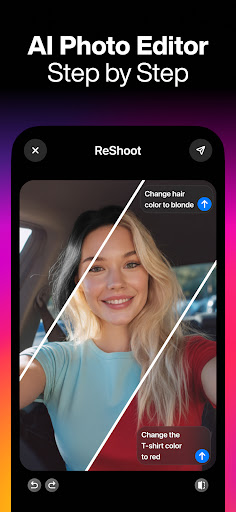
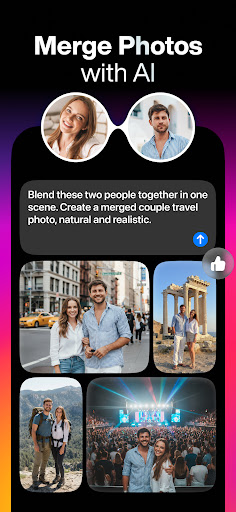
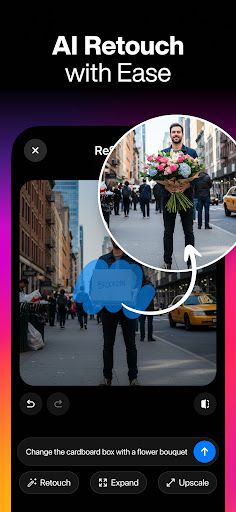
Transform One Selfie into Stunning Photoshoots with ReShoot: AI Photos & Edits Completely Free!
Powered by Google’s new viral image editor, Gemini 2.5 Flash Image (aka Nano Banana)
Forget boring photo editors, meet Reshoot powered by Gemini, the ultimate game-changer in photography. With ReShoot, you don’t need the perfect shot on the first try. Whether it’s a snap from years ago or a picture from your next big celebration, ReShoot transforms it into a photo you’ll love with just one tap — now with a timeless Polaroid camera too.
Skip the filters, editing and confusion;
Just upload a photo, and ReShoot will do the rest.
Get ultra-realistic AI photos with just one selfie.
What You Can Do with ReShoot:
• AI Photo Generator: Turn your selfie into magazine-style portraits with stunning outfits
• AI Picture Editor: Enhance any photo with one tap to reveal your best self
• AI Interior Designer: See your dream home in seconds
• AI Tattoo Generator: Try on tattoo ideas before committing
• AI Image Generator: Create stunning logos and visuals from text
• See Your Future Self: AI aging, made fun
• AI Cartoon Filters: Transform your face into art
• Try on Hairstyles: Find the perfect look before your next haircut or color
• Product Photo Studio: Professional product images in seconds
• AI Professional Business Headshots: Look sharp in suits or business outfits
• Merge Photos with AI Power: Combine two people’s photos into one realistic, shared picture
• AI Retouch – Instantly remove unwanted objects, change the background, or add creative elements like a flower bouquet. Easy, precise, and fully AI-powered.
• Expand Your Image – Go beyond the frame! Extend your photo safely for Instagram Story, Portrait, or Square sizes using smart AI outpainting.
- ReShoot is Perfect for:
Professional Photo Editing
Social media glow-ups
Professional profile pictures
Creative exploration
Just having fun
Why ReShoot?
ReShoot is not just another AI photo app it’s your complete AI photo studio in your pocket. With cutting-edge technology, it takes your selfie and transforms it into countless styles: business headshots, creative portraits, glamorous photoshoots, artistic cartoons, and even futuristic edits.
Endless Possibilities
Create a professional Business headshot without needing a suit or studio.
- Test out hairstyles and hair colors before committing at the salon.
- Generate realistic AI avatars for social media, gaming, or creative projects.
- Use AI cartoon filters to turn yourself into anime, or comic book.
- Design unique tattoos and see how they would look on your skin.
- Produce product photography for online shops, ads, and social media posts.
- Explore interior design ideas for your dream home with just one tap.
For Professionals and Creators
If you’re an influencer, marketer, or entrepreneur, ReShoot is your secret weapon. Create brand-worthy content in seconds. Need a new profile photo for your website, business card, or resume? Done. Launching a new product and want studio-quality product photos? Easy. Running social media campaigns and need fresh content daily? Generate an endless stream of unique images instantly.
Key Features Recap
AI Photo Generator for realistic portraits
AI Retouch & Editing tools
AI Headshots in suits and formal wear
AI Hairstyles & makeover options
AI Cartoon & anime transformations
AI Interior Design preview
AI Logo & image creation
AI Product photo studio
AI Merge Photos for realistic shared pictures
We value your feedback! If you have suggestions or feedback to make ReShoot better, we'd love to hear from you. Don't hesitate to contact us at support@reshootapp.org
By using the app, you confirm that you acknowledge and accept our Privacy Policy and Terms of Use:
Privacy Policy: https://reshootapp.org/privacy
Terms of Service: https://reshootapp.org/terms
Download ReShoot now and get your first AI photo set in under 30 seconds.
Show more

1. Κατεβάστε το πρόγραμμα εγκατάστασης MEmu και ολοκληρώστε την εγκατάσταση

2. Ξεκινήστε το MEmu και στη συνέχεια ανοίξτε το Google Play στην επιφάνεια εργασίας

3. Αναζητήστε τον ReShoot: AI Photos & Edits στο Google Play
Install
4. Λήψη και εγκατάσταση του ReShoot: AI Photos & Edits
5. Μόλις ολοκληρωθεί η εγκατάσταση, κάντε κλικ στο εικονίδιο για να ξεκινήσετε

6. Απολαύστε τη χρήση του ReShoot: AI Photos & Edits σε υπολογιστή με το MEmu
Το MEmu Play είναι ο καλύτερος δωρεάν εξομοιωτής Android, που χρησιμοποιείται αυτήν τη στιγμή από πάνω από 50 εκατομμύρια χρήστες που απολαμβάνουν την εμπειρία εφαρμογών που προσφέρει. Μέσω της τεχνολογίας εικονικοποίησης MEmu 9, οι χρήστες μπορούν να δοκιμάσουν εφαρμογές Android στους υπολογιστές τους, ακόμα και σε εκείνους που απαιτούν υψηλή ισχύ επεξεργασίας γραφικών, οι οποίες λειτουργούν ομαλά σαν να λειτουργούν στα κινητά τηλέφωνα τελευταίας γενιάς, χωρίς να θυσιάζεται η ποιότητα της εικόνας και η εμπειρία χρήστη.
Μεγαλύτερη οθόνη με καλύτερα γραφικά. Μεγάλη διάρκεια ζωής, χωρίς περιορισμό μπαταρίας ή δεδομένων κινητής τηλεφωνίας.
Πλήρης υποστήριξη αντιστοίχισης πλήκτρων για ακριβή έλεγχο του πληκτρολογίου και του ποντικιού ή του gamepad.
Πολλαπλοί λογαριασμοί παιχνιδιών ή εργασίες σε έναν υπολογιστή ταυτόχρονα με τον διαχειριστή πολλαπλών περιπτώσεων.
Use ReShoot: AI Photos & Edits on PC by following steps: