
Clover Tales: Idle Adventure
अपडेट किया गया
वर्तमान वर्शन
संसाधन

अपने सेलफोन पर Clover Tales: Idle Adventure का उपयोग करते समय ओवरचार्ज के बारे में चिंता करना बंद करें, अपने आप को छोटी स्क्रीन से मुक्त करें और बहुत बड़े डिस्प्ले पर ऐप का उपयोग करने का आनंद लें। अब से, कीबोर्ड और माउस के साथ अपने ऐप का पूर्ण-स्क्रीन अनुभव प्राप्त करें। एमईएमयू आपको उन सभी आश्चर्यजनक सुविधाओं की पेशकश करता है जिनकी आपको उम्मीद थी: त्वरित इंस्टॉल और आसान सेटअप, सहज नियंत्रण, बैटरी की कोई सीमा नहीं, मोबाइल डेटा और परेशान कॉल। आपके कंप्यूटर पर Clover Tales: Idle Adventure का उपयोग करने का सबसे अच्छा विकल्प नया MEmu 9 है। हमारे अवशोषण के साथ कोडित, बहु-उदाहरण प्रबंधक एक ही समय में 2 या अधिक खाते खोलना संभव बनाता है। और सबसे महत्वपूर्ण, हमारा अनन्य उत्सर्जन इंजन आपके पीसी की पूरी क्षमता को जारी कर सकता है, सब कुछ सुचारू और सुखद बना सकता है।
और दिखाएं
डाउनलोड करें Clover Tales: Idle Adventure पीसी पर MEmu एंड्रॉयड एमुलेटर के साथ बड़े पर्दे पर खेलने का आनंद लें। Legend says that in the continent of Clovia, four-leaf clovers drift in the wind, guiding the way to a fantastical world.


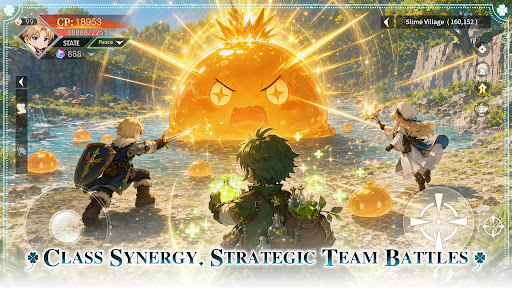

Legend says that in the continent of Clovia, four-leaf clovers drift in the wind, guiding the way to a fantastical world.
There, vast forests, open grasslands, and ancient ruins come together, filled with the unknown and countless surprises, as well as many untold stories waiting to be discovered.
Everyone who steps into this world will begin their own unique adventure.
Class Synergy, Strategic Team Battles
Combine a variety of classes to create the perfect team composition. Leverage each role’s unique strengths and adapt to ever-changing battles to overcome every challenge ahead.
Idle Progression, Rich Rewards
Keep growing even while offline. Earn valuable resources and equipment automatically, allowing you to advance your adventure with ease and enjoy steady progression at your own pace.
Unlock New Classes, Grow Stronger
As your journey unfolds, new classes become available, bringing fresh skills and combat styles. Continue to strengthen your character and discover new ways to conquer the challenges ahead.
Explore the World, Discover Hidden Wonders
Travel across vast grasslands, dense forests, and ancient ruins. Venture into unexplored regions, uncover hidden secrets, and experience the unique stories each land has to offer.
Gather Allies, Adventure Together
Join forces with like-minded companions and take on challenges as a team. Grow stronger through every battle and expedition while creating unforgettable memories along the way.
और दिखाएं

1. MEmu इंस्टॉलर को डाउनलोड करें और इंस्टॉलेशन को पूरा करें

2. MEmu शुरू करें फिर होमपेज पर Google Play खोलें

3. Google Play में Clover Tales: Idle Adventure खोजें
Install
4. Clover Tales: Idle Adventure डाउनलोड कर इंस्टॉल करें
5. इंस्टॉल पूरा होने पर आइकन दबाएं

6. MEmu से पीसी पर Clover Tales: Idle Adventure खेलने का आनंद लें
MEmu Play सबसे बेहतरीन मुफ़्त Android एमुलेटर है और 5 करोड़ लोग पहले ही इसके शानदार Android गेमिंग अनुभव का आनंद ले चुके हैं। MEmu 9 वर्चुअलाइज़ेशन तकनीक आपको अपने PC पर हज़ारों Android गेम, यहाँ तक कि सबसे ज़्यादा ग्राफ़िक्स वाले गेम भी, आसानी से खेलने की सुविधा देती है।
असीमित बैटरी या मोबाइल डेटा के साथ बेहतर ग्राफिक्स के साथ बड़ी स्क्रीन; लंबी अवधि।
कीबोर्ड और माउस या गेमपैड के उत्तम नियंत्रण के लिए संपूर्ण कीमैपिंग का समर्थन करता हैं।
एक ही पीसी पर मल्टी-इंस्टेंस मैनेजर के साथ एक समय में कई गेम खाते या कार्य कर सकते हैं।
Play Clover Tales: Idle Adventure on PC by following steps: