
Clover Tales: Idle Adventure
Updated
Current Version
Offered By

With your passion for Clover Tales: Idle Adventure, you shouldn’t have to limit yourself to the small screen of a phone. Play like a pro and take full control of the game using a keyboard and mouse. MEmu gives you everything you’re looking for. Download and play Clover Tales: Idle Adventure on PC. Play as long as you want — no more worries about battery life, mobile data, or unexpected calls. The all-new MEmu 9 is the best way to play Clover Tales: Idle Adventure on PC. With our expertly designed keymapping system, Clover Tales: Idle Adventure feels just like a real PC game. The MEmu multi-instance manager lets you run two or more accounts on the same device at the same time. Most importantly, our exclusive emulation engine unlocks your PC’s full potential, delivering smooth and seamless performance.
Show more
Download Clover Tales: Idle Adventure on PC with MEmu Android Emulator. Enjoy playing on big screen. Legend says that in the continent of Clovia, four-leaf clovers drift in the wind, guiding the way to a fantastical world.


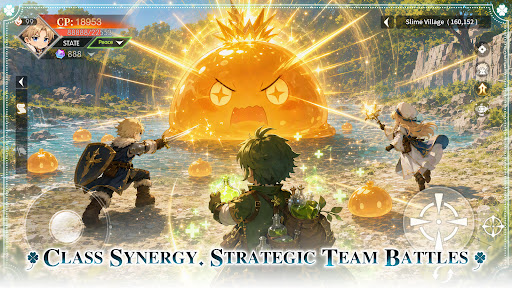
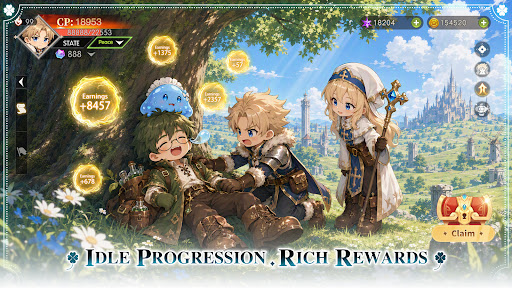
Legend says that in the continent of Clovia, four-leaf clovers drift in the wind, guiding the way to a fantastical world.
There, vast forests, open grasslands, and ancient ruins come together, filled with the unknown and countless surprises, as well as many untold stories waiting to be discovered.
Everyone who steps into this world will begin their own unique adventure.
Class Synergy, Strategic Team Battles
Combine a variety of classes to create the perfect team composition. Leverage each role’s unique strengths and adapt to ever-changing battles to overcome every challenge ahead.
Idle Progression, Rich Rewards
Keep growing even while offline. Earn valuable resources and equipment automatically, allowing you to advance your adventure with ease and enjoy steady progression at your own pace.
Unlock New Classes, Grow Stronger
As your journey unfolds, new classes become available, bringing fresh skills and combat styles. Continue to strengthen your character and discover new ways to conquer the challenges ahead.
Explore the World, Discover Hidden Wonders
Travel across vast grasslands, dense forests, and ancient ruins. Venture into unexplored regions, uncover hidden secrets, and experience the unique stories each land has to offer.
Gather Allies, Adventure Together
Join forces with like-minded companions and take on challenges as a team. Grow stronger through every battle and expedition while creating unforgettable memories along the way.
Show more

1. Download MEmu installer and finish the setup

2. Start MEmu then open Google Play on the desktop

3. Search Clover Tales: Idle Adventure in Google Play
Install
4. Download and Install Clover Tales: Idle Adventure
5. On install completion click the icon to start

6. Enjoy playing Clover Tales: Idle Adventure on PC with MEmu
MEmu Play is the best Android emulator and 100 million people already enjoy its superb Android gaming experience. The MEmu virtualization technology empowers you to play thousands of Android games smoothly on your PC, even the most graphic-intensive ones.
Bigger screen with better graphics; Long duration, without limitation of battery or mobile data.
Full Keymapping support for precise control of keyboard and mouse or gamepad.
Multiple game accounts or tasks on single PC at one time with Multi-Instance manager.
Play Clover Tales: Idle Adventure on PC by following steps: