Ever Night
अपडेट किया गया
वर्तमान वर्शन
10.0.60
संसाधन

अपने सेलफोन पर Ever Night का उपयोग करते समय ओवरचार्ज के बारे में चिंता करना बंद करें, अपने आप को छोटी स्क्रीन से मुक्त करें और बहुत बड़े डिस्प्ले पर ऐप का उपयोग करने का आनंद लें। अब से, कीबोर्ड और माउस के साथ अपने ऐप का पूर्ण-स्क्रीन अनुभव प्राप्त करें। एमईएमयू आपको उन सभी आश्चर्यजनक सुविधाओं की पेशकश करता है जिनकी आपको उम्मीद थी: त्वरित इंस्टॉल और आसान सेटअप, सहज नियंत्रण, बैटरी की कोई सीमा नहीं, मोबाइल डेटा और परेशान कॉल। आपके कंप्यूटर पर Ever Night का उपयोग करने का सबसे अच्छा विकल्प नया MEmu 9 है। हमारे अवशोषण के साथ कोडित, बहु-उदाहरण प्रबंधक एक ही समय में 2 या अधिक खाते खोलना संभव बनाता है। और सबसे महत्वपूर्ण, हमारा अनन्य उत्सर्जन इंजन आपके पीसी की पूरी क्षमता को जारी कर सकता है, सब कुछ सुचारू और सुखद बना सकता है।
और दिखाएं
डाउनलोड करें Ever Night पीसी पर MEmu एंड्रॉयड एमुलेटर के साथ बड़े पर्दे पर खेलने का आनंद लें। जब सूर्य का प्रकाश अथाह अंधकार में समा जाता है, तो दुनिया शाश्वत अंधकार में डूब जाती है.
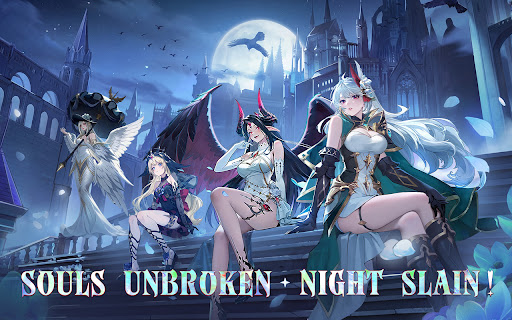
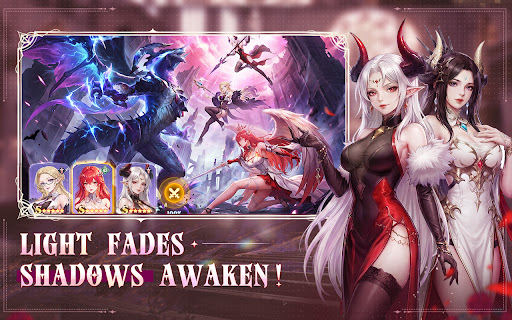
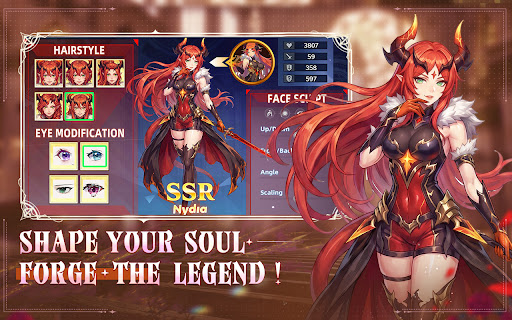
जब सूर्य का प्रकाश अथाह अंधकार में समा जाता है, तो दुनिया शाश्वत अंधकार में डूब जाती है. राक्षस बेकाबू हो जाते हैं, सभ्यता पतन के कगार पर पहुँच जाती है. एवर नाइट में, आप भाग्य से प्रेरित लाइटचेज़र बनते हैं, जो निराशा और चमत्कारों से भरी एक अंधेरी भूमि में एक महाकाव्य यात्रा पर निकलते हैं. नायकों को जगाएँ, अपनी सबसे शक्तिशाली पार्टी बनाएँ, और प्रकाश को बहाल करने के लिए शाश्वत अंधकार के पीछे की साजिश का पर्दाफाश करें!
गहन अंधकारमय वातावरण, एक शानदार ऑडियो-विजुअल दावत.
अगली पीढ़ी का इंजन आश्चर्यजनक डार्क फैंटेसी दृश्य प्रस्तुत करता है, जिसमें जटिल रूप से विस्तृत वातावरण और चकाचौंध कर देने वाले कौशल प्रभाव शामिल हैं, जो एक वास्तविक सिनेमाई अनुभव प्रदान करते हैं. रहस्यमय छायादार जंगलों, जीर्ण-शीर्ण प्राचीन किलों और गहरी भूमिगत खाईयों का अन्वेषण करें, और एक लुभावनी, रोमांचक कहानी में डूब जाएँ.
विशाल नायक एकत्रित होते हैं, रणनीतिक संयोजन युद्ध का रुख बदल देते हैं.
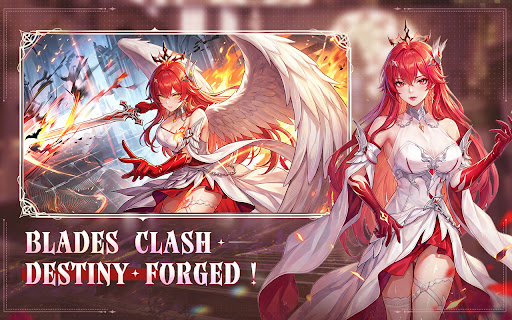
पाँच गुट और सौ से अधिक अद्वितीय नायक आपके आह्वान की प्रतीक्षा कर रहे हैं! योद्धा, जादूगर, हत्यारे, समर्थक... अपनी कक्षाओं और कौशलों को स्वतंत्र रूप से मिलाएँ. अपने खास लाइनअप को तैयार करने के लिए फैक्शन काउंटर्स और बॉन्ड बोनस का इस्तेमाल करें, चतुराई से ताकतवर दुश्मनों को हराएं और दिमाग को झकझोर देने वाले रणनीतिक गेमप्ले का अनुभव करें.
आसान आइडल प्ले - ऑफलाइन रहते हुए भी ताकतवर बनें.
कोई मेहनत नहीं, बस मज़ा! स्मार्ट आइडल सिस्टम आपको ऑफलाइन होने पर भी बड़े इनाम देता है. लॉगिन करते ही एक टैप से एपिक गियर और भरपूर संसाधन पाएं, जिससे आपके हीरो हर चुनौती को आसानी से पार करने के लिए हमेशा चरम पर बने रहें.
विविध और समृद्ध गेमप्ले, अनंत अथाह गहराई का अन्वेषण करें.
रोमांचक मुख्य अभियान के अलावा, कई तरह के मोड आपकी चुनौती का इंतज़ार कर रहे हैं, जिनमें रोगलाइक डंजन एक्सप्लोरेशन, टावर ट्रायल, वर्ल्ड बॉस और बहुत कुछ शामिल हैं. हर एडवेंचर एक नया अनुभव है, जिसमें रैंडम इवेंट्स और छिपे हुए चेस्ट सफर को सरप्राइज़ से भरपूर रखते हैं.
वैश्विक सर्वर-व्यापी प्रतियोगिता, अपने गिल्ड का सम्मान बनाए रखें.
एक गिल्ड में शामिल हों, भरोसेमंद साथियों के साथ रिश्ते बनाएं और ताकतवर क्रॉस-सर्वर हमलावरों के खिलाफ एकजुट होकर खड़े हों. रोमांचक एरिना लड़ाइयों और गिल्ड वॉर्स में हिस्सा लें और दुनिया भर के खिलाड़ियों के साथ मुकाबला करें. लीडरबोर्ड पर शीर्ष स्थान प्राप्त करें और बेमिसाल गौरव व भरपूर पुरस्कार जीतें!
प्रकाश कभी बुझेगा नहीं, आशा कभी नष्ट नहीं होगी. आज ही एवर नाइट डाउनलोड करें और अपने उद्धार की यात्रा शुरू करें!
-- अधिक जानकारी के लिए हमें फॉलो करें--
आधिकारिक फेसबुक पेज: https://www.facebook.com/evernightreawaken
आधिकारिक वेबसाइट: https://www.yrlongxin.com/
और दिखाएं

1. MEmu इंस्टॉलर को डाउनलोड करें और इंस्टॉलेशन को पूरा करें

2. MEmu शुरू करें फिर होमपेज पर Google Play खोलें

3. Google Play में Ever Night खोजें
Install
4. Ever Night डाउनलोड कर इंस्टॉल करें
5. इंस्टॉल पूरा होने पर आइकन दबाएं

6. MEmu से पीसी पर Ever Night खेलने का आनंद लें
MEmu Play सबसे बेहतरीन मुफ़्त Android एमुलेटर है और 5 करोड़ लोग पहले ही इसके शानदार Android गेमिंग अनुभव का आनंद ले चुके हैं। MEmu 9 वर्चुअलाइज़ेशन तकनीक आपको अपने PC पर हज़ारों Android गेम, यहाँ तक कि सबसे ज़्यादा ग्राफ़िक्स वाले गेम भी, आसानी से खेलने की सुविधा देती है।
असीमित बैटरी या मोबाइल डेटा के साथ बेहतर ग्राफिक्स के साथ बड़ी स्क्रीन; लंबी अवधि।
कीबोर्ड और माउस या गेमपैड के उत्तम नियंत्रण के लिए संपूर्ण कीमैपिंग का समर्थन करता हैं।
एक ही पीसी पर मल्टी-इंस्टेंस मैनेजर के साथ एक समय में कई गेम खाते या कार्य कर सकते हैं।
Play Ever Night on PC by following steps: