FEROCIOUS
अपडेट किया गया
वर्तमान वर्शन
संसाधन

अपने सेलफोन पर FEROCIOUS का उपयोग करते समय ओवरचार्ज के बारे में चिंता करना बंद करें, अपने आप को छोटी स्क्रीन से मुक्त करें और बहुत बड़े डिस्प्ले पर ऐप का उपयोग करने का आनंद लें। अब से, कीबोर्ड और माउस के साथ अपने ऐप का पूर्ण-स्क्रीन अनुभव प्राप्त करें। एमईएमयू आपको उन सभी आश्चर्यजनक सुविधाओं की पेशकश करता है जिनकी आपको उम्मीद थी: त्वरित इंस्टॉल और आसान सेटअप, सहज नियंत्रण, बैटरी की कोई सीमा नहीं, मोबाइल डेटा और परेशान कॉल। आपके कंप्यूटर पर FEROCIOUS का उपयोग करने का सबसे अच्छा विकल्प नया MEmu 9 है। हमारे अवशोषण के साथ कोडित, बहु-उदाहरण प्रबंधक एक ही समय में 2 या अधिक खाते खोलना संभव बनाता है। और सबसे महत्वपूर्ण, हमारा अनन्य उत्सर्जन इंजन आपके पीसी की पूरी क्षमता को जारी कर सकता है, सब कुछ सुचारू और सुखद बना सकता है।
और दिखाएं
डाउनलोड करें FEROCIOUS पीसी पर MEmu एंड्रॉयड एमुलेटर के साथ बड़े पर्दे पर खेलने का आनंद लें। In FEROCIOUS, players wake up on a mysterious island brimming with ancient ruins and lethal predators, challenging them to adapt and survive.
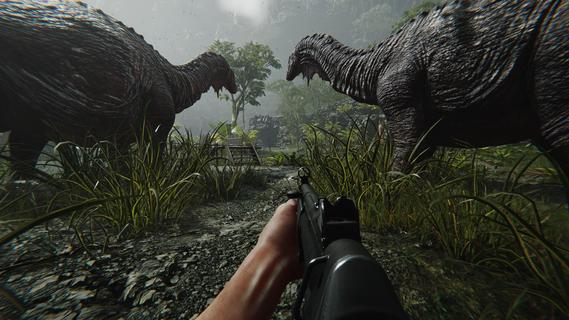
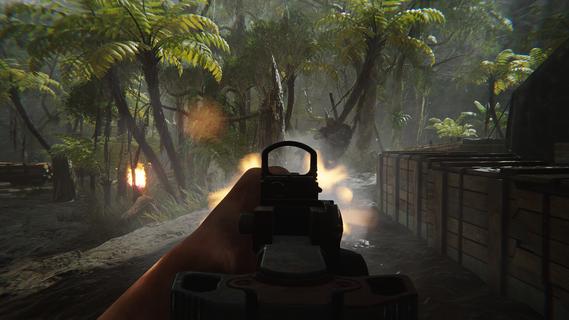
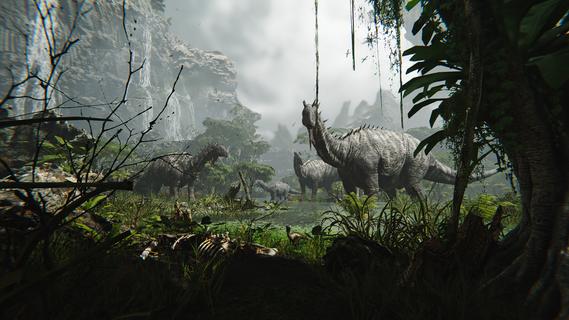
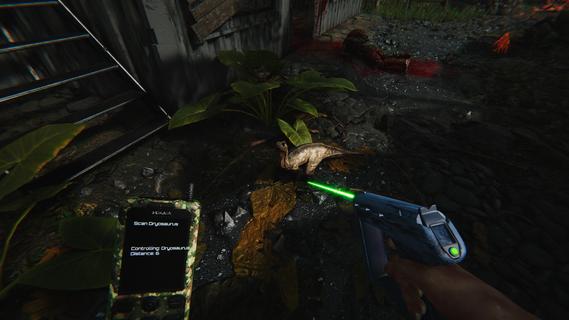
In FEROCIOUS, players wake up on a mysterious island brimming with ancient ruins and lethal predators, challenging them to adapt and survive. Every encounter provides thrilling combat experiences while utilizing the environment to craft weapons and gear. Explore hidden secrets and engage strategically to master the island's unpredictability and uncover its mysteries. Features of FEROCIOUS- Dynamic FPS Combat: Engage in intense gunfights against mercenaries, fierce dinosaurs, and powerful mechas. The combat system is designed for high-stakes encounters that keep players on their toes, ensuring that every fight feels unpredictable and exhilarating. - Exploration and Survival: Navigate through a vast, dangerous island where survival is paramount. Players must carefully explore the terrain to uncover hidden paths, essential gear, and secrets that aid in their quest for survival. - Resource Crafting System: Utilize the resources found throughout the environment to craft weapons and gear that suit your play style. This crafting system allows players to adapt to various challenges by customizing their arsenal for each encounter. - Animal Control Mechanics: Turn the island's wild inhabitants to your advantage. Players can control dinosaurs to attack enemies, create advantageous distractions, or access guarded areas, adding a unique strategic layer to gameplay. - Ever-Changing Environment: The island itself acts as a living entity, with unpredictable elements that can either aid or hinder players. This dynamic setting not only enhances the challenge but also rewards those who dare to explore and understand its intricacies.
और दिखाएं

1. MEmu इंस्टॉलर को डाउनलोड करें और इंस्टॉलेशन को पूरा करें

2. MEmu शुरू करें फिर होमपेज पर Google Play खोलें

3. Google Play में FEROCIOUS खोजें
Install
4. FEROCIOUS डाउनलोड कर इंस्टॉल करें
5. इंस्टॉल पूरा होने पर आइकन दबाएं

6. MEmu से पीसी पर FEROCIOUS खेलने का आनंद लें
MEmu Play सबसे बेहतरीन मुफ़्त Android एमुलेटर है और 5 करोड़ लोग पहले ही इसके शानदार Android गेमिंग अनुभव का आनंद ले चुके हैं। MEmu 9 वर्चुअलाइज़ेशन तकनीक आपको अपने PC पर हज़ारों Android गेम, यहाँ तक कि सबसे ज़्यादा ग्राफ़िक्स वाले गेम भी, आसानी से खेलने की सुविधा देती है।
असीमित बैटरी या मोबाइल डेटा के साथ बेहतर ग्राफिक्स के साथ बड़ी स्क्रीन; लंबी अवधि।
कीबोर्ड और माउस या गेमपैड के उत्तम नियंत्रण के लिए संपूर्ण कीमैपिंग का समर्थन करता हैं।
एक ही पीसी पर मल्टी-इंस्टेंस मैनेजर के साथ एक समय में कई गेम खाते या कार्य कर सकते हैं।
Play FEROCIOUS on PC by following steps: