Google Play Store
अपडेट किया गया
वर्तमान वर्शन
संसाधन

अपने सेलफोन पर Google Play Store का उपयोग करते समय ओवरचार्ज के बारे में चिंता करना बंद करें, अपने आप को छोटी स्क्रीन से मुक्त करें और बहुत बड़े डिस्प्ले पर ऐप का उपयोग करने का आनंद लें। अब से, कीबोर्ड और माउस के साथ अपने ऐप का पूर्ण-स्क्रीन अनुभव प्राप्त करें। एमईएमयू आपको उन सभी आश्चर्यजनक सुविधाओं की पेशकश करता है जिनकी आपको उम्मीद थी: त्वरित इंस्टॉल और आसान सेटअप, सहज नियंत्रण, बैटरी की कोई सीमा नहीं, मोबाइल डेटा और परेशान कॉल। आपके कंप्यूटर पर Google Play Store का उपयोग करने का सबसे अच्छा विकल्प नया MEmu 9 है। हमारे अवशोषण के साथ कोडित, बहु-उदाहरण प्रबंधक एक ही समय में 2 या अधिक खाते खोलना संभव बनाता है। और सबसे महत्वपूर्ण, हमारा अनन्य उत्सर्जन इंजन आपके पीसी की पूरी क्षमता को जारी कर सकता है, सब कुछ सुचारू और सुखद बना सकता है।
और दिखाएं
डाउनलोड करें Google Play Store पीसी पर MEmu एंड्रॉयड एमुलेटर के साथ बड़े पर्दे पर खेलने का आनंद लें। The Google Play Store app is an essential application for Android users that allows them to browse, download, and update a variety of apps and games on their mobile devices.
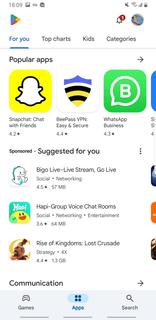
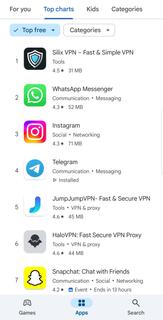
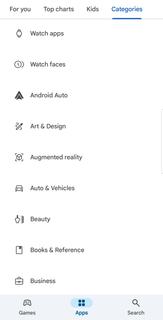
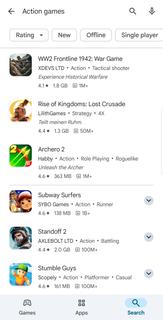
The Google Play Store app is an essential application for Android users that allows them to browse, download, and update a variety of apps and games on their mobile devices. With over 3 million apps, games, music, movies, TV shows, and books, the Google Play Store app is the largest mobile marketplace. Google Play Store interface is user-friendly and straightforward, making it easy for users to navigate and find the content they are looking for. There is a range of categories, such as top charts, new releases, and staff picks, which allow users to quickly discover new and popular apps. Moreover, the ratings and reviews given by other users help to give an idea of the app's quality and usefulness, making it easier for users to make informed decisions when downloading apps. In addition to apps and games, the Google Play Store app provides access to movies, TV shows, music, and books in various formats. Users can buy or rent movies and TV shows, watch them on their mobile devices or online on a TV or computer. Users can also stream music, discover new artists, or purchase individual songs or albums from their favorite artists. Additionally, users can find and purchase e-books and audiobooks to read or listen to offline. The Google Play Store app also allows users to manage their digital content effectively. The My Apps & Games section makes it easy for users to see the status of their app downloads, updates, and disable auto-update, if required. Users can also manage their notifications, subscriptions, and view their purchase history. The Google Play Store app ensures that the content shared on its platform is safe and secure for users to access. All apps and games are reviewed for functionality and security before being made available on the platform. Additionally, Google Play Protect constantly scans for malware and other malicious behavior to ensure that users remain safe.Google Play Store app is not available at Google Play Store for download. So you can install APK file of Google Play Store from APKPure.com for your Android devices .
और दिखाएं

1. MEmu इंस्टॉलर को डाउनलोड करें और इंस्टॉलेशन को पूरा करें

2. MEmu शुरू करें फिर होमपेज पर Google Play खोलें

3. Google Play में Google Play Store खोजें
Install
4. Google Play Store डाउनलोड कर इंस्टॉल करें
5. इंस्टॉल पूरा होने पर आइकन दबाएं

6. MEmu से पीसी पर Google Play Store खेलने का आनंद लें
MEmu Play सबसे बेहतरीन मुफ़्त Android एमुलेटर है और 5 करोड़ लोग पहले ही इसके शानदार Android गेमिंग अनुभव का आनंद ले चुके हैं। MEmu 9 वर्चुअलाइज़ेशन तकनीक आपको अपने PC पर हज़ारों Android गेम, यहाँ तक कि सबसे ज़्यादा ग्राफ़िक्स वाले गेम भी, आसानी से खेलने की सुविधा देती है।
असीमित बैटरी या मोबाइल डेटा के साथ बेहतर ग्राफिक्स के साथ बड़ी स्क्रीन; लंबी अवधि।
कीबोर्ड और माउस या गेमपैड के उत्तम नियंत्रण के लिए संपूर्ण कीमैपिंग का समर्थन करता हैं।
एक ही पीसी पर मल्टी-इंस्टेंस मैनेजर के साथ एक समय में कई गेम खाते या कार्य कर सकते हैं।
Play Google Play Store on PC by following steps: