MERGE HAMSTER
अपडेट किया गया
वर्तमान वर्शन
1721892745
संसाधन

अपने सेलफोन पर MERGE HAMSTER का उपयोग करते समय ओवरचार्ज के बारे में चिंता करना बंद करें, अपने आप को छोटी स्क्रीन से मुक्त करें और बहुत बड़े डिस्प्ले पर ऐप का उपयोग करने का आनंद लें। अब से, कीबोर्ड और माउस के साथ अपने ऐप का पूर्ण-स्क्रीन अनुभव प्राप्त करें। एमईएमयू आपको उन सभी आश्चर्यजनक सुविधाओं की पेशकश करता है जिनकी आपको उम्मीद थी: त्वरित इंस्टॉल और आसान सेटअप, सहज नियंत्रण, बैटरी की कोई सीमा नहीं, मोबाइल डेटा और परेशान कॉल। आपके कंप्यूटर पर MERGE HAMSTER का उपयोग करने का सबसे अच्छा विकल्प नया MEmu 9 है। हमारे अवशोषण के साथ कोडित, बहु-उदाहरण प्रबंधक एक ही समय में 2 या अधिक खाते खोलना संभव बनाता है। और सबसे महत्वपूर्ण, हमारा अनन्य उत्सर्जन इंजन आपके पीसी की पूरी क्षमता को जारी कर सकता है, सब कुछ सुचारू और सुखद बना सकता है।
और दिखाएं
डाउनलोड करें MERGE HAMSTER पीसी पर MEmu एंड्रॉयड एमुलेटर के साथ बड़े पर्दे पर खेलने का आनंद लें। Squeeeak!

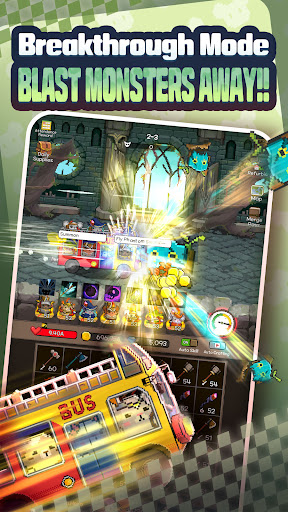
Squeeeak!!! The hamsters are angry!!
An evil force has suddenly appeared in the once peaceful forest of the hamsters, disturbing their tranquility.
Their peaceful days of eating and sleeping have been shattered, and they can no longer tolerate it!
Don’t underestimate them because of their small size! It’s time to show what the hamsters can do!
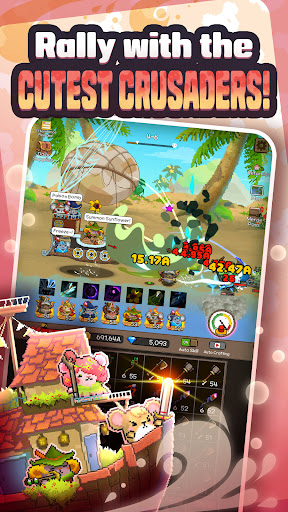
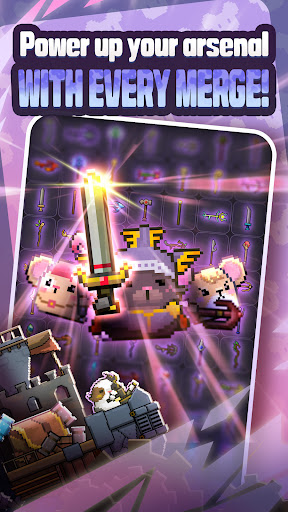
Merge Hamster is an idle merge game. Recruit hamsters, merge and upgrade various weapons, and protect the forest!
Hamster Raising Guide
▶ Tap and Merge!
Merge weapons to create even more powerful ones.
There’s no end to the growth of the hamsters!
▶ Recruit Hamsters
Recruit cute and brave hamsters.
Hamsters with various abilities and skills will join you!
▶ Hamster Skills
Utilize the various skills of the hamsters to experience even more spectacular battles.
Using skills strategically increases your chances of victory in battles.
▶ Fortress Upgrade
Upgrade the fortress where the hamsters live.
The better the fortress, the stronger the hamsters become, enhancing their abilities.
Protect the forest with your adorable hamster heroes!
और दिखाएं

1. MEmu इंस्टॉलर को डाउनलोड करें और इंस्टॉलेशन को पूरा करें

2. MEmu शुरू करें फिर होमपेज पर Google Play खोलें

3. Google Play में MERGE HAMSTER खोजें
Install
4. MERGE HAMSTER डाउनलोड कर इंस्टॉल करें
5. इंस्टॉल पूरा होने पर आइकन दबाएं

6. MEmu से पीसी पर MERGE HAMSTER खेलने का आनंद लें
MEmu Play सबसे बेहतरीन मुफ़्त Android एमुलेटर है और 5 करोड़ लोग पहले ही इसके शानदार Android गेमिंग अनुभव का आनंद ले चुके हैं। MEmu 9 वर्चुअलाइज़ेशन तकनीक आपको अपने PC पर हज़ारों Android गेम, यहाँ तक कि सबसे ज़्यादा ग्राफ़िक्स वाले गेम भी, आसानी से खेलने की सुविधा देती है।
असीमित बैटरी या मोबाइल डेटा के साथ बेहतर ग्राफिक्स के साथ बड़ी स्क्रीन; लंबी अवधि।
कीबोर्ड और माउस या गेमपैड के उत्तम नियंत्रण के लिए संपूर्ण कीमैपिंग का समर्थन करता हैं।
एक ही पीसी पर मल्टी-इंस्टेंस मैनेजर के साथ एक समय में कई गेम खाते या कार्य कर सकते हैं।
Play MERGE HAMSTER on PC by following steps: