Mythic Expedition
अपडेट किया गया
वर्तमान वर्शन
1.0.6
संसाधन

अपने सेलफोन पर Mythic Expedition का उपयोग करते समय ओवरचार्ज के बारे में चिंता करना बंद करें, अपने आप को छोटी स्क्रीन से मुक्त करें और बहुत बड़े डिस्प्ले पर ऐप का उपयोग करने का आनंद लें। अब से, कीबोर्ड और माउस के साथ अपने ऐप का पूर्ण-स्क्रीन अनुभव प्राप्त करें। एमईएमयू आपको उन सभी आश्चर्यजनक सुविधाओं की पेशकश करता है जिनकी आपको उम्मीद थी: त्वरित इंस्टॉल और आसान सेटअप, सहज नियंत्रण, बैटरी की कोई सीमा नहीं, मोबाइल डेटा और परेशान कॉल। आपके कंप्यूटर पर Mythic Expedition का उपयोग करने का सबसे अच्छा विकल्प नया MEmu 9 है। हमारे अवशोषण के साथ कोडित, बहु-उदाहरण प्रबंधक एक ही समय में 2 या अधिक खाते खोलना संभव बनाता है। और सबसे महत्वपूर्ण, हमारा अनन्य उत्सर्जन इंजन आपके पीसी की पूरी क्षमता को जारी कर सकता है, सब कुछ सुचारू और सुखद बना सकता है।
और दिखाएं
डाउनलोड करें Mythic Expedition पीसी पर MEmu एंड्रॉयड एमुलेटर के साथ बड़े पर्दे पर खेलने का आनंद लें। Embark on a Cute Fantasy Adventure!
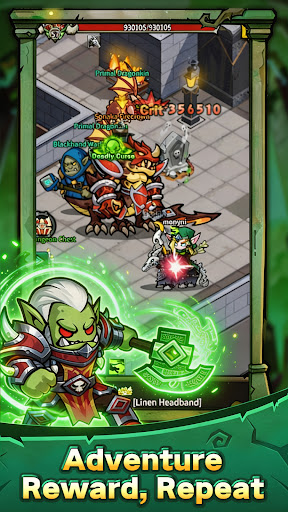
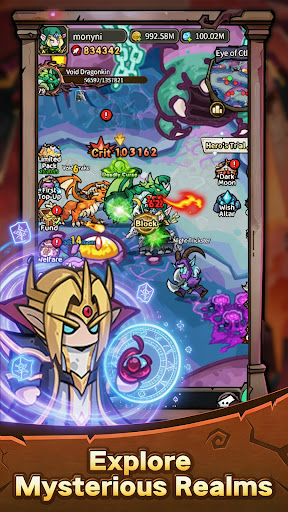

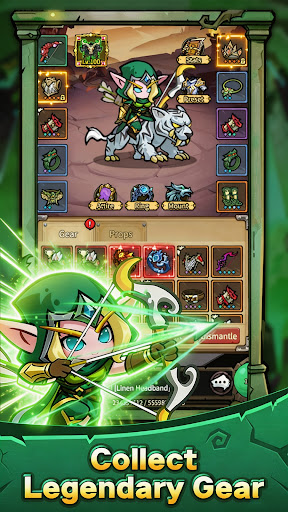
Embark on a Cute Fantasy Adventure!
Step into a magical world filled with legendary heroes, mysterious lands, powerful monsters, and endless adventures. Experience classic fantasy reimagined in a charming chibi style!
Cute Fantasy World
Explore a colorful magical world featuring Humans, Orcs, Elves, Undead, and more. Discover charming heroes, beautiful locations, and exciting adventures.
Easy Idle Progression
No endless grinding! Your heroes keep gaining experience and collecting resources even while you're away. Come back, claim your rewards, and grow stronger at your own pace.
Build Your Dream Team
Combine Warriors, Mages, Hunters, Priests, and unique heroes to create powerful teams. Master different skills and strategies to conquer dungeons and mighty bosses.
Adventure Awaits
Explore dungeons, challenge powerful bosses, collect epic equipment, recruit heroes, and embark on an unforgettable fantasy journey.
Build your team. Explore the world. Become a legend!
और दिखाएं

1. MEmu इंस्टॉलर को डाउनलोड करें और इंस्टॉलेशन को पूरा करें

2. MEmu शुरू करें फिर होमपेज पर Google Play खोलें

3. Google Play में Mythic Expedition खोजें
Install
4. Mythic Expedition डाउनलोड कर इंस्टॉल करें
5. इंस्टॉल पूरा होने पर आइकन दबाएं

6. MEmu से पीसी पर Mythic Expedition खेलने का आनंद लें
MEmu Play सबसे बेहतरीन मुफ़्त Android एमुलेटर है और 5 करोड़ लोग पहले ही इसके शानदार Android गेमिंग अनुभव का आनंद ले चुके हैं। MEmu 9 वर्चुअलाइज़ेशन तकनीक आपको अपने PC पर हज़ारों Android गेम, यहाँ तक कि सबसे ज़्यादा ग्राफ़िक्स वाले गेम भी, आसानी से खेलने की सुविधा देती है।
असीमित बैटरी या मोबाइल डेटा के साथ बेहतर ग्राफिक्स के साथ बड़ी स्क्रीन; लंबी अवधि।
कीबोर्ड और माउस या गेमपैड के उत्तम नियंत्रण के लिए संपूर्ण कीमैपिंग का समर्थन करता हैं।
एक ही पीसी पर मल्टी-इंस्टेंस मैनेजर के साथ एक समय में कई गेम खाते या कार्य कर सकते हैं।
Play Mythic Expedition on PC by following steps: