Mythic Expedition
อัปเดตเมื่อ
เวอร์ชันปัจจุบัน
1.0.6
ให้บริการโดย

เวลาคุณเล่น Mythic Expedition, คุณอาจรู้สึกว่ามือคุณอาจบังจอแล้วทำให้ไม่ได้เล่นแบบเต็มที่. เล่นแบบไร้ขีดจำกัดด้วยเม้าส์และคีย์บอร์ด. MEmu มีตัวเลือกหลายอย่างให้คุณใช้งานเกมที่คุณเล่นแบบที่คุณต้องการ. ดาวน์โหลดและเล่น Mythic Expedition บน PC. เล่นนานแค่ไหนก็ได้, ไม่ต้องชาร์จแบตเตอรี่, หรือเจอคนโทรเข้ามาระหว่างเล่น. MEmu 9 เป็นตัวเลือกสำหรับการเล่น Mythic Expedition บน PC. ทางทีมงานเราได้ปรับแต่งเกม, ปรับให้เล่นเกมบางเกมได้เหมือนเล่น Mythic Expedition เป็นเกม PC เช่นเล็งด้วยเม้าส์หรือใช้คีย์บอร์ด. ระบบของเรายังทำให้คุณสามารถเปิดเล่นได้มากกว่า 2 เกมพร้อมๆกันในคอมของคุณ. และที่สำคัญที่สุด, ระบบโปรแกรมของเราสามารถทำให้คุณใช้ระบบของ PC ทำให้เกมลื่นเหมือนกับใช้โทรศัพท์รุ่นล่าสุด. เราไม่ได้ดูแลเรื่องการเล่นเกม, แต่เราดูแลถึงความสนุกสนานที่คุณได้จากการเล่นด้วย.
แสดงเพิ่มเติม
ดาวน์โหลด Mythic Expedition บน PC ด้วย MEmu Android Emulator สนุกกับการเล่นบนหน้าจอขนาดใหญ่ Embark on a Cute Fantasy Adventure!
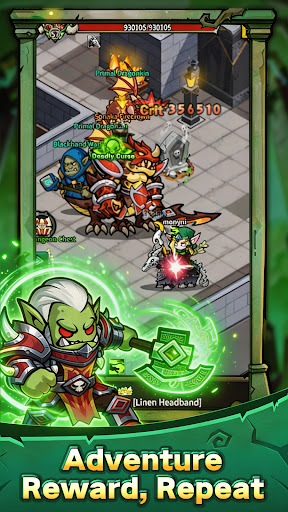
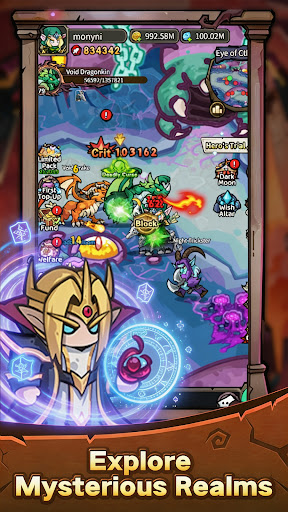

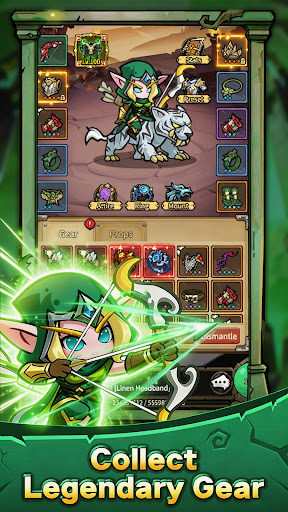
Embark on a Cute Fantasy Adventure!
Step into a magical world filled with legendary heroes, mysterious lands, powerful monsters, and endless adventures. Experience classic fantasy reimagined in a charming chibi style!
Cute Fantasy World
Explore a colorful magical world featuring Humans, Orcs, Elves, Undead, and more. Discover charming heroes, beautiful locations, and exciting adventures.
Easy Idle Progression
No endless grinding! Your heroes keep gaining experience and collecting resources even while you're away. Come back, claim your rewards, and grow stronger at your own pace.
Build Your Dream Team
Combine Warriors, Mages, Hunters, Priests, and unique heroes to create powerful teams. Master different skills and strategies to conquer dungeons and mighty bosses.
Adventure Awaits
Explore dungeons, challenge powerful bosses, collect epic equipment, recruit heroes, and embark on an unforgettable fantasy journey.
Build your team. Explore the world. Become a legend!
แสดงเพิ่มเติม

1. ดาวน์โหลดตัวติดตั้ง MEmu และสิ้นสุดการติดตั้ง

2. เริ่ม MEmu จากนั้นเปิด Google Play บนหน้าแรก

3. ค้นหา Mythic Expedition ใน Google Play
Install
4. ดาวน์โหลดและติดตั้ง Mythic Expedition
5. เมื่อติดตั้งเสร็จให้คลิกที่ไอคอนเพื่อเริ่มใช้งาน

6. สนุกกับการเล่น Mythic Expedition บนพีซีด้วย MEmu
MEmu App Player เป็นอีมูเลเตอร์ Android ที่ดีที่สุดและผู้คนกว่า 50 ล้านคนเพลิดเพลินไปกับประสบการณ์การเล่นเกม Android ที่ยอดเยี่ยม เทคโนโลยีการจำลองเสมือนของ MEmu ช่วยให้คุณเล่นเกม Android หลายพันเกมได้อย่างราบรื่นบนพีซีของคุณแม้แต่เกมที่ต้องใช้กราฟิกมากที่สุด
จอใหญ่และกราฟฟิกสวยกว่า; เล่นได้นาน, ไม่ต้องใช้แบตเตอรี่โทรศัพท์หรือเน็ตโทรศัพท์.
ระบบปรับแต่งปุ่มคีย์บอร์ดและเม้าส์ตามที่คุณเลือก
เล่นมากกว่าหนึ่งเกมบน PC ในเวลาเดียวกันด้วยระบบหลายจอหรือ Multi-Instance manager.
Play Mythic Expedition on PC by following steps: