
PancitoMerge
अपडेट किया गया
वर्तमान वर्शन
संसाधन

अपने सेलफोन पर PancitoMerge का उपयोग करते समय ओवरचार्ज के बारे में चिंता करना बंद करें, अपने आप को छोटी स्क्रीन से मुक्त करें और बहुत बड़े डिस्प्ले पर ऐप का उपयोग करने का आनंद लें। अब से, कीबोर्ड और माउस के साथ अपने ऐप का पूर्ण-स्क्रीन अनुभव प्राप्त करें। एमईएमयू आपको उन सभी आश्चर्यजनक सुविधाओं की पेशकश करता है जिनकी आपको उम्मीद थी: त्वरित इंस्टॉल और आसान सेटअप, सहज नियंत्रण, बैटरी की कोई सीमा नहीं, मोबाइल डेटा और परेशान कॉल। आपके कंप्यूटर पर PancitoMerge का उपयोग करने का सबसे अच्छा विकल्प नया MEmu 9 है। हमारे अवशोषण के साथ कोडित, बहु-उदाहरण प्रबंधक एक ही समय में 2 या अधिक खाते खोलना संभव बनाता है। और सबसे महत्वपूर्ण, हमारा अनन्य उत्सर्जन इंजन आपके पीसी की पूरी क्षमता को जारी कर सकता है, सब कुछ सुचारू और सुखद बना सकता है।
और दिखाएं
डाउनलोड करें PancitoMerge पीसी पर MEmu एंड्रॉयड एमुलेटर के साथ बड़े पर्दे पर खेलने का आनंद लें। Step into a warm, flour-dusted world where pan dulce takes center stage.
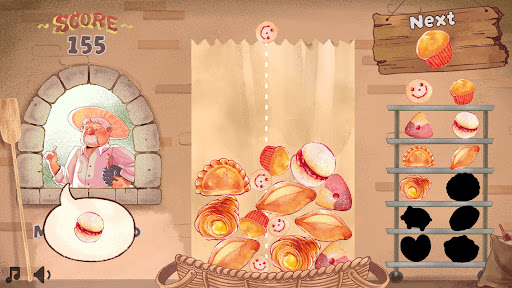
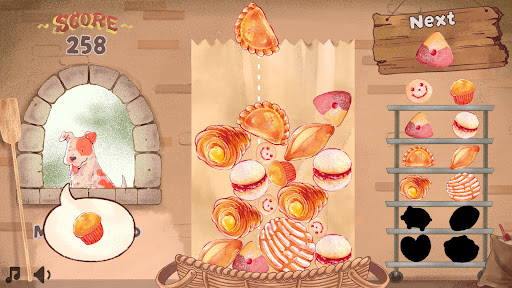
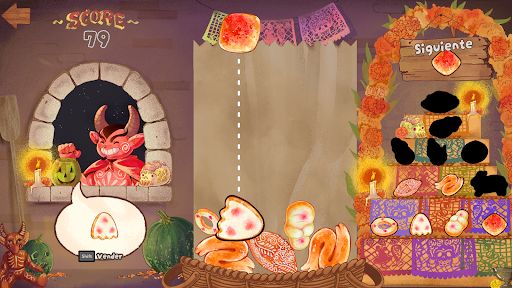
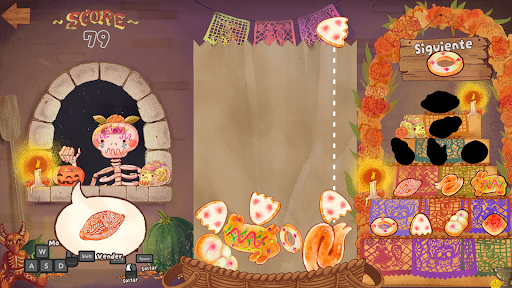
Step into a warm, flour-dusted world where pan dulce takes center stage. Merge adorable conchas, cuernitos, and more to discover delicious new treats in this whimsical puzzle game. With a dash of strategy and a sprinkle of tradition, PancitoMerge blends the joy of classic falling block games with the vibrant spirit of a neighborhood panadería.
Great for cozy breaks or chasing a high-score, no baking skills required!
The goal is simple: merge matching breads to create higher-level ones, aiming for the highest score possible while unlocking every type of bread in a single run. But be careful, the game ends if the breads stack up to the top of the bag!
A Tasty Twist: Every 5 drops, a customer arrives with a specific bread request. Fulfill their order by clicking/tapping on the requested bread in the bag.
PancitoMerge is a love letter to Mexican culture and the joy of pan dulce. From colorful conchas to buttery cuernitos, each bread is inspired by real treats found in local bakeries, celebrating the warmth, tradition, and creativity of Mexican baking.
और दिखाएं

1. MEmu इंस्टॉलर को डाउनलोड करें और इंस्टॉलेशन को पूरा करें

2. MEmu शुरू करें फिर होमपेज पर Google Play खोलें

3. Google Play में PancitoMerge खोजें
Install
4. PancitoMerge डाउनलोड कर इंस्टॉल करें
5. इंस्टॉल पूरा होने पर आइकन दबाएं

6. MEmu से पीसी पर PancitoMerge खेलने का आनंद लें
MEmu Play सबसे बेहतरीन मुफ़्त Android एमुलेटर है और 5 करोड़ लोग पहले ही इसके शानदार Android गेमिंग अनुभव का आनंद ले चुके हैं। MEmu 9 वर्चुअलाइज़ेशन तकनीक आपको अपने PC पर हज़ारों Android गेम, यहाँ तक कि सबसे ज़्यादा ग्राफ़िक्स वाले गेम भी, आसानी से खेलने की सुविधा देती है।
असीमित बैटरी या मोबाइल डेटा के साथ बेहतर ग्राफिक्स के साथ बड़ी स्क्रीन; लंबी अवधि।
कीबोर्ड और माउस या गेमपैड के उत्तम नियंत्रण के लिए संपूर्ण कीमैपिंग का समर्थन करता हैं।
एक ही पीसी पर मल्टी-इंस्टेंस मैनेजर के साथ एक समय में कई गेम खाते या कार्य कर सकते हैं।
Play PancitoMerge on PC by following steps: