PancitoMerge
更新日
現在のバージョン
提供元

スマホ不要!プロ選手のようにキーボードとマウスで操作しよう。MEmuエミュはあなたにすべての期待を与える。電池が切れてしまうとか画面が小さいとかの問題を心配する必要がなくて、存分PancitoMergeを楽しんでください。新しいMEmuエミュ7はPCでPancitoMergeをプレイするのに最適!完璧なキーマッピングシステムにより、まるでパソコンゲームみたい。マルチインスタンスで複数のゲームやアプリを同時に実行!唯一無二な仮想化エンジンがパソコンの可能性を最大限になる。遊べるだけでなく、より楽しめる!
もっと見る
PancitoMergeをPCでダウンロード!大画面でより楽しむ。電源が落ちてしまうとか通信料が足りないとかの問題を心配する必要がなく、PCの大画面でより快適にゲームを楽しましょう! Step into a warm, flour-dusted world where pan dulce takes center stage.
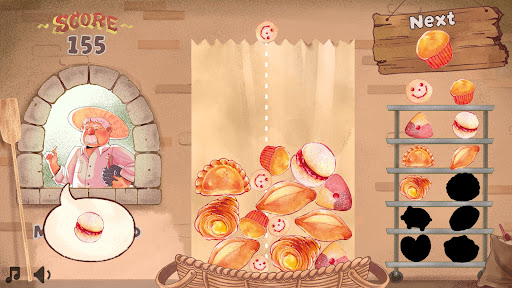
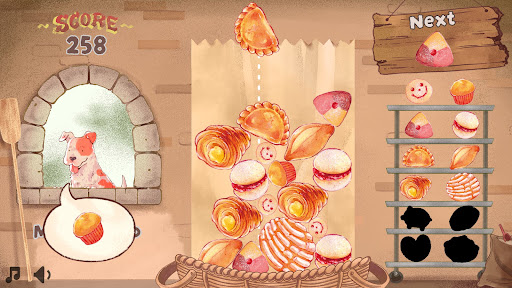
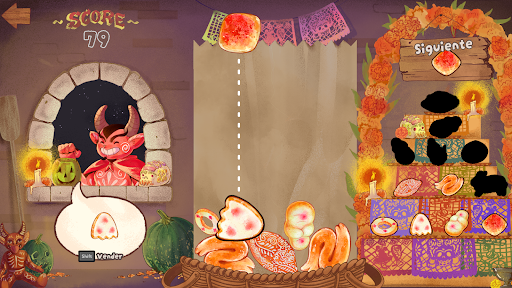
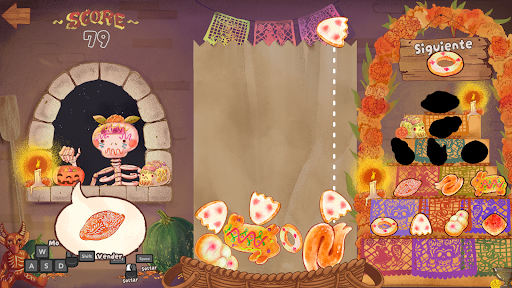
Step into a warm, flour-dusted world where pan dulce takes center stage. Merge adorable conchas, cuernitos, and more to discover delicious new treats in this whimsical puzzle game. With a dash of strategy and a sprinkle of tradition, PancitoMerge blends the joy of classic falling block games with the vibrant spirit of a neighborhood panadería.
Great for cozy breaks or chasing a high-score, no baking skills required!
The goal is simple: merge matching breads to create higher-level ones, aiming for the highest score possible while unlocking every type of bread in a single run. But be careful, the game ends if the breads stack up to the top of the bag!
A Tasty Twist: Every 5 drops, a customer arrives with a specific bread request. Fulfill their order by clicking/tapping on the requested bread in the bag.
PancitoMerge is a love letter to Mexican culture and the joy of pan dulce. From colorful conchas to buttery cuernitos, each bread is inspired by real treats found in local bakeries, celebrating the warmth, tradition, and creativity of Mexican baking.
もっと見る

1. MEmuインストーラーをダウンロードしてセットアップを完了する

2. MEmuを起動し、デスクトップでのPlayストアを開く

3. PlayストアでPancitoMergeを検索する
Install
4. PancitoMergeをダウンロードしてインストールする
5. インストールが完了したら、アイコンをクリックしてスタート

6. MEmuを使用してPCでPancitoMergeを楽しむ
MEmu App Playerは最高の無料で提供されるAndroidエミュレータで、5,000万人がすでに優れたAndroidゲーム体験を楽しんでいます。 MEmuの仮想化技術は、あなたのPCで何千ものAndroidゲームを快適にプレイすることを可能にします。
大画面でより精細;無限の待機、電池とドラフィックの極限を超え
キーボード・マウス・コントローラーを全力でサポート、より快適
マルチインスタンスで複数のゲームを同時に実行
Play PancitoMerge on PC by following steps: