Rogue Reigns
अपडेट किया गया
वर्तमान वर्शन
संसाधन

अपने सेलफोन पर Rogue Reigns का उपयोग करते समय ओवरचार्ज के बारे में चिंता करना बंद करें, अपने आप को छोटी स्क्रीन से मुक्त करें और बहुत बड़े डिस्प्ले पर ऐप का उपयोग करने का आनंद लें। अब से, कीबोर्ड और माउस के साथ अपने ऐप का पूर्ण-स्क्रीन अनुभव प्राप्त करें। एमईएमयू आपको उन सभी आश्चर्यजनक सुविधाओं की पेशकश करता है जिनकी आपको उम्मीद थी: त्वरित इंस्टॉल और आसान सेटअप, सहज नियंत्रण, बैटरी की कोई सीमा नहीं, मोबाइल डेटा और परेशान कॉल। आपके कंप्यूटर पर Rogue Reigns का उपयोग करने का सबसे अच्छा विकल्प नया MEmu 9 है। हमारे अवशोषण के साथ कोडित, बहु-उदाहरण प्रबंधक एक ही समय में 2 या अधिक खाते खोलना संभव बनाता है। और सबसे महत्वपूर्ण, हमारा अनन्य उत्सर्जन इंजन आपके पीसी की पूरी क्षमता को जारी कर सकता है, सब कुछ सुचारू और सुखद बना सकता है।
और दिखाएं
डाउनलोड करें Rogue Reigns पीसी पर MEmu एंड्रॉयड एमुलेटर के साथ बड़े पर्दे पर खेलने का आनंद लें। A DARK FANTASY ROGUELIKE DECKBUILDER ABOUT TRUST AND SACRIFICE.
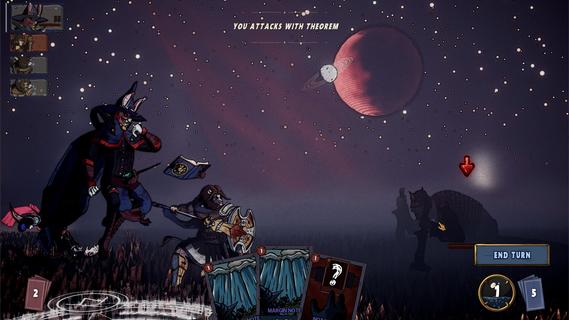
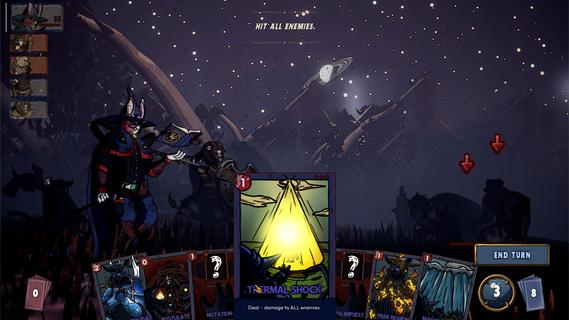
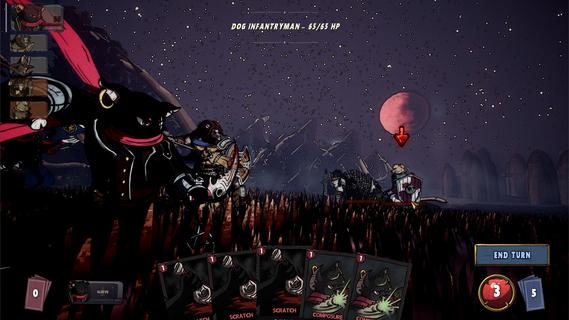
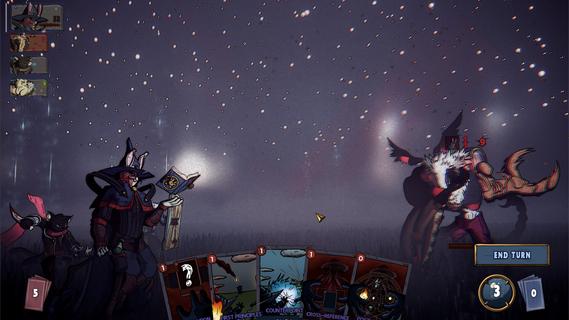
A DARK FANTASY ROGUELIKE DECKBUILDER ABOUT TRUST AND SACRIFICE.A grieving bear, a guilty lion, a scheming cat, and a rabbit who knows too much.Their abilities interlock. What one sets up, another finishes. Their motives don't.Every card you give one is a card you took from another. Strengthen one and another starves.Their synergies are fragile. Their resentment isn't.The party holds together only as long as you force it;And the run will force you to choose between them.It doesn't wait at the end of the map. It stalks you across it.The sky dims. The road goes quiet. Read the signs or get caught.Every fall sends you back, scarred and stitched. But this one is different.When it finds you, that fall is permanent.A queen who fused with the dead to shelter them.A prince who starved until he devoured the battlefield.A princess who sewed her dead lover to her own flesh.You learn who they were when they kill you.PARTY DECKBUILDINGFour decks, one fight. Combos and synergies run across your whole party.CROSS-CHARACTERS PAYOFFSYour finishers enter allies' decks. Your setup is their payoff.TRUST AND SACRIFICEFavor a champion and they grow. Neglect one and face the consequences.A STALKERHunts you across the map. Miss the signs and fall for real.MULTIPLE ENDINGSWho you trusted and who you sacrificed determines how it ends.HAND-DRAWN CHARACTERSEvery frame animated by hand.ANIMATED CARDSEvery card brought to life with hand-crafted animation.
और दिखाएं

1. MEmu इंस्टॉलर को डाउनलोड करें और इंस्टॉलेशन को पूरा करें

2. MEmu शुरू करें फिर होमपेज पर Google Play खोलें

3. Google Play में Rogue Reigns खोजें
Install
4. Rogue Reigns डाउनलोड कर इंस्टॉल करें
5. इंस्टॉल पूरा होने पर आइकन दबाएं

6. MEmu से पीसी पर Rogue Reigns खेलने का आनंद लें
MEmu Play सबसे बेहतरीन मुफ़्त Android एमुलेटर है और 5 करोड़ लोग पहले ही इसके शानदार Android गेमिंग अनुभव का आनंद ले चुके हैं। MEmu 9 वर्चुअलाइज़ेशन तकनीक आपको अपने PC पर हज़ारों Android गेम, यहाँ तक कि सबसे ज़्यादा ग्राफ़िक्स वाले गेम भी, आसानी से खेलने की सुविधा देती है।
असीमित बैटरी या मोबाइल डेटा के साथ बेहतर ग्राफिक्स के साथ बड़ी स्क्रीन; लंबी अवधि।
कीबोर्ड और माउस या गेमपैड के उत्तम नियंत्रण के लिए संपूर्ण कीमैपिंग का समर्थन करता हैं।
एक ही पीसी पर मल्टी-इंस्टेंस मैनेजर के साथ एक समय में कई गेम खाते या कार्य कर सकते हैं।
Play Rogue Reigns on PC by following steps: