Thrifty Business
अपडेट किया गया
वर्तमान वर्शन
संसाधन

अपने सेलफोन पर Thrifty Business का उपयोग करते समय ओवरचार्ज के बारे में चिंता करना बंद करें, अपने आप को छोटी स्क्रीन से मुक्त करें और बहुत बड़े डिस्प्ले पर ऐप का उपयोग करने का आनंद लें। अब से, कीबोर्ड और माउस के साथ अपने ऐप का पूर्ण-स्क्रीन अनुभव प्राप्त करें। एमईएमयू आपको उन सभी आश्चर्यजनक सुविधाओं की पेशकश करता है जिनकी आपको उम्मीद थी: त्वरित इंस्टॉल और आसान सेटअप, सहज नियंत्रण, बैटरी की कोई सीमा नहीं, मोबाइल डेटा और परेशान कॉल। आपके कंप्यूटर पर Thrifty Business का उपयोग करने का सबसे अच्छा विकल्प नया MEmu 9 है। हमारे अवशोषण के साथ कोडित, बहु-उदाहरण प्रबंधक एक ही समय में 2 या अधिक खाते खोलना संभव बनाता है। और सबसे महत्वपूर्ण, हमारा अनन्य उत्सर्जन इंजन आपके पीसी की पूरी क्षमता को जारी कर सकता है, सब कुछ सुचारू और सुखद बना सकता है।
और दिखाएं
डाउनलोड करें Thrifty Business पीसी पर MEmu एंड्रॉयड एमुलेटर के साथ बड़े पर्दे पर खेलने का आनंद लें। [TRY BEFORE YOU BUY].
[TRY BEFORE YOU BUY]
Try the first 60 minutes of Thrifty Business for free! If you like it, you can unlock the full game with a one-time purchase!
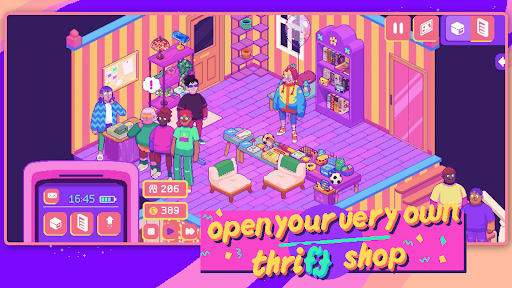
There’s a brand new thrift store in town, and guess what? You’re in charge!
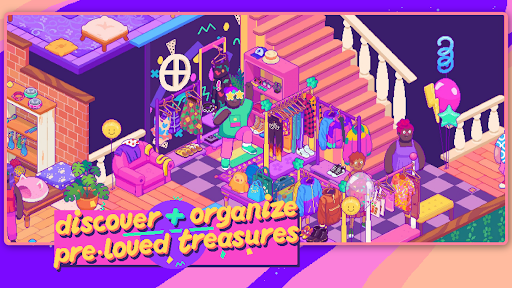
In Thrifty Business, you’ll set up and manage your very own 90’s-inspired vintage thrift shop. Search through boxes filled with pre-loved gems and use them to create gorgeous displays. Unlock furniture, decorations, wallpaper & floors to create a beautiful community space that brings everybody together!
Adjust your layout and organize your shelves and racks to the finest detail. Group your wares by colour, theme, purpose, or whatever you like. The more organized your store is, the more community points you’ll get to unlock new goodies!
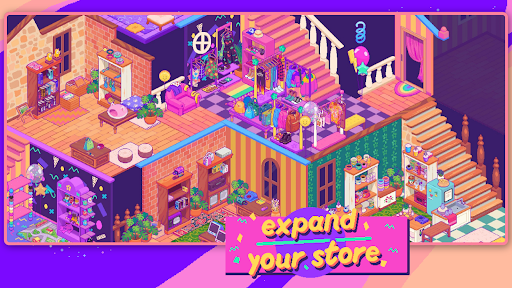
Customize the furniture, wallpaper, flooring and decor to make your store as welcoming and cozy as possible. As business grows, you might even need to expand into the adjacent rooms!
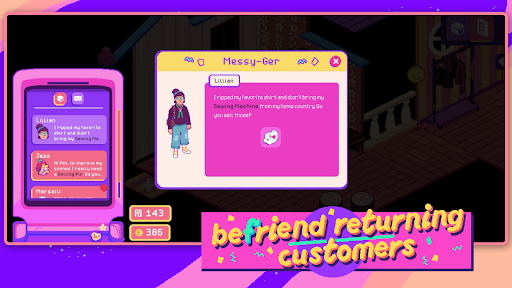
This is so much more than just a store. Listen to customer’s stories and try to fulfill their requests. You can also unlock and host hobbyist events, turning your business into a treasured third space for locals!
What Thrifty Business has in store for you:
- laid-back management sim
- colorful 90s-inspired graphics
- 500+ different items to add to your shelves
- precision placing so you can organize exactly how you want
- customization options: furniture, decorations, wallpaper & flooring
- a quirky and unique cast of customers
What you won’t find on our shelves:
- stressful min-maxing to get the best possible profit
- setting item prices or haggling
- impatient customers that leave your store in anger
और दिखाएं

1. MEmu इंस्टॉलर को डाउनलोड करें और इंस्टॉलेशन को पूरा करें

2. MEmu शुरू करें फिर होमपेज पर Google Play खोलें

3. Google Play में Thrifty Business खोजें
Install
4. Thrifty Business डाउनलोड कर इंस्टॉल करें
5. इंस्टॉल पूरा होने पर आइकन दबाएं

6. MEmu से पीसी पर Thrifty Business खेलने का आनंद लें
MEmu Play सबसे बेहतरीन मुफ़्त Android एमुलेटर है और 5 करोड़ लोग पहले ही इसके शानदार Android गेमिंग अनुभव का आनंद ले चुके हैं। MEmu 9 वर्चुअलाइज़ेशन तकनीक आपको अपने PC पर हज़ारों Android गेम, यहाँ तक कि सबसे ज़्यादा ग्राफ़िक्स वाले गेम भी, आसानी से खेलने की सुविधा देती है।
असीमित बैटरी या मोबाइल डेटा के साथ बेहतर ग्राफिक्स के साथ बड़ी स्क्रीन; लंबी अवधि।
कीबोर्ड और माउस या गेमपैड के उत्तम नियंत्रण के लिए संपूर्ण कीमैपिंग का समर्थन करता हैं।
एक ही पीसी पर मल्टी-इंस्टेंस मैनेजर के साथ एक समय में कई गेम खाते या कार्य कर सकते हैं।
Play Thrifty Business on PC by following steps: