Thrifty Business
อัปเดตเมื่อ
เวอร์ชันปัจจุบัน
ให้บริการโดย

เวลาคุณเล่น Thrifty Business, คุณอาจรู้สึกว่ามือคุณอาจบังจอแล้วทำให้ไม่ได้เล่นแบบเต็มที่. เล่นแบบไร้ขีดจำกัดด้วยเม้าส์และคีย์บอร์ด. MEmu มีตัวเลือกหลายอย่างให้คุณใช้งานเกมที่คุณเล่นแบบที่คุณต้องการ. ดาวน์โหลดและเล่น Thrifty Business บน PC. เล่นนานแค่ไหนก็ได้, ไม่ต้องชาร์จแบตเตอรี่, หรือเจอคนโทรเข้ามาระหว่างเล่น. MEmu 9 เป็นตัวเลือกสำหรับการเล่น Thrifty Business บน PC. ทางทีมงานเราได้ปรับแต่งเกม, ปรับให้เล่นเกมบางเกมได้เหมือนเล่น Thrifty Business เป็นเกม PC เช่นเล็งด้วยเม้าส์หรือใช้คีย์บอร์ด. ระบบของเรายังทำให้คุณสามารถเปิดเล่นได้มากกว่า 2 เกมพร้อมๆกันในคอมของคุณ. และที่สำคัญที่สุด, ระบบโปรแกรมของเราสามารถทำให้คุณใช้ระบบของ PC ทำให้เกมลื่นเหมือนกับใช้โทรศัพท์รุ่นล่าสุด. เราไม่ได้ดูแลเรื่องการเล่นเกม, แต่เราดูแลถึงความสนุกสนานที่คุณได้จากการเล่นด้วย.
แสดงเพิ่มเติม
ดาวน์โหลด Thrifty Business บน PC ด้วย MEmu Android Emulator สนุกกับการเล่นบนหน้าจอขนาดใหญ่ [TRY BEFORE YOU BUY].
[TRY BEFORE YOU BUY]
Try the first 60 minutes of Thrifty Business for free! If you like it, you can unlock the full game with a one-time purchase!
There’s a brand new thrift store in town, and guess what? You’re in charge!
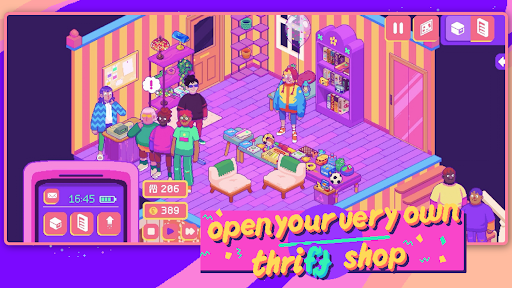
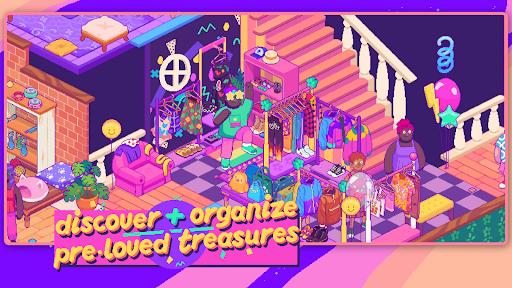
In Thrifty Business, you’ll set up and manage your very own 90’s-inspired vintage thrift shop. Search through boxes filled with pre-loved gems and use them to create gorgeous displays. Unlock furniture, decorations, wallpaper & floors to create a beautiful community space that brings everybody together!
Adjust your layout and organize your shelves and racks to the finest detail. Group your wares by colour, theme, purpose, or whatever you like. The more organized your store is, the more community points you’ll get to unlock new goodies!
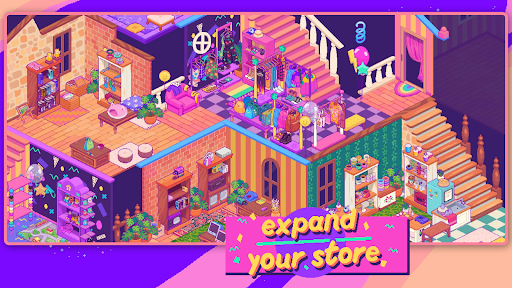
Customize the furniture, wallpaper, flooring and decor to make your store as welcoming and cozy as possible. As business grows, you might even need to expand into the adjacent rooms!
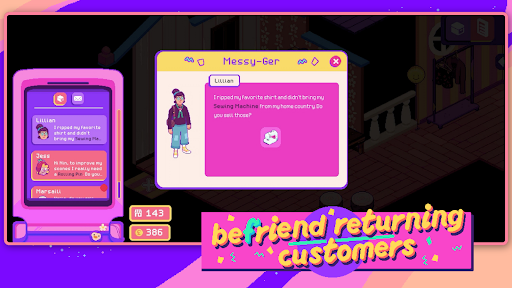
This is so much more than just a store. Listen to customer’s stories and try to fulfill their requests. You can also unlock and host hobbyist events, turning your business into a treasured third space for locals!
What Thrifty Business has in store for you:
- laid-back management sim
- colorful 90s-inspired graphics
- 500+ different items to add to your shelves
- precision placing so you can organize exactly how you want
- customization options: furniture, decorations, wallpaper & flooring
- a quirky and unique cast of customers
What you won’t find on our shelves:
- stressful min-maxing to get the best possible profit
- setting item prices or haggling
- impatient customers that leave your store in anger
แสดงเพิ่มเติม

1. ดาวน์โหลดตัวติดตั้ง MEmu และสิ้นสุดการติดตั้ง

2. เริ่ม MEmu จากนั้นเปิด Google Play บนหน้าแรก

3. ค้นหา Thrifty Business ใน Google Play
Install
4. ดาวน์โหลดและติดตั้ง Thrifty Business
5. เมื่อติดตั้งเสร็จให้คลิกที่ไอคอนเพื่อเริ่มใช้งาน

6. สนุกกับการเล่น Thrifty Business บนพีซีด้วย MEmu
MEmu App Player เป็นอีมูเลเตอร์ Android ที่ดีที่สุดและผู้คนกว่า 50 ล้านคนเพลิดเพลินไปกับประสบการณ์การเล่นเกม Android ที่ยอดเยี่ยม เทคโนโลยีการจำลองเสมือนของ MEmu ช่วยให้คุณเล่นเกม Android หลายพันเกมได้อย่างราบรื่นบนพีซีของคุณแม้แต่เกมที่ต้องใช้กราฟิกมากที่สุด
จอใหญ่และกราฟฟิกสวยกว่า; เล่นได้นาน, ไม่ต้องใช้แบตเตอรี่โทรศัพท์หรือเน็ตโทรศัพท์.
ระบบปรับแต่งปุ่มคีย์บอร์ดและเม้าส์ตามที่คุณเลือก
เล่นมากกว่าหนึ่งเกมบน PC ในเวลาเดียวกันด้วยระบบหลายจอหรือ Multi-Instance manager.
Play Thrifty Business on PC by following steps: