
Chartr - Tickets, Bus & Metro
अपडेट किया गया
वर्तमान वर्शन
1.11.5
संसाधन

Chartr - Tickets, Bus & Metro पर अपनी मोबाइल डेटा सीमा पार करने को अलविदा कहें और छोटी स्क्रीन की सीमाओं से मुक्त होकर बड़े डिस्प्ले के लाभों का अनुभव करें। अब, आप अपने कीबोर्ड और माउस का उपयोग करके फुल-स्क्रीन मोड में टॉपर्स क्लैन की शक्ति का अनुभव कर सकते हैं। MEmu Play में वे सभी बेहतरीन सुविधाएँ हैं जिनकी आप अपेक्षा करते हैं: त्वरित इंस्टॉलेशन और आसान सेटअप, सहज नियंत्रण, बैटरी की आवश्यकता नहीं, और कोई डेटा या कॉल समय सीमा नहीं। नया MEmu 9 आपके कंप्यूटर पर Chartr - Tickets, Bus & Metro का उपयोग करने के लिए सबसे अच्छा विकल्प है। हमारा मालिकाना मल्टी-इंस्टेंस मैनेजर एक साथ दो या अधिक खातों को चलाने का समर्थन करता है। इससे भी महत्वपूर्ण बात यह है कि हमारा अनूठा इम्यूलेशन इंजन आपके कंप्यूटर के प्रदर्शन का पूरा उपयोग करता है, जिससे एक सहज और निर्बाध अनुभव मिलता है।
और दिखाएं
डाउनलोड करें Chartr - Tickets, Bus & Metro पीसी पर MEmu एंड्रॉयड एमुलेटर के साथ बड़े पर्दे पर खेलने का आनंद लें। Chartr is one of the app which has been approved for buying contactless e-tickets in New Delhi.
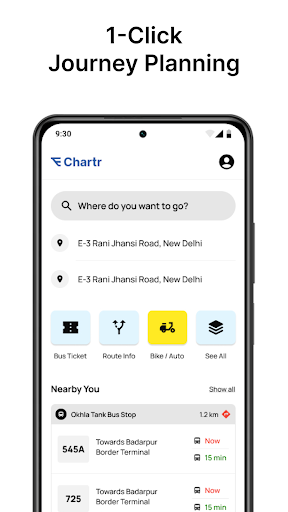
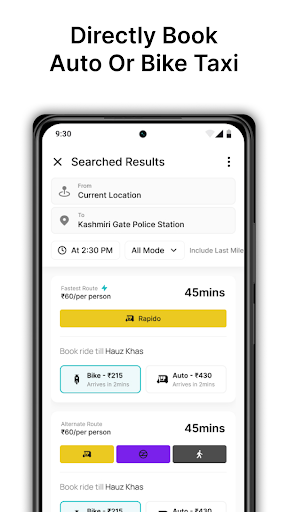
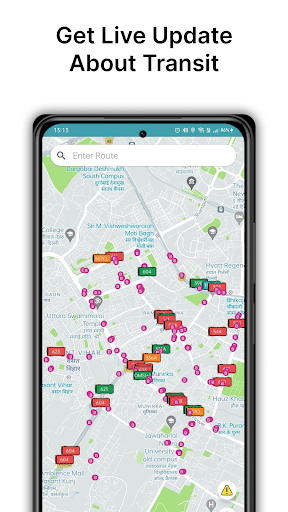
Chartr is one of the app which has been approved for buying contactless e-tickets in New Delhi. Other than ticketing, you can get direction using only bus or bus and metro both, track buses live and get eta of buses arriving at any bus stop. Say no to waiting for bus at bus stops.
Contactless e-ticketing
Using chartr, you can buy e-tickets of buses. There are two methods of buying tickets:
1st method: By Fare
Step 1: User scans a QR code present in the bus using the Chartr app.
Step 2: User selects fare.
Step 3: User pay the fare amount.
Step 4: After successful transaction, user receives the ticket.
2nd method: By Destination
Step 1: User selects the route, source and destination.
Step 2: User scans the QR code present in the bus.
Step 3: Fare is calculated and shown to the user.
Step 4: User pay the fare amount.
Step 5: After successful transaction, user receives the ticket.
Directions
Using chartr, plan your journey using only buses, only metro and both metro & bus.
Live bus tracking and route information
Get details of all routes and track live buses running on those routes. We use information from tbe opendata platform to show live location of buses.
Public information system (PIS)
Using live location of buses, we show the estimated time of arrival (eta) of all buses and type of bus (AC / Non-AC) coming at a particular bus stop.
Other Features
- Auto detect closest bus stops and metro stations near you.
- Save home and office for easy commute.
- Hindi language support coming soon.
और दिखाएं

1. MEmu इंस्टॉलर को डाउनलोड करें और इंस्टॉलेशन को पूरा करें

2. MEmu शुरू करें फिर होमपेज पर Google Play खोलें

3. Google Play में Chartr - Tickets, Bus & Metro खोजें
Install
4. Chartr - Tickets, Bus & Metro डाउनलोड कर इंस्टॉल करें
5. इंस्टॉल पूरा होने पर आइकन दबाएं

6. MEmu का उपयोग करके अपने कंप्यूटर पर Chartr - Tickets, Bus & Metro का अनुभव करें
MEmu Play सबसे बेहतरीन मुफ़्त Android एमुलेटर है और 5 करोड़ लोग पहले ही इसके शानदार Android ऐप अनुभव का आनंद ले चुके हैं। MEmu 9 वर्चुअलाइज़ेशन तकनीक आपको अपने PC पर हज़ारों Android ऐप्स, यहाँ तक कि सबसे ज़्यादा ग्राफ़िक्स वाले ऐप्स भी, आसानी से चलाने की सुविधा देती है।
असीमित बैटरी या मोबाइल डेटा के साथ बेहतर ग्राफिक्स के साथ बड़ी स्क्रीन; लंबी अवधि।
कीबोर्ड और माउस या गेमपैड के उत्तम नियंत्रण के लिए संपूर्ण कीमैपिंग का समर्थन करता हैं।
एक ही पीसी पर मल्टी-इंस्टेंस मैनेजर के साथ एक समय में कई गेम खाते या कार्य कर सकते हैं।
Use Chartr - Tickets, Bus & Metro on PC by following steps: