Chartr - Tickets, Bus & Metro
আপডেট করা হয়েছে
বর্তমান সংস্করণ
1.12.2.2
অফার করেছে

আপনার মোবাইলে Chartr - Tickets, Bus & Metro ব্যবহার করার সময় অতিরিক্ত চার্জ নিয়ে চিন্তা করা বন্ধ করুন, নিজেকে ছোট পর্দা থেকে মুক্ত করুন এবং অনেক বড় ডিসপ্লেতে অ্যাপ ব্যবহার করে উপভোগ করুন। এখন থেকে, কীবোর্ড এবং মাউস দিয়ে আপনার অ্যাপের একটি পূর্ণ-স্ক্রীন অভিজ্ঞতা পান। MEmu আপনাকে সমস্ত আশ্চর্যজনক বৈশিষ্ট্যগুলি অফার করে যা আপনি আশা করেছিলেন: দ্রুত ইনস্টল এবং সহজ সেটআপ, স্বজ্ঞাত নিয়ন্ত্রণ, ব্যাটারির আর কোন সীমাবদ্ধতা নেই, মোবাইল ডেটা এবং বিরক্তিকর কল৷ একদম নতুন MEmu 9 হল আপনার কম্পিউটারে Chartr - Tickets, Bus & Metro ব্যবহার করার সেরা পছন্দ। MEmu মাল্টি-ইনস্ট্যান্স ম্যানেজার একই সময়ে 2 বা তার বেশি অ্যাকাউন্ট খোলা সম্ভব করে তোলে। এবং সবচেয়ে গুরুত্বপূর্ণ, আমাদের একচেটিয়া ইমুলেশন ইঞ্জিন আপনার পিসির সম্পূর্ণ সম্ভাবনা প্রকাশ করতে পারে, সবকিছুকে মসৃণ এবং উপভোগ্য করে তুলতে পারে।
বেশি দেখান
Download Chartr - Tickets, Bus & Metro on PC with MEmu Android Emulator. Enjoy playing on big screen. Chartr is one of the app which has been approved for buying contactless e-tickets in New Delhi.
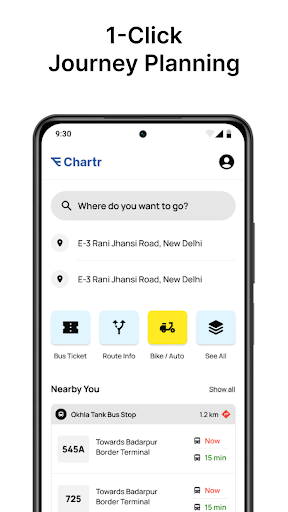
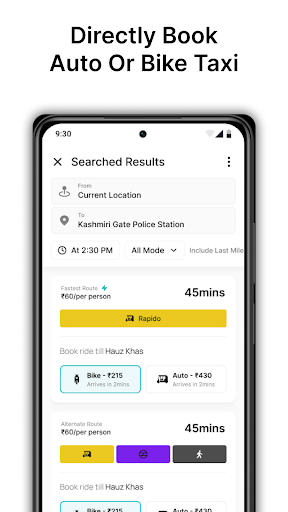
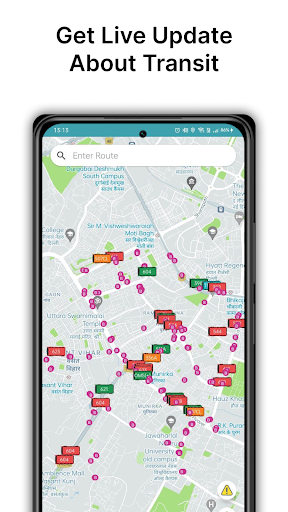
Chartr is one of the app which has been approved for buying contactless e-tickets in New Delhi. Other than ticketing, you can get direction using only bus or bus and metro both, track buses live and get eta of buses arriving at any bus stop. Say no to waiting for bus at bus stops.
Contactless e-ticketing
Using chartr, you can buy e-tickets of buses. There are two methods of buying tickets:
1st method: By Fare
Step 1: User scans a QR code present in the bus using the Chartr app.
Step 2: User selects fare.
Step 3: User pay the fare amount.
Step 4: After successful transaction, user receives the ticket.
2nd method: By Destination
Step 1: User selects the route, source and destination.
Step 2: User scans the QR code present in the bus.
Step 3: Fare is calculated and shown to the user.
Step 4: User pay the fare amount.
Step 5: After successful transaction, user receives the ticket.
Directions
Using chartr, plan your journey using only buses, only metro and both metro & bus.
Live bus tracking and route information
Get details of all routes and track live buses running on those routes. We use information from tbe opendata platform to show live location of buses.
Public information system (PIS)
Using live location of buses, we show the estimated time of arrival (eta) of all buses and type of bus (AC / Non-AC) coming at a particular bus stop.
Other Features
- Auto detect closest bus stops and metro stations near you.
- Save home and office for easy commute.
- Hindi language support coming soon.
বেশি দেখান

1. MEmu ইনস্টলার ডাউনলোড করুন এবং সেটআপ শেষ করুন

2. MEmu শুরু করুন তারপর ডেস্কটপে Google Play খুলুন

3. Google Play এ Chartr - Tickets, Bus & Metro খুঁজুন
Install
4. Chartr - Tickets, Bus & Metro ডাউনলোড এবং ইনস্টল করুন
5. ইনস্টল সমাপ্তি শুরু করতে আইকনে ক্লিক করুন

6. MEmu ব্যবহার করে আপনার কম্পিউটারে Chartr - Tickets, Bus & Metro উপভোগ করুন
MEmu Play হল সেরা অ্যান্ড্রয়েড এমুলেটর, যার ১০ কোটিরও বেশি ব্যবহারকারী এর উন্নত অ্যান্ড্রয়েড অ্যাপ অভিজ্ঞতা উপভোগ করছেন। MEmu 9 এর ভার্চুয়ালাইজেশন প্রযুক্তি আপনাকে আপনার কম্পিউটারে হাজার হাজার অ্যান্ড্রয়েড অ্যাপ মসৃণভাবে চালাতে দেয়, এমনকি সবচেয়ে চাহিদাসম্পন্ন অ্যাপগুলিও।
ভালো গ্রাফিক্সের সাথে বড় স্ক্রীন; লম্বা অবধি, ব্যাটারি বা মোবাইল ডাটা'র কোন সীমা ছাড়া।
কীবোর্ড এবং মাউস বা গেমপ্যাডের সুনির্দিষ্ট নিয়ন্ত্রণের জন্য সম্পূর্ণ কীম্যাপিং সমর্থন।
মাল্টি-ইনস্ট্যান্স ম্যানেজারের সাথে একটি পিসিতে একাধিক গেম অ্যাকাউন্ট বা কাজ।
নিম্নলিখিত ধাপগুলোর মাধ্যমে পিসি এ Chartr - Tickets, Bus & Metro ব্যবহার করুন: