Weather Wallpaper :VR & Radar
अपडेट किया गया
वर्तमान वर्शन
1.9.9
संसाधन

Weather Wallpaper :VR & Radar पर अपनी मोबाइल डेटा सीमा पार करने को अलविदा कहें और छोटी स्क्रीन की सीमाओं से मुक्त होकर बड़े डिस्प्ले के लाभों का अनुभव करें। अब, आप अपने कीबोर्ड और माउस का उपयोग करके फुल-स्क्रीन मोड में टॉपर्स क्लैन की शक्ति का अनुभव कर सकते हैं। MEmu Play में वे सभी बेहतरीन सुविधाएँ हैं जिनकी आप अपेक्षा करते हैं: त्वरित इंस्टॉलेशन और आसान सेटअप, सहज नियंत्रण, बैटरी की आवश्यकता नहीं, और कोई डेटा या कॉल समय सीमा नहीं। नया MEmu 9 आपके कंप्यूटर पर Weather Wallpaper :VR & Radar का उपयोग करने के लिए सबसे अच्छा विकल्प है। हमारा मालिकाना मल्टी-इंस्टेंस मैनेजर एक साथ दो या अधिक खातों को चलाने का समर्थन करता है। इससे भी महत्वपूर्ण बात यह है कि हमारा अनूठा इम्यूलेशन इंजन आपके कंप्यूटर के प्रदर्शन का पूरा उपयोग करता है, जिससे एक सहज और निर्बाध अनुभव मिलता है।
और दिखाएं
डाउनलोड करें Weather Wallpaper :VR & Radar पीसी पर MEmu एंड्रॉयड एमुलेटर के साथ बड़े पर्दे पर खेलने का आनंद लें। Virtual panoramas and landscape images changing with weather changes.
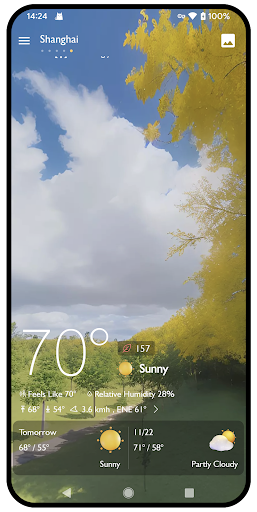
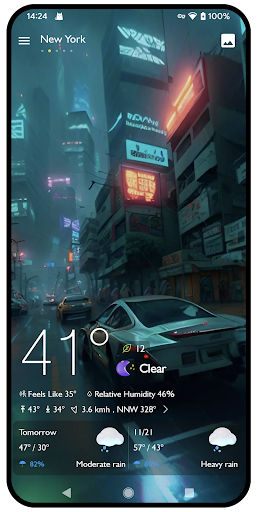
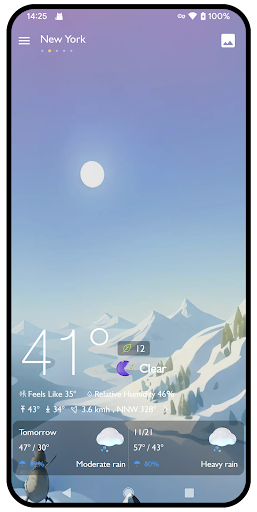
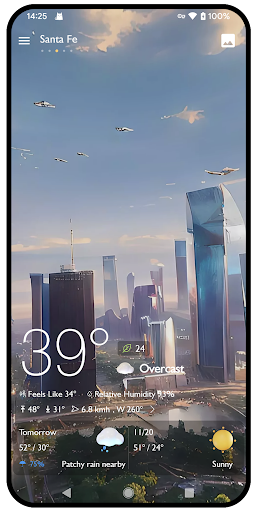
Virtual panoramas and landscape images changing with weather changes.
Panorama wallpapers and more free landscape wallpapers available for use.
Be up to date at all times with Hourly weather forecasts - Radar & widget for free!
Most accurate weather features:
Better weather app with hourly forecasts.
Enjoy the most accurate weather forecast for free
Beautiful weather widgets easy-to-use.
Accurate and real-time weather forecast.
Accurate temperature forecasts.
A weather app easy to use.
Automatic location detection plus add many cities easily.
Accurate hourly weather forecasts for next 72-hour.
Tomorrow weather forecast for free!.
It help you to know weather very quickly.
Precipitation chance in 72 hours by nice graphics.
You can also see weather of many location on the world.
This make your day more comfortable with suitable plan.
Live weather for free: this climate app offers hourly weather, tomorrow weather forecasts and 15-day weather forecasts.
Beautiful live radar loop and weather today.
Air Quality Index in wonderful graphics.
It is really convenient that you have weather app in your smart.
और दिखाएं

1. MEmu इंस्टॉलर को डाउनलोड करें और इंस्टॉलेशन को पूरा करें

2. MEmu शुरू करें फिर होमपेज पर Google Play खोलें

3. Google Play में Weather Wallpaper :VR & Radar खोजें
Install
4. Weather Wallpaper :VR & Radar डाउनलोड कर इंस्टॉल करें
5. इंस्टॉल पूरा होने पर आइकन दबाएं

6. MEmu का उपयोग करके अपने कंप्यूटर पर Weather Wallpaper :VR & Radar का अनुभव करें
MEmu Play सबसे बेहतरीन मुफ़्त Android एमुलेटर है और 5 करोड़ लोग पहले ही इसके शानदार Android ऐप अनुभव का आनंद ले चुके हैं। MEmu 9 वर्चुअलाइज़ेशन तकनीक आपको अपने PC पर हज़ारों Android ऐप्स, यहाँ तक कि सबसे ज़्यादा ग्राफ़िक्स वाले ऐप्स भी, आसानी से चलाने की सुविधा देती है।
असीमित बैटरी या मोबाइल डेटा के साथ बेहतर ग्राफिक्स के साथ बड़ी स्क्रीन; लंबी अवधि।
कीबोर्ड और माउस या गेमपैड के उत्तम नियंत्रण के लिए संपूर्ण कीमैपिंग का समर्थन करता हैं।
एक ही पीसी पर मल्टी-इंस्टेंस मैनेजर के साथ एक समय में कई गेम खाते या कार्य कर सकते हैं।
Use Weather Wallpaper :VR & Radar on PC by following steps: