Crosshair & Nickname Generator
अपडेट किया गया
वर्तमान वर्शन
71
संसाधन

Crosshair & Nickname Generator पर अपनी मोबाइल डेटा सीमा पार करने को अलविदा कहें और छोटी स्क्रीन की सीमाओं से मुक्त होकर बड़े डिस्प्ले के लाभों का अनुभव करें। अब, आप अपने कीबोर्ड और माउस का उपयोग करके फुल-स्क्रीन मोड में टॉपर्स क्लैन की शक्ति का अनुभव कर सकते हैं। MEmu Play में वे सभी बेहतरीन सुविधाएँ हैं जिनकी आप अपेक्षा करते हैं: त्वरित इंस्टॉलेशन और आसान सेटअप, सहज नियंत्रण, बैटरी की आवश्यकता नहीं, और कोई डेटा या कॉल समय सीमा नहीं। नया MEmu 9 आपके कंप्यूटर पर Crosshair & Nickname Generator का उपयोग करने के लिए सबसे अच्छा विकल्प है। हमारा मालिकाना मल्टी-इंस्टेंस मैनेजर एक साथ दो या अधिक खातों को चलाने का समर्थन करता है। इससे भी महत्वपूर्ण बात यह है कि हमारा अनूठा इम्यूलेशन इंजन आपके कंप्यूटर के प्रदर्शन का पूरा उपयोग करता है, जिससे एक सहज और निर्बाध अनुभव मिलता है।
और दिखाएं
डाउनलोड करें Crosshair & Nickname Generator पीसी पर MEmu एंड्रॉयड एमुलेटर के साथ बड़े पर्दे पर खेलने का आनंद लें। Gamer Bubble let's you put custom overlay bubbles on your game screen to get some usefull values of your device when you need to measure the gaming performance of your device.
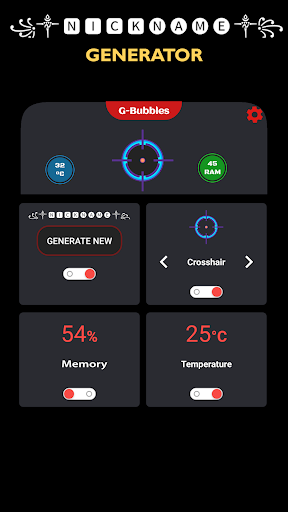
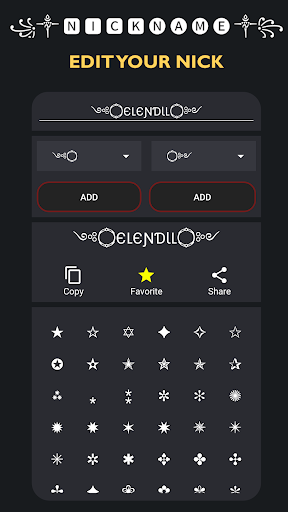
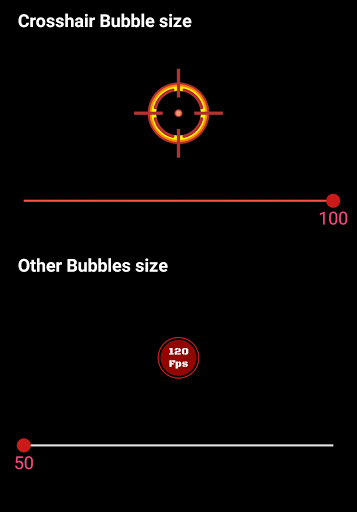
Gamer Bubble let's you put custom overlay bubbles on your game screen to get some usefull values of your device when you need to measure the gaming performance of your device. Also you can now generate cool nicknames and copy them to set as your nickname on the game you play!
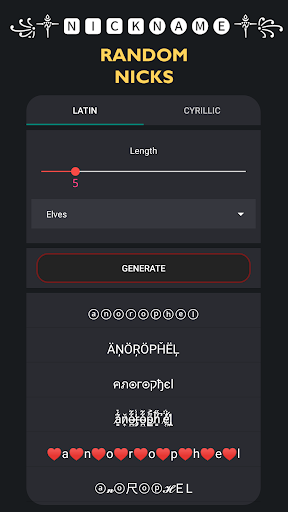
Create cool nicknames for all games.
Create beautiful nicknames with ASCII characters.
◉ Memory usage bubble
◉ Temperature bubble
⊕ Crosshair bubble
◉ ▄︻̷̿┻̿═━一Nickname generator☠꧂
You can resize your bubbles on the settings activity when you need.
Create fancy name styles easily and use it EVERYWHERE with no limit ⭐
☀ Can be used in all games.
Nickname generator gives lots of great results for gamers.
With the nickname generator you can create:
☢ Elf-themed nicknames
☢ Orc-themed nicknames
☢ Dwarf-themed nicknames
☢ Human (Male/Female)-themed nicknames
☀ Edit, Copy, Share your nickname anywhere, anytime
Thanks for using G-Bubbles!
Activate your bubbles when need and drag it over the game view. When done, just drag it to trash view on the bottom of the screen.
और दिखाएं

1. MEmu इंस्टॉलर को डाउनलोड करें और इंस्टॉलेशन को पूरा करें

2. MEmu शुरू करें फिर होमपेज पर Google Play खोलें

3. Google Play में Crosshair & Nickname Generator खोजें
Install
4. Crosshair & Nickname Generator डाउनलोड कर इंस्टॉल करें
5. इंस्टॉल पूरा होने पर आइकन दबाएं

6. MEmu का उपयोग करके अपने कंप्यूटर पर Crosshair & Nickname Generator का अनुभव करें
MEmu Play सबसे बेहतरीन मुफ़्त Android एमुलेटर है और 5 करोड़ लोग पहले ही इसके शानदार Android ऐप अनुभव का आनंद ले चुके हैं। MEmu 9 वर्चुअलाइज़ेशन तकनीक आपको अपने PC पर हज़ारों Android ऐप्स, यहाँ तक कि सबसे ज़्यादा ग्राफ़िक्स वाले ऐप्स भी, आसानी से चलाने की सुविधा देती है।
असीमित बैटरी या मोबाइल डेटा के साथ बेहतर ग्राफिक्स के साथ बड़ी स्क्रीन; लंबी अवधि।
कीबोर्ड और माउस या गेमपैड के उत्तम नियंत्रण के लिए संपूर्ण कीमैपिंग का समर्थन करता हैं।
एक ही पीसी पर मल्टी-इंस्टेंस मैनेजर के साथ एक समय में कई गेम खाते या कार्य कर सकते हैं।
Use Crosshair & Nickname Generator on PC by following steps: