Dream11
अपडेट किया गया
वर्तमान वर्शन
7.7.2
संसाधन

Dream11 पर अपनी मोबाइल डेटा सीमा पार करने को अलविदा कहें और छोटी स्क्रीन की सीमाओं से मुक्त होकर बड़े डिस्प्ले के लाभों का अनुभव करें। अब, आप अपने कीबोर्ड और माउस का उपयोग करके फुल-स्क्रीन मोड में टॉपर्स क्लैन की शक्ति का अनुभव कर सकते हैं। MEmu Play में वे सभी बेहतरीन सुविधाएँ हैं जिनकी आप अपेक्षा करते हैं: त्वरित इंस्टॉलेशन और आसान सेटअप, सहज नियंत्रण, बैटरी की आवश्यकता नहीं, और कोई डेटा या कॉल समय सीमा नहीं। नया MEmu 9 आपके कंप्यूटर पर Dream11 का उपयोग करने के लिए सबसे अच्छा विकल्प है। हमारा मालिकाना मल्टी-इंस्टेंस मैनेजर एक साथ दो या अधिक खातों को चलाने का समर्थन करता है। इससे भी महत्वपूर्ण बात यह है कि हमारा अनूठा इम्यूलेशन इंजन आपके कंप्यूटर के प्रदर्शन का पूरा उपयोग करता है, जिससे एक सहज और निर्बाध अनुभव मिलता है।
और दिखाएं
डाउनलोड करें Dream11 पीसी पर MEmu एंड्रॉयड एमुलेटर के साथ बड़े पर्दे पर खेलने का आनंद लें। Dream11 has made watching sports a whole lot better — it's the only app where playing and watching live happen together.
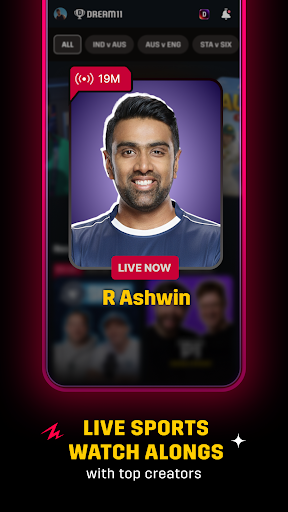
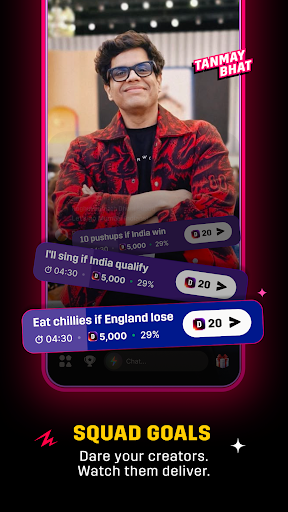
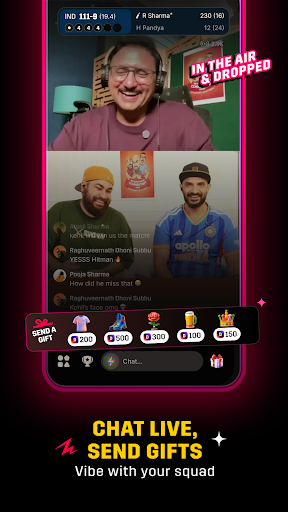
Dream11 has made watching sports a whole lot better — it's the only app where playing and watching live happen together. Join Watch Alongs led by top creators like R Ashwin, Tanmay Bhat, Stuart Broad, and many more, who bring real, unfiltered energy to every Indian T20 League 2026. They highlight the biggest moments, share instant reactions, and turn every over into something exciting.
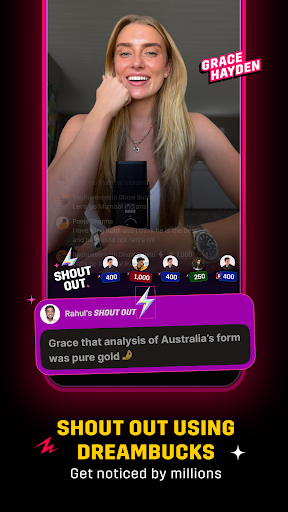
Want to get even more out of every Indian T20 League match? Use your DreamBucks to send Shout Outs on your favourite creators' live streams and get your comments pinned right in the live chat—an easy and enjoyable way to get noticed and feel like part of the action!
And when your competitive instincts kick in, create your fantasy team and enter contests, called leagues, on Dream11, because this is a place where you can watch, play, and stay entertained, all at once.
Dream11 Welcomes You to Tune In to Watch Alongs & Participate in Squad Goals
Download the Dream11 app and jump into live streams happening right during the Indian T20 League 2026 match
Watch, chat, or challenge creators using DreamBucks to enjoy every bit of the Watch Alongs
Spend your DreamBucks to get shoutouts from top creators like AB Cric Info, Pahul Walia, Azeem Banatwalla, Kumar Varun, and more, and get noticed during the stream!
What Happens in Dream11 Live Streams & Watch Alongs
Creators like R Ashwin, Tanmay Bhat, Stuart Broad, and other prominent names share key moments and match stats in a raw, unfiltered style
Participate in Squad Goals using DreamBucks to challenge creators during the Live Stream
Join the Hit or Miss competition and earn DreamBucks by answering correctly
Participate in fun polls, banters, and live chats, and vibe with lakhs of sports fans from across the world
Send gifts to the creators you love, from a rose and pizza slice to a mic and beyond
Connect with fans of teams you love, through live video in clubs
Build Your Fantasy Cricket Team and Compete for Exciting Rewards—All for Free!
Pick your best 11, choose your captain and vice-captain wisely, and let the match do the rest. Every run, wicket, and catch earns your team points, and the better your team performs, the higher you rank!
Getting started on Dream11 is simple:
1⃣ Pick a match and jump right in
2⃣ Choose real players from international and domestic lineups to build your team
3⃣ Lock in your captain and vice-captain and watch the points roll in with every live match moment
4⃣ Join free leagues and compete for exciting rewards
Your players play. You win. It's that simple—only on Dream11!
Why Choose Dream11?
Join Watch Alongs hosted by top international and domestic creators with raw and unfiltered match commentary
Chat, vibe, and be a part of the excitement as every big moment unfolds in real time
Win or buy DreamBucks, and use them to get your chats pinned, give Shout Outs, or send gifts
Challenge creators with Squad Goals and make your presence felt in the live stream
Build your fantasy team and join free contests in Indian T20 League matches to compete for exciting rewards
Win amazing prizes through giveaways, Hit or Miss, and other fun creator contests
Everything in one app — watch, chat, play, and win all at the same time!
और दिखाएं

1. MEmu इंस्टॉलर को डाउनलोड करें और इंस्टॉलेशन को पूरा करें

2. MEmu शुरू करें फिर होमपेज पर Google Play खोलें

3. Google Play में Dream11 खोजें
Install
4. Dream11 डाउनलोड कर इंस्टॉल करें
5. इंस्टॉल पूरा होने पर आइकन दबाएं

6. MEmu का उपयोग करके अपने कंप्यूटर पर Dream11 का अनुभव करें
MEmu Play सबसे बेहतरीन मुफ़्त Android एमुलेटर है और 5 करोड़ लोग पहले ही इसके शानदार Android ऐप अनुभव का आनंद ले चुके हैं। MEmu 9 वर्चुअलाइज़ेशन तकनीक आपको अपने PC पर हज़ारों Android ऐप्स, यहाँ तक कि सबसे ज़्यादा ग्राफ़िक्स वाले ऐप्स भी, आसानी से चलाने की सुविधा देती है।
असीमित बैटरी या मोबाइल डेटा के साथ बेहतर ग्राफिक्स के साथ बड़ी स्क्रीन; लंबी अवधि।
कीबोर्ड और माउस या गेमपैड के उत्तम नियंत्रण के लिए संपूर्ण कीमैपिंग का समर्थन करता हैं।
एक ही पीसी पर मल्टी-इंस्टेंस मैनेजर के साथ एक समय में कई गेम खाते या कार्य कर सकते हैं।
Use Dream11 on PC by following steps: