Dream11: Fantasy Cricket App
Actualizada
Versión actual
7.7.0
Ofrecida por

Deje de preocuparse por los recargos cuando use Dream11: Fantasy Cricket App en su teléfono celular, libérese de la pequeña pantalla y disfrute usando la aplicación en una pantalla mucho más grande. A partir de ahora, obtenga una experiencia de pantalla completa de su aplicación con teclado y mouse. MEmu le ofrece todas las características sorprendentes que esperaba: instalación rápida y configuración fácil, controles intuitivos, no más limitaciones de batería, datos móviles y llamadas molestas. El nuevo MEmu 9 es la mejor opción para usar Dream11: Fantasy Cricket App en su computadora. Codificado con nuestra absorción, el administrador de instancias múltiples hace posible abrir 2 o más cuentas al mismo tiempo. Y lo más importante, nuestro exclusivo motor de emulación puede liberar todo el potencial de su PC, hacer que todo sea fluido y agradable.
Más detalles
Descargar Dream11: Fantasy Cricket App en PC con MEmu Android Emulador. Disfruta jugando en la pentalla grande. Dream11 has made watching sports a whole lot better—it's the only app where playing and watching live happen together.
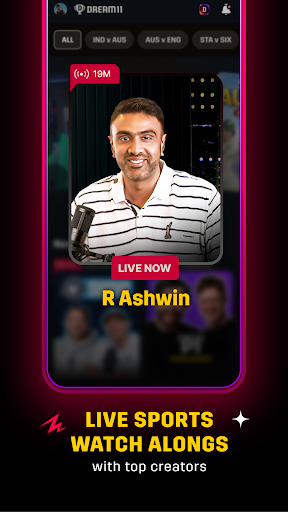
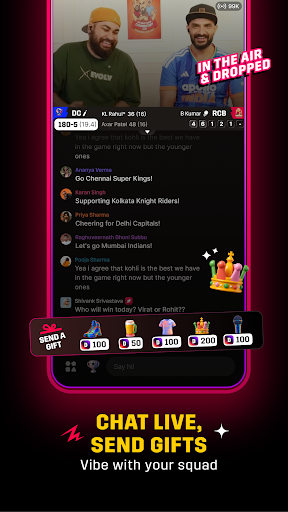
Dream11 has made watching sports a whole lot better—it's the only app where playing and watching live happen together. Join Watch Alongs led by top creators like R Ashwin, Tanmay Bhat, Stuart Broad, and many more, who bring real, unfiltered energy to every game. They highlight the biggest moments, share instant reactions, and turn every over into something exciting.
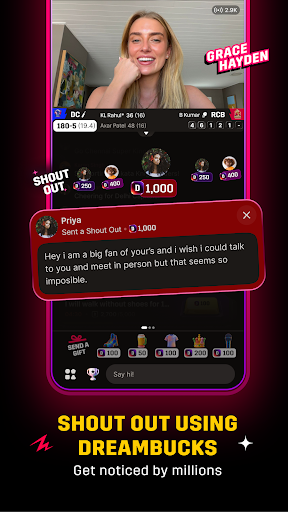
Want to get even more out of every match? Use your DreamBucks to send Shout Outs on your favourite creators' live streams and get your comments pinned right in the live chat—an easy and enjoyable way to get noticed and feel like part of the action!
And when your competitive instincts kick in, create your fantasy team and enter contests called 'leagues' on Dream11, because this is a place where you can watch, play, and stay entertained, all at once.
Dream11 Welcomes You to Tune In to Watch Alongs & Participate in Squad Goals
Download the Dream11 app and jump into live streams happening right during the match
Watch, chat, or challenge creators using DreamBucks to enjoy every bit of the Watch Alongs
Spend your DreamBucks to get shoutouts from top creators like AB Cric Info, Pahul Walia, Azeem Banatwalla, Kumar Varun, and more, and get noticed during the stream!
What Happens in Dream11 Live Streams & Watch Alongs
Creators like R Ashwin, Tanmay Bhat, Stuart Broad, and other prominent names share key moments and match stats in a raw, unfiltered style
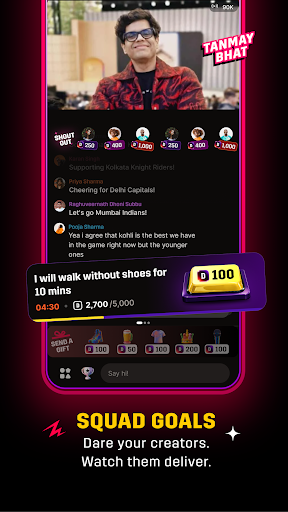
Participate in Squad Goals using DreamBucks to challenge creators during the Live Stream
Join the Hit or Miss competition and earn DreamBucks by answering correctly
Participate in fun polls, banters, and live chats, and vibe with lakhs of sports fans from across the world
Send gifts to the creators you lovee from a rose and pizza slice to a mic and beyond
Build Your Fantasy Cricket Team and Compete for Exciting Rewards—All for Free!
Pick your best 11, choose your captain and vice-captain wisely, and let the match do the rest. Every run, wicket, and catch earns your team points, and the better your team performs, the bigger your winnings!
Getting started on Dream11 is simple:
1⃣ Pick a match and jump right in
2⃣ Choose real players from international and domestic lineups to build your team
3⃣ Lock in your captain and vice-captain and watch the points roll in with every live match moment
4⃣ Join free leagues and compete for exciting rewards
Your players play. You win. It's that simple—only on Dream11!
Why Choose Dream11?
Join Watch Alongs hosted by top international and domestic creators with raw and unfiltered match commentary
Chat, vibe, and be a part of the excitement as every big moment unfolds in real time
Win or buy DreamBucks, and use them to get your chats pinned, give Shout Outs, or send gifts
Challenge creators with Squad Goals and make your presence felt in the live stream
Build your fantasy team and join free contests to compete for exciting rewards
Win amazing prizes through giveaways and Hit or Miss, and other fun creator contests
Everything in one app—watch, chat, play, and win all at the same time!
Más detalles

1. Descargar el instalador de MEmu y finalice la instalación

2. Iniciar MEmu y abrir Google Play en la página de inicio

3. Buscar Dream11: Fantasy Cricket App en Google Play
Install
4. Descargar y instalar Dream11: Fantasy Cricket App
5. Hacer click al icono para iniciar

6. Experiencia Dream11: Fantasy Cricket App en PC con MEmu
MEmu App Player es el mejor emulador de Android gratuito y 50 millones de personas ya están disfrutando su magnífica experiencia de aplicación en Android. La tecnología de virtualización de MEmu te permite jugar a miles de aplicaciones Android suavemente en tu PC, incluso los más intensivos gráficamente.
Pantalla más grande con mejores gráficos; Larga duración, sin limitación de batería o datos móviles.
Soporte completo de keymapping para un control preciso del teclado y el mouse o gamepad.
Múltiples cuentas de juegos o tareas en una sola PC a la vez con el administrador de instancias múltiples.
Use Dream11: Fantasy Cricket App on PC by following steps: