
Google Voice
अपडेट किया गया
वर्तमान वर्शन
2026.03.14.883854649
संसाधन

Google Voice पर अपनी मोबाइल डेटा सीमा पार करने को अलविदा कहें और छोटी स्क्रीन की सीमाओं से मुक्त होकर बड़े डिस्प्ले के लाभों का अनुभव करें। अब, आप अपने कीबोर्ड और माउस का उपयोग करके फुल-स्क्रीन मोड में टॉपर्स क्लैन की शक्ति का अनुभव कर सकते हैं। MEmu Play में वे सभी बेहतरीन सुविधाएँ हैं जिनकी आप अपेक्षा करते हैं: त्वरित इंस्टॉलेशन और आसान सेटअप, सहज नियंत्रण, बैटरी की आवश्यकता नहीं, और कोई डेटा या कॉल समय सीमा नहीं। नया MEmu 9 आपके कंप्यूटर पर Google Voice का उपयोग करने के लिए सबसे अच्छा विकल्प है। हमारा मालिकाना मल्टी-इंस्टेंस मैनेजर एक साथ दो या अधिक खातों को चलाने का समर्थन करता है। इससे भी महत्वपूर्ण बात यह है कि हमारा अनूठा इम्यूलेशन इंजन आपके कंप्यूटर के प्रदर्शन का पूरा उपयोग करता है, जिससे एक सहज और निर्बाध अनुभव मिलता है।
और दिखाएं
डाउनलोड करें Google Voice पीसी पर MEmu एंड्रॉयड एमुलेटर के साथ बड़े पर्दे पर खेलने का आनंद लें। Google Voice gives you a phone number for calling, text messaging, and voicemail.
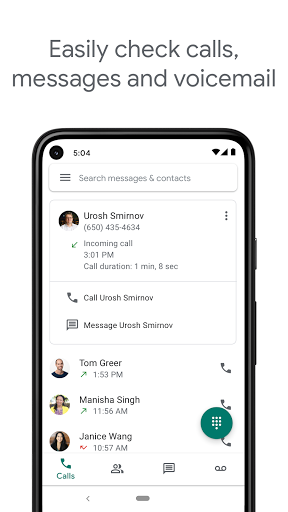
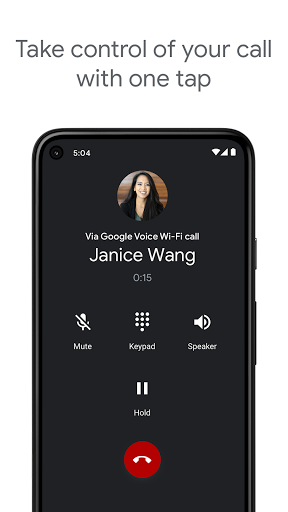
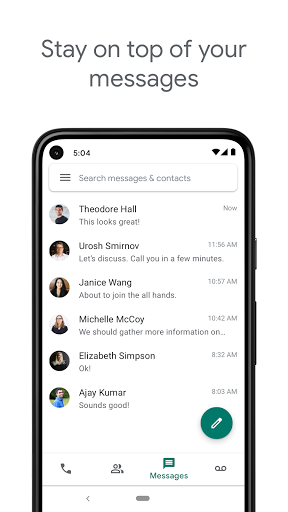
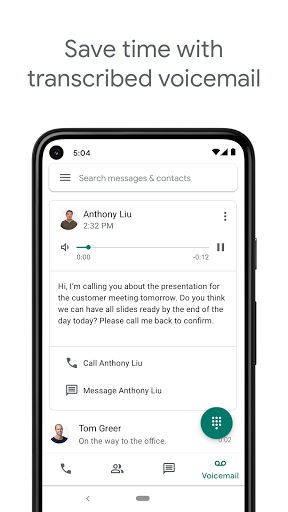
Google Voice gives you a phone number for calling, text messaging, and voicemail. It works on smartphones and computers, and syncs across your devices so you can use the app in the office, at home, or on the go.
NOTE: Google Voice only works for personal Google Accounts in the US and Google Workspace accounts in select markets. Text messaging is not supported in all markets.
You're in control
Get spam filtered automatically and block numbers you don’t want to hear from. Manage your time with personalized settings for forwarding calls, text messages, and voicemail.
Backed up and searchable
Calls, text messages, and voicemails are stored and backed up to make it easy for you to search your history.
Manage messages across devices
Send and receive individual and group SMS messages from all your devices.
Your voicemail, transcribed
Google Voice provides advanced voicemail transcriptions that you can read in the app and/or have sent to your email.
Save on international calling
Make international calls at competitive rates without paying extra for international minutes with your mobile carrier.
Keep in mind:
• Google Voice is currently only available in the US. Google Voice for Google Workspace users is available in select countries. Check with your administrator for access.
• Calls made using Google Voice for Android can be placed through a Google Voice access number. All access number based calls use the standard minutes from your cell phone plan and may incur costs (e.g. when traveling internationally).
और दिखाएं

1. MEmu इंस्टॉलर को डाउनलोड करें और इंस्टॉलेशन को पूरा करें

2. MEmu शुरू करें फिर होमपेज पर Google Play खोलें

3. Google Play में Google Voice खोजें
Install
4. Google Voice डाउनलोड कर इंस्टॉल करें
5. इंस्टॉल पूरा होने पर आइकन दबाएं

6. MEmu का उपयोग करके अपने कंप्यूटर पर Google Voice का अनुभव करें
MEmu Play सबसे बेहतरीन मुफ़्त Android एमुलेटर है और 5 करोड़ लोग पहले ही इसके शानदार Android ऐप अनुभव का आनंद ले चुके हैं। MEmu 9 वर्चुअलाइज़ेशन तकनीक आपको अपने PC पर हज़ारों Android ऐप्स, यहाँ तक कि सबसे ज़्यादा ग्राफ़िक्स वाले ऐप्स भी, आसानी से चलाने की सुविधा देती है।
असीमित बैटरी या मोबाइल डेटा के साथ बेहतर ग्राफिक्स के साथ बड़ी स्क्रीन; लंबी अवधि।
कीबोर्ड और माउस या गेमपैड के उत्तम नियंत्रण के लिए संपूर्ण कीमैपिंग का समर्थन करता हैं।
एक ही पीसी पर मल्टी-इंस्टेंस मैनेजर के साथ एक समय में कई गेम खाते या कार्य कर सकते हैं।
Use Google Voice on PC by following steps: