
Hubbe Parent
अपडेट किया गया
वर्तमान वर्शन
12.04.2402
संसाधन

Hubbe Parent पर अपनी मोबाइल डेटा सीमा पार करने को अलविदा कहें और छोटी स्क्रीन की सीमाओं से मुक्त होकर बड़े डिस्प्ले के लाभों का अनुभव करें। अब, आप अपने कीबोर्ड और माउस का उपयोग करके फुल-स्क्रीन मोड में टॉपर्स क्लैन की शक्ति का अनुभव कर सकते हैं। MEmu Play में वे सभी बेहतरीन सुविधाएँ हैं जिनकी आप अपेक्षा करते हैं: त्वरित इंस्टॉलेशन और आसान सेटअप, सहज नियंत्रण, बैटरी की आवश्यकता नहीं, और कोई डेटा या कॉल समय सीमा नहीं। नया MEmu 9 आपके कंप्यूटर पर Hubbe Parent का उपयोग करने के लिए सबसे अच्छा विकल्प है। हमारा मालिकाना मल्टी-इंस्टेंस मैनेजर एक साथ दो या अधिक खातों को चलाने का समर्थन करता है। इससे भी महत्वपूर्ण बात यह है कि हमारा अनूठा इम्यूलेशन इंजन आपके कंप्यूटर के प्रदर्शन का पूरा उपयोग करता है, जिससे एक सहज और निर्बाध अनुभव मिलता है।
और दिखाएं
MEmu Play के साथ PC पर Hubbe Parent इस्तेमाल करने के शानदार अनुभव का आनंद लें। यह एक शक्तिशाली मुफ़्त Android एमुलेटर है जो आपको डेस्कटॉप वर्ज़न के लिए हज़ारों Android ऐप्स उपलब्ध कराता है। दोस्तों से जुड़ने और अपने काम को और भी बेहतर बनाने का आनंद लें! Hubbe Inc.
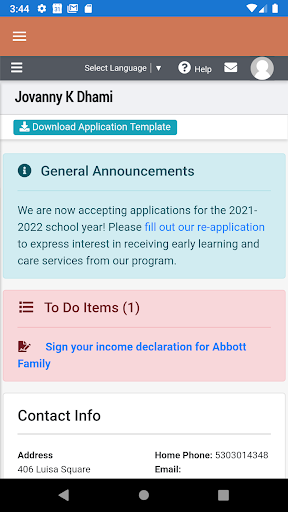
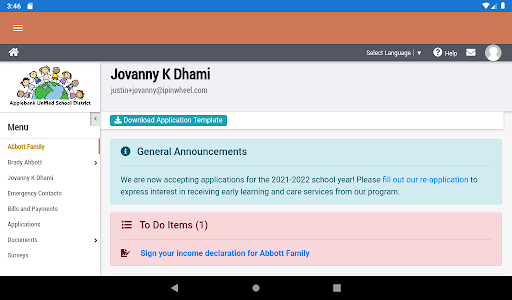
Hubbe Inc. partners with organizations to reduce the burden of managing complex state-funded early childhood education programs with a proven and secure, FERPA-compliant data system. SIS Hubbe California was designed to “start” in the infant/toddler/preschool classroom. The system has many features that benefit classroom instructional staff as well as state funded and tuition-based preschool program administrators for managing their program and improving the quality of early childhood education.
Hubbe is also a powerful platform that connects parents with their child's early learning and care providers. Using Hubbe's Parent Portal, parents can perform a multitude of tasks and access information about their child's preschool experience.
Parents are able to do the following in Hubbe:
*Apply to an early learning and care agency
*Upload important enrollment documents while being guided through a step-by-step checklist
*Electronically sign documents
*Fill out and complete the DRDP Parent Survey and other custom surveys
*Manage bills and payments and pay for their child care services online, powered by PayPal
*Access tax documents
*View their family data including their enrolled children and emergency contacts
*Monitor their child’s attendance trends
*Receive notifications of any incidents that occurred while their child was at school
Note that this app is intended for use by parents/guardians of students who are served by agencies using Hubbe to manage their programs. If you're a parent and wish to use Hubbe's mobile application, please contact your child's early learning and care program about using our platform.
और दिखाएं

1. MEmu इंस्टॉलर को डाउनलोड करें और इंस्टॉलेशन को पूरा करें

2. MEmu शुरू करें फिर होमपेज पर Google Play खोलें

3. Google Play में Hubbe Parent खोजें
Install
4. Hubbe Parent डाउनलोड कर इंस्टॉल करें
5. इंस्टॉल पूरा होने पर आइकन दबाएं

6. MEmu का उपयोग करके अपने कंप्यूटर पर Hubbe Parent का अनुभव करें
MEmu Play सबसे बेहतरीन मुफ़्त Android एमुलेटर है और 5 करोड़ लोग पहले ही इसके शानदार Android ऐप अनुभव का आनंद ले चुके हैं। MEmu 9 वर्चुअलाइज़ेशन तकनीक आपको अपने PC पर हज़ारों Android ऐप्स, यहाँ तक कि सबसे ज़्यादा ग्राफ़िक्स वाले ऐप्स भी, आसानी से चलाने की सुविधा देती है।
असीमित बैटरी या मोबाइल डेटा के साथ बेहतर ग्राफिक्स के साथ बड़ी स्क्रीन; लंबी अवधि।
कीबोर्ड और माउस या गेमपैड के उत्तम नियंत्रण के लिए संपूर्ण कीमैपिंग का समर्थन करता हैं।
एक ही पीसी पर मल्टी-इंस्टेंस मैनेजर के साथ एक समय में कई गेम खाते या कार्य कर सकते हैं।
Use Hubbe Parent on PC by following steps: