
Learn Dutch | Dutch Translator
अपडेट किया गया
वर्तमान वर्शन
26.2.23
संसाधन

Learn Dutch | Dutch Translator पर अपनी मोबाइल डेटा सीमा पार करने को अलविदा कहें और छोटी स्क्रीन की सीमाओं से मुक्त होकर बड़े डिस्प्ले के लाभों का अनुभव करें। अब, आप अपने कीबोर्ड और माउस का उपयोग करके फुल-स्क्रीन मोड में टॉपर्स क्लैन की शक्ति का अनुभव कर सकते हैं। MEmu Play में वे सभी बेहतरीन सुविधाएँ हैं जिनकी आप अपेक्षा करते हैं: त्वरित इंस्टॉलेशन और आसान सेटअप, सहज नियंत्रण, बैटरी की आवश्यकता नहीं, और कोई डेटा या कॉल समय सीमा नहीं। नया MEmu 9 आपके कंप्यूटर पर Learn Dutch | Dutch Translator का उपयोग करने के लिए सबसे अच्छा विकल्प है। हमारा मालिकाना मल्टी-इंस्टेंस मैनेजर एक साथ दो या अधिक खातों को चलाने का समर्थन करता है। इससे भी महत्वपूर्ण बात यह है कि हमारा अनूठा इम्यूलेशन इंजन आपके कंप्यूटर के प्रदर्शन का पूरा उपयोग करता है, जिससे एक सहज और निर्बाध अनुभव मिलता है।
और दिखाएं
MEmu Play के साथ PC पर Learn Dutch | Dutch Translator इस्तेमाल करने के शानदार अनुभव का आनंद लें। यह एक शक्तिशाली मुफ़्त Android एमुलेटर है जो आपको डेस्कटॉप वर्ज़न के लिए हज़ारों Android ऐप्स उपलब्ध कराता है। दोस्तों से जुड़ने और अपने काम को और भी बेहतर बनाने का आनंद लें! "Learn Dutch" to quickly learn Dutch daily vocabulary and daily phrases, simple and practical, let you easily communicate with foreigners.
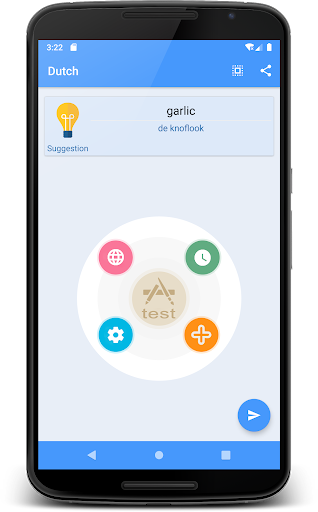
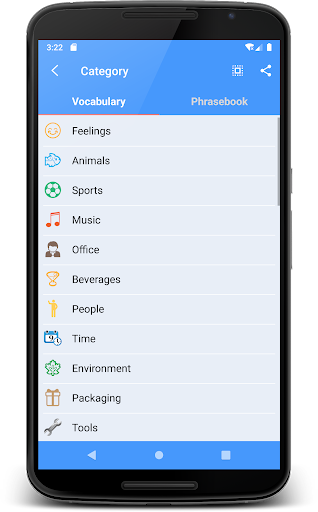
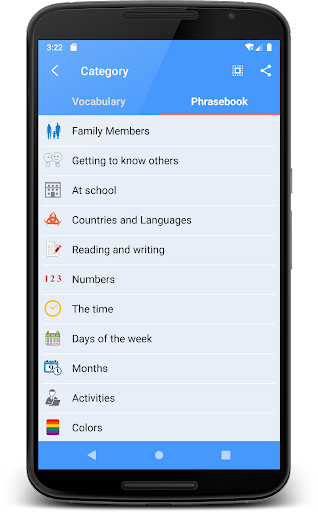
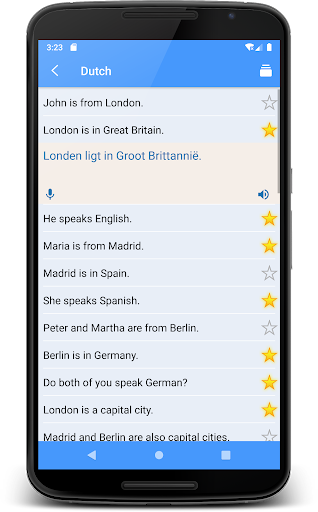
"Learn Dutch" to quickly learn Dutch daily vocabulary and daily phrases, simple and practical, let you easily communicate with foreigners
"Learn Dutch" is a good help to improve Dutch speaking and Dutch listening.
The main function:
1. Learn Dutch vocabulary, including dozens of vocabulary learning, real human pronunciation, clear and easy to learn
2. Learn Dutch phrases, including dozens of categories of phrase learning, real human pronunciation, clear and easy to learn
3. Support recording function, convenient for users to compare learning, To improve Dutch speaking and Dutch listening
4. Support list and card display methods for learning
5. Provide simulation test function, convenient for users to carry out staged self-test
6. Support online translation function, this function is mainly for translation between source language and Dutch
7. Support for the collection function
Software introduction:
1. A Dutch vocabulary learning software
Learn Dutch vocabulary is so easy
2. A Dutch phrase Learn software
Learn Dutch phrases is so easy
3. A Dutch translation software
Support Dutch online translation, most languages support online pronunciation function
main feature:
1. Easy to use, easy and fast
2. The interface is beautiful and generous
3. Offline Learn
If you encounter any software related problems during use, please contact us (you can email us via email)
In the follow-up, we will continue to develop related software in other languages according to the needs, so that everyone can communicate and learn in daily life, so stay tuned!
और दिखाएं

1. MEmu इंस्टॉलर को डाउनलोड करें और इंस्टॉलेशन को पूरा करें

2. MEmu शुरू करें फिर होमपेज पर Google Play खोलें

3. Google Play में Learn Dutch | Dutch Translator खोजें
Install
4. Learn Dutch | Dutch Translator डाउनलोड कर इंस्टॉल करें
5. इंस्टॉल पूरा होने पर आइकन दबाएं

6. MEmu का उपयोग करके अपने कंप्यूटर पर Learn Dutch | Dutch Translator का अनुभव करें
MEmu Play सबसे बेहतरीन मुफ़्त Android एमुलेटर है और 5 करोड़ लोग पहले ही इसके शानदार Android ऐप अनुभव का आनंद ले चुके हैं। MEmu 9 वर्चुअलाइज़ेशन तकनीक आपको अपने PC पर हज़ारों Android ऐप्स, यहाँ तक कि सबसे ज़्यादा ग्राफ़िक्स वाले ऐप्स भी, आसानी से चलाने की सुविधा देती है।
असीमित बैटरी या मोबाइल डेटा के साथ बेहतर ग्राफिक्स के साथ बड़ी स्क्रीन; लंबी अवधि।
कीबोर्ड और माउस या गेमपैड के उत्तम नियंत्रण के लिए संपूर्ण कीमैपिंग का समर्थन करता हैं।
एक ही पीसी पर मल्टी-इंस्टेंस मैनेजर के साथ एक समय में कई गेम खाते या कार्य कर सकते हैं।
Use Learn Dutch | Dutch Translator on PC by following steps: