
MHR Tutorial
अपडेट किया गया
वर्तमान वर्शन
1.5.3.5
संसाधन

MHR Tutorial पर अपनी मोबाइल डेटा सीमा पार करने को अलविदा कहें और छोटी स्क्रीन की सीमाओं से मुक्त होकर बड़े डिस्प्ले के लाभों का अनुभव करें। अब, आप अपने कीबोर्ड और माउस का उपयोग करके फुल-स्क्रीन मोड में टॉपर्स क्लैन की शक्ति का अनुभव कर सकते हैं। MEmu Play में वे सभी बेहतरीन सुविधाएँ हैं जिनकी आप अपेक्षा करते हैं: त्वरित इंस्टॉलेशन और आसान सेटअप, सहज नियंत्रण, बैटरी की आवश्यकता नहीं, और कोई डेटा या कॉल समय सीमा नहीं। नया MEmu 9 आपके कंप्यूटर पर MHR Tutorial का उपयोग करने के लिए सबसे अच्छा विकल्प है। हमारा मालिकाना मल्टी-इंस्टेंस मैनेजर एक साथ दो या अधिक खातों को चलाने का समर्थन करता है। इससे भी महत्वपूर्ण बात यह है कि हमारा अनूठा इम्यूलेशन इंजन आपके कंप्यूटर के प्रदर्शन का पूरा उपयोग करता है, जिससे एक सहज और निर्बाध अनुभव मिलता है।
और दिखाएं
MEmu Play के साथ PC पर MHR Tutorial इस्तेमाल करने के शानदार अनुभव का आनंद लें। यह एक शक्तिशाली मुफ़्त Android एमुलेटर है जो आपको डेस्कटॉप वर्ज़न के लिए हज़ारों Android ऐप्स उपलब्ध कराता है। दोस्तों से जुड़ने और अपने काम को और भी बेहतर बनाने का आनंद लें! Right from understanding the topics to clearing the exam, we offer you a one-stop solution for all your learning needs.
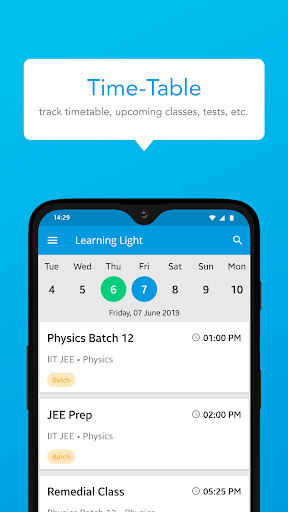
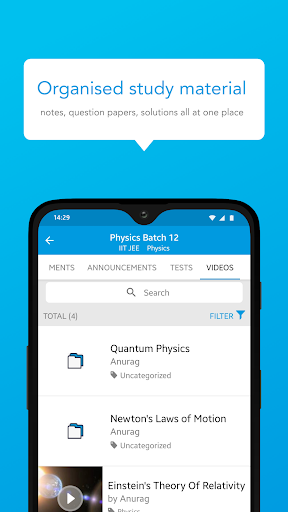
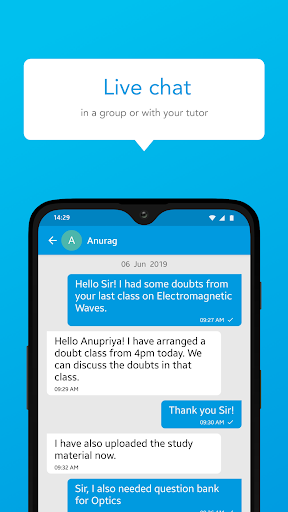
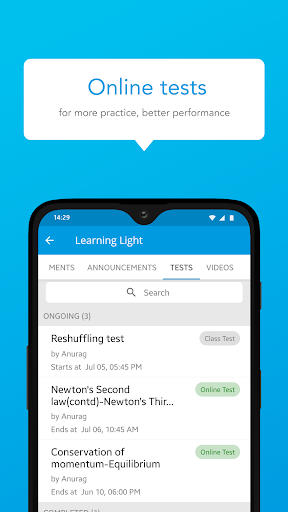
Right from understanding the topics to clearing the exam, we offer you a one-stop solution for all your learning needs. Now learn with us, uninterrupted from the safety of your home.
Our app is the go-to solution for students across the country with a simple user interface, design, and exciting features.
åWhy study with us? Want to know what all you will get?
Interactive live classes
Now, let’s recreate our physical experiences through our state-of-the-art live classes interface where multiple students can study together.
- Periodical live classes to ensure you clear your exams
- Raise your hand feature to solve individual queries
Course material
- Get access to the course, notes, and other study material on-the-go
- Regularly updated content
Tests and performance reports
- Get online tests and exams
- Track your performance, test scores & rank from time to time.
Ask every doubt
- Clearing doubts has never been easier. Ask your doubts by just clicking a screenshot/photo of the question and uploading it. We’ll ensure that all your doubts are clarified.
- Clear your doubts on the go through our mobile app
Proven record of excellence:
- We have been part of the market for a long time now and we have helped multiple candidates clear their exams.
- Excellence has always been our motto, and the only thing that will never change is our motto.
⏰ Reminders and notifications for batches and sessions
- Get notifications about new courses, sessions and updates. No more worrying about missed classes, sessions, etc. because we only want you to focus on your studies.
- Get announcements around exam dates/special classes/ special events etc.
Assignment submission
- Practice makes a student perfect. Get regular online assignments so that you can become perfect.
- Submit your assignments online and we will help you in evaluating your performance
Anytime access
- Watch our classes, live or recorded, anytime from any of your devices.
Parent-Teacher discussion
- Parents can download the app and connect with teachers & track their ward’s performance
- Parents can easily chat with the teacher in case of any query
Payments and fees
- Easy fees submission with 100% safe and secure payment options
Online fee payment option for ease
Compete within groups
- Compete within groups and with peers who are stuying
- Get to see your comparative score as compared to peer students
Ads Free
- No ads for a seamless studying experience
Safe and secure
- Safety of your data i.e. phone number, email address, etc. is of utmost importance
- We never use student data for any kind of advertisement
An online platform for studying most efficiently and transparently. Download now !!
और दिखाएं

1. MEmu इंस्टॉलर को डाउनलोड करें और इंस्टॉलेशन को पूरा करें

2. MEmu शुरू करें फिर होमपेज पर Google Play खोलें

3. Google Play में MHR Tutorial खोजें
Install
4. MHR Tutorial डाउनलोड कर इंस्टॉल करें
5. इंस्टॉल पूरा होने पर आइकन दबाएं

6. MEmu का उपयोग करके अपने कंप्यूटर पर MHR Tutorial का अनुभव करें
MEmu Play सबसे बेहतरीन मुफ़्त Android एमुलेटर है और 5 करोड़ लोग पहले ही इसके शानदार Android ऐप अनुभव का आनंद ले चुके हैं। MEmu 9 वर्चुअलाइज़ेशन तकनीक आपको अपने PC पर हज़ारों Android ऐप्स, यहाँ तक कि सबसे ज़्यादा ग्राफ़िक्स वाले ऐप्स भी, आसानी से चलाने की सुविधा देती है।
असीमित बैटरी या मोबाइल डेटा के साथ बेहतर ग्राफिक्स के साथ बड़ी स्क्रीन; लंबी अवधि।
कीबोर्ड और माउस या गेमपैड के उत्तम नियंत्रण के लिए संपूर्ण कीमैपिंग का समर्थन करता हैं।
एक ही पीसी पर मल्टी-इंस्टेंस मैनेजर के साथ एक समय में कई गेम खाते या कार्य कर सकते हैं।
Use MHR Tutorial on PC by following steps: