
Pratap Academy (Exam Key)
अपडेट किया गया
वर्तमान वर्शन
1.12.1.1
संसाधन

Pratap Academy (Exam Key) पर अपनी मोबाइल डेटा सीमा पार करने को अलविदा कहें और छोटी स्क्रीन की सीमाओं से मुक्त होकर बड़े डिस्प्ले के लाभों का अनुभव करें। अब, आप अपने कीबोर्ड और माउस का उपयोग करके फुल-स्क्रीन मोड में टॉपर्स क्लैन की शक्ति का अनुभव कर सकते हैं। MEmu Play में वे सभी बेहतरीन सुविधाएँ हैं जिनकी आप अपेक्षा करते हैं: त्वरित इंस्टॉलेशन और आसान सेटअप, सहज नियंत्रण, बैटरी की आवश्यकता नहीं, और कोई डेटा या कॉल समय सीमा नहीं। नया MEmu 9 आपके कंप्यूटर पर Pratap Academy (Exam Key) का उपयोग करने के लिए सबसे अच्छा विकल्प है। हमारा मालिकाना मल्टी-इंस्टेंस मैनेजर एक साथ दो या अधिक खातों को चलाने का समर्थन करता है। इससे भी महत्वपूर्ण बात यह है कि हमारा अनूठा इम्यूलेशन इंजन आपके कंप्यूटर के प्रदर्शन का पूरा उपयोग करता है, जिससे एक सहज और निर्बाध अनुभव मिलता है।
और दिखाएं
MEmu Play के साथ PC पर Pratap Academy (Exam Key) इस्तेमाल करने के शानदार अनुभव का आनंद लें। यह एक शक्तिशाली मुफ़्त Android एमुलेटर है जो आपको डेस्कटॉप वर्ज़न के लिए हज़ारों Android ऐप्स उपलब्ध कराता है। दोस्तों से जुड़ने और अपने काम को और भी बेहतर बनाने का आनंद लें! EXAM KEY CLASSES is an online platform for managing data associated with its tutoring classes in the most efficient and transparent manner.
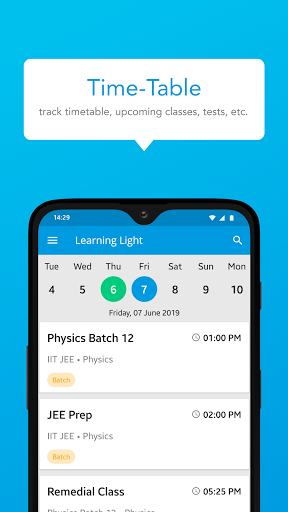
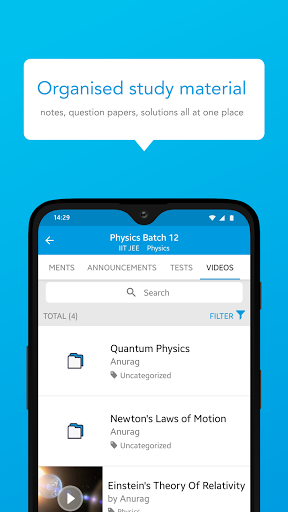
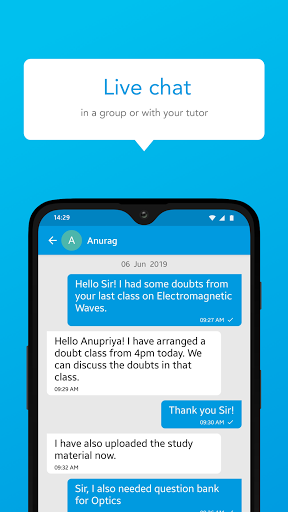
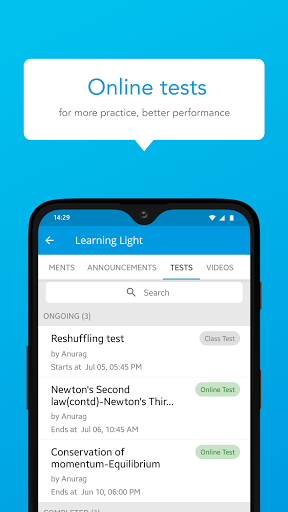
EXAM KEY CLASSES is an online platform for managing data associated with its tutoring classes in the most efficient and transparent manner. It is a user-friendly app with amazing features like online attendance, fees management, homework submission, detailed performance reports and much more- a perfect on- the- go solution for parents to know about their wards’ class details. It’s a great amalgamation of simple user interface design and exciting features; greatly loved by students, parents, and tutors.
और दिखाएं

1. MEmu इंस्टॉलर को डाउनलोड करें और इंस्टॉलेशन को पूरा करें

2. MEmu शुरू करें फिर होमपेज पर Google Play खोलें

3. Google Play में Pratap Academy (Exam Key) खोजें
Install
4. Pratap Academy (Exam Key) डाउनलोड कर इंस्टॉल करें
5. इंस्टॉल पूरा होने पर आइकन दबाएं

6. MEmu का उपयोग करके अपने कंप्यूटर पर Pratap Academy (Exam Key) का अनुभव करें
MEmu Play सबसे बेहतरीन मुफ़्त Android एमुलेटर है और 5 करोड़ लोग पहले ही इसके शानदार Android ऐप अनुभव का आनंद ले चुके हैं। MEmu 9 वर्चुअलाइज़ेशन तकनीक आपको अपने PC पर हज़ारों Android ऐप्स, यहाँ तक कि सबसे ज़्यादा ग्राफ़िक्स वाले ऐप्स भी, आसानी से चलाने की सुविधा देती है।
असीमित बैटरी या मोबाइल डेटा के साथ बेहतर ग्राफिक्स के साथ बड़ी स्क्रीन; लंबी अवधि।
कीबोर्ड और माउस या गेमपैड के उत्तम नियंत्रण के लिए संपूर्ण कीमैपिंग का समर्थन करता हैं।
एक ही पीसी पर मल्टी-इंस्टेंस मैनेजर के साथ एक समय में कई गेम खाते या कार्य कर सकते हैं।
Use Pratap Academy (Exam Key) on PC by following steps: