
PURE SIKSHA
अपडेट किया गया
वर्तमान वर्शन
1.16.1.1
संसाधन

PURE SIKSHA पर अपनी मोबाइल डेटा सीमा पार करने को अलविदा कहें और छोटी स्क्रीन की सीमाओं से मुक्त होकर बड़े डिस्प्ले के लाभों का अनुभव करें। अब, आप अपने कीबोर्ड और माउस का उपयोग करके फुल-स्क्रीन मोड में टॉपर्स क्लैन की शक्ति का अनुभव कर सकते हैं। MEmu Play में वे सभी बेहतरीन सुविधाएँ हैं जिनकी आप अपेक्षा करते हैं: त्वरित इंस्टॉलेशन और आसान सेटअप, सहज नियंत्रण, बैटरी की आवश्यकता नहीं, और कोई डेटा या कॉल समय सीमा नहीं। नया MEmu 9 आपके कंप्यूटर पर PURE SIKSHA का उपयोग करने के लिए सबसे अच्छा विकल्प है। हमारा मालिकाना मल्टी-इंस्टेंस मैनेजर एक साथ दो या अधिक खातों को चलाने का समर्थन करता है। इससे भी महत्वपूर्ण बात यह है कि हमारा अनूठा इम्यूलेशन इंजन आपके कंप्यूटर के प्रदर्शन का पूरा उपयोग करता है, जिससे एक सहज और निर्बाध अनुभव मिलता है।
और दिखाएं
MEmu Play के साथ PC पर PURE SIKSHA इस्तेमाल करने के शानदार अनुभव का आनंद लें। यह एक शक्तिशाली मुफ़्त Android एमुलेटर है जो आपको डेस्कटॉप वर्ज़न के लिए हज़ारों Android ऐप्स उपलब्ध कराता है। दोस्तों से जुड़ने और अपने काम को और भी बेहतर बनाने का आनंद लें! PURE SIKSHA – Your Trusted Learning Companion.
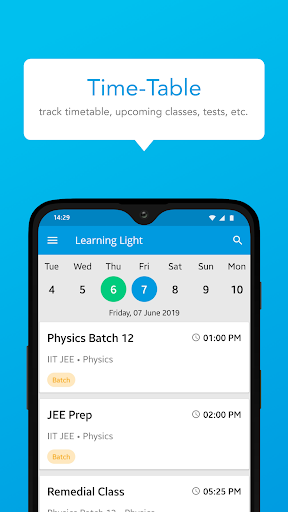
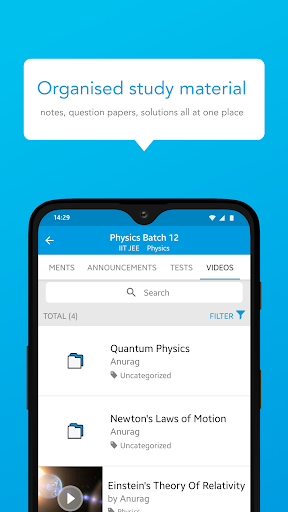
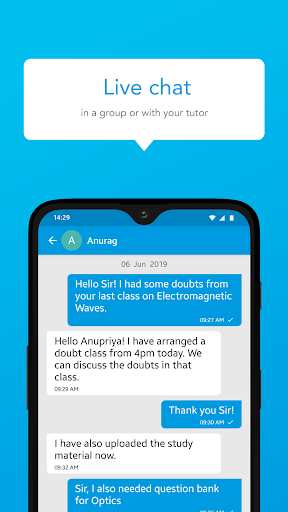
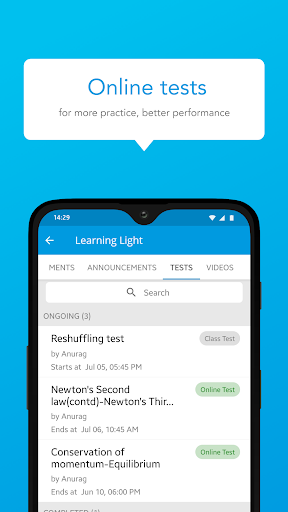
PURE SIKSHA – Your Trusted Learning Companion
PURE SIKSHA is a next-generation Ed-Tech platform designed to offer high-quality, structured, and engaging education to students, professionals, and lifelong learners. Whether you're preparing for school exams, competitive tests, or skill-based certifications, PURE SIKSHA provides comprehensive learning solutions tailored to your needs.
Key Features:
Diverse Course Offerings
Access expert-curated courses on subjects including Mathematics, Science, Commerce, Humanities, Competitive Exams, and Skill Development.
Learn from Experts
Gain knowledge from top educators with years of experience in academic and professional training.
Engaging Video Lectures
Enjoy high-quality video lessons that make learning fun, interactive, and easy to understand.
Live Classes & Doubt Solving
Attend real-time sessions, interact with mentors, and get instant solutions to your doubts.
AI-Powered Personalized Learning
Get a customized study plan based on your strengths and improvement areas for a tailored learning experience.
Mock Tests & Quizzes
Boost your confidence with chapter-wise tests, previous-year papers, and full-length mock exams to track your progress.
Learn Anytime, Anywhere
PURE SIKSHA is designed for flexible learning, allowing you to study at your own pace, anytime, anywhere.
Certification & Career Growth
Complete courses and earn industry-recognized certificates to enhance your academic and professional profile.
Why Choose PURE SIKSHA?
Structured curriculum
Expert-led teaching
Personalized learning experience
Affordable and user-friendly
Download PURE SIKSHA now and transform your learning journey today!
और दिखाएं

1. MEmu इंस्टॉलर को डाउनलोड करें और इंस्टॉलेशन को पूरा करें

2. MEmu शुरू करें फिर होमपेज पर Google Play खोलें

3. Google Play में PURE SIKSHA खोजें
Install
4. PURE SIKSHA डाउनलोड कर इंस्टॉल करें
5. इंस्टॉल पूरा होने पर आइकन दबाएं

6. MEmu का उपयोग करके अपने कंप्यूटर पर PURE SIKSHA का अनुभव करें
MEmu Play सबसे बेहतरीन मुफ़्त Android एमुलेटर है और 5 करोड़ लोग पहले ही इसके शानदार Android ऐप अनुभव का आनंद ले चुके हैं। MEmu 9 वर्चुअलाइज़ेशन तकनीक आपको अपने PC पर हज़ारों Android ऐप्स, यहाँ तक कि सबसे ज़्यादा ग्राफ़िक्स वाले ऐप्स भी, आसानी से चलाने की सुविधा देती है।
असीमित बैटरी या मोबाइल डेटा के साथ बेहतर ग्राफिक्स के साथ बड़ी स्क्रीन; लंबी अवधि।
कीबोर्ड और माउस या गेमपैड के उत्तम नियंत्रण के लिए संपूर्ण कीमैपिंग का समर्थन करता हैं।
एक ही पीसी पर मल्टी-इंस्टेंस मैनेजर के साथ एक समय में कई गेम खाते या कार्य कर सकते हैं।
Use PURE SIKSHA on PC by following steps: