
Sleepway: Sleep Tracker, Sound
अपडेट किया गया
वर्तमान वर्शन
1.1.0
संसाधन

Sleepway: Sleep Tracker, Sound पर अपनी मोबाइल डेटा सीमा पार करने को अलविदा कहें और छोटी स्क्रीन की सीमाओं से मुक्त होकर बड़े डिस्प्ले के लाभों का अनुभव करें। अब, आप अपने कीबोर्ड और माउस का उपयोग करके फुल-स्क्रीन मोड में टॉपर्स क्लैन की शक्ति का अनुभव कर सकते हैं। MEmu Play में वे सभी बेहतरीन सुविधाएँ हैं जिनकी आप अपेक्षा करते हैं: त्वरित इंस्टॉलेशन और आसान सेटअप, सहज नियंत्रण, बैटरी की आवश्यकता नहीं, और कोई डेटा या कॉल समय सीमा नहीं। नया MEmu 9 आपके कंप्यूटर पर Sleepway: Sleep Tracker, Sound का उपयोग करने के लिए सबसे अच्छा विकल्प है। हमारा मालिकाना मल्टी-इंस्टेंस मैनेजर एक साथ दो या अधिक खातों को चलाने का समर्थन करता है। इससे भी महत्वपूर्ण बात यह है कि हमारा अनूठा इम्यूलेशन इंजन आपके कंप्यूटर के प्रदर्शन का पूरा उपयोग करता है, जिससे एक सहज और निर्बाध अनुभव मिलता है।
और दिखाएं
डाउनलोड करें Sleepway: Sleep Tracker, Sound पीसी पर MEmu एंड्रॉयड एमुलेटर के साथ बड़े पर्दे पर खेलने का आनंद लें। Sleepway: Your Pathway to a Better Night's Sleep.
Sleepway: Your Pathway to a Better Night's Sleep
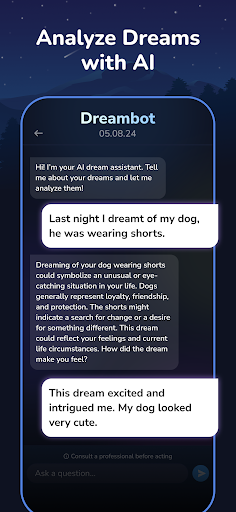
Looking to drift off to dreamland faster and wake up feeling refreshed? Sleepway is your all-in-one sleep solution, offering calming soundscapes, personalized audio mixing, and sleep tracking to help you understand and improve your sleep habits.
Here's how Sleepway empowers you to achieve a better night's rest:
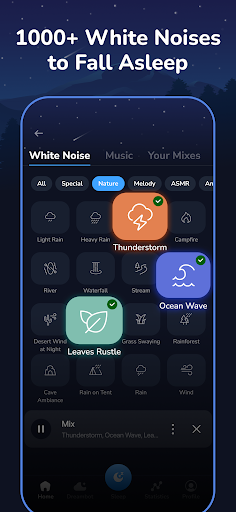
Unwind with Calming Sounds & Music: Sleepway boasts a library of soothing sounds and music designed to lull you to sleep. Choose from nature sounds, gentle melodies, or white noise to create a relaxing sleep environment.
Mix & Match Your Perfect Soundscape: Don't just listen, create! Sleepway's sound-mixing feature allows you to blend different sounds to personalize your sleep experience. Combine rain and birdsong, or ocean waves with calming piano music – the possibilities are endless!
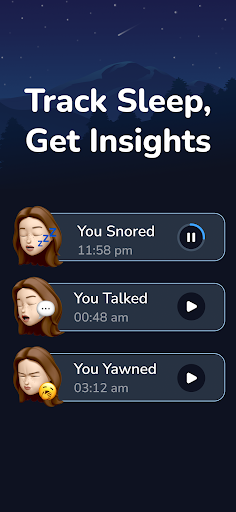
Track Your Nighttime Noises: Curious about what happens while you sleep? Sleepway automatically detects and records nighttime noises like snoring and yawning. This helps you identify potential sleep disruptors and track any changes over time.
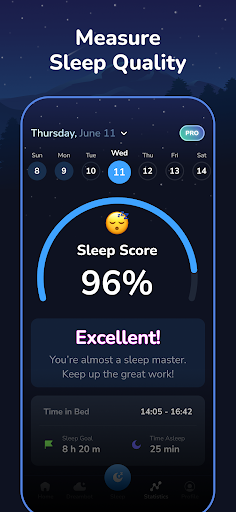
Gain Sleep Insights: Sleepway keeps things simple with easy-to-read charts and graphs displaying your total sleep duration. See how long you slept each night and use this data to adjust your sleep routine for optimal well-being.
Intuitive Interface: Sleepway prioritizes user-friendliness. Navigate easily and browse through sounds, effortlessly mix your creations, view sleep data with clarity, and listen back to recorded sleep noises – all within a simple and intuitive interface.
Sleepway isn't just about tracking – it's about understanding your sleep and taking action for a healthier, happier you.
With Sleepway, you can:
Enhance your sleep quality: Discover the calming sounds and music that work best for you.
Personalize your sleep experience: Craft unique audio mixes for a truly restful night.
Gain valuable sleep insights: Track sleep noises and basic sleep statistics to identify areas for improvement.
Become more sleep-aware: Gain a deeper understanding of your sleep patterns and make informed choices for better overall health.
Download Sleepway today and unlock the gateway to a better night's sleep!
Terms and Conditions: https://storage.googleapis.com/static.sleepway.app/terms-and-conditions-english.html
Privacy Policy:
https://storage.googleapis.com/static.sleepway.app/privacy-policy-eng.html
Community Guidelines:
https://storage.googleapis.com/static.sleepway.app/community-guidelines-eng.html
और दिखाएं

1. MEmu इंस्टॉलर को डाउनलोड करें और इंस्टॉलेशन को पूरा करें

2. MEmu शुरू करें फिर होमपेज पर Google Play खोलें

3. Google Play में Sleepway: Sleep Tracker, Sound खोजें
Install
4. Sleepway: Sleep Tracker, Sound डाउनलोड कर इंस्टॉल करें
5. इंस्टॉल पूरा होने पर आइकन दबाएं

6. MEmu का उपयोग करके अपने कंप्यूटर पर Sleepway: Sleep Tracker, Sound का अनुभव करें
MEmu Play सबसे बेहतरीन मुफ़्त Android एमुलेटर है और 5 करोड़ लोग पहले ही इसके शानदार Android ऐप अनुभव का आनंद ले चुके हैं। MEmu 9 वर्चुअलाइज़ेशन तकनीक आपको अपने PC पर हज़ारों Android ऐप्स, यहाँ तक कि सबसे ज़्यादा ग्राफ़िक्स वाले ऐप्स भी, आसानी से चलाने की सुविधा देती है।
असीमित बैटरी या मोबाइल डेटा के साथ बेहतर ग्राफिक्स के साथ बड़ी स्क्रीन; लंबी अवधि।
कीबोर्ड और माउस या गेमपैड के उत्तम नियंत्रण के लिए संपूर्ण कीमैपिंग का समर्थन करता हैं।
एक ही पीसी पर मल्टी-इंस्टेंस मैनेजर के साथ एक समय में कई गेम खाते या कार्य कर सकते हैं।
Use Sleepway: Sleep Tracker, Sound on PC by following steps: