
stats.fm for Spotify
अपडेट किया गया
वर्तमान वर्शन
1.8.28
संसाधन

stats.fm for Spotify पर अपनी मोबाइल डेटा सीमा पार करने को अलविदा कहें और छोटी स्क्रीन की सीमाओं से मुक्त होकर बड़े डिस्प्ले के लाभों का अनुभव करें। अब, आप अपने कीबोर्ड और माउस का उपयोग करके फुल-स्क्रीन मोड में टॉपर्स क्लैन की शक्ति का अनुभव कर सकते हैं। MEmu Play में वे सभी बेहतरीन सुविधाएँ हैं जिनकी आप अपेक्षा करते हैं: त्वरित इंस्टॉलेशन और आसान सेटअप, सहज नियंत्रण, बैटरी की आवश्यकता नहीं, और कोई डेटा या कॉल समय सीमा नहीं। नया MEmu 9 आपके कंप्यूटर पर stats.fm for Spotify का उपयोग करने के लिए सबसे अच्छा विकल्प है। हमारा मालिकाना मल्टी-इंस्टेंस मैनेजर एक साथ दो या अधिक खातों को चलाने का समर्थन करता है। इससे भी महत्वपूर्ण बात यह है कि हमारा अनूठा इम्यूलेशन इंजन आपके कंप्यूटर के प्रदर्शन का पूरा उपयोग करता है, जिससे एक सहज और निर्बाध अनुभव मिलता है।
और दिखाएं
डाउनलोड करें stats.fm for Spotify पीसी पर MEmu एंड्रॉयड एमुलेटर के साथ बड़े पर्दे पर खेलने का आनंद लें। Your music, your stats, your story!
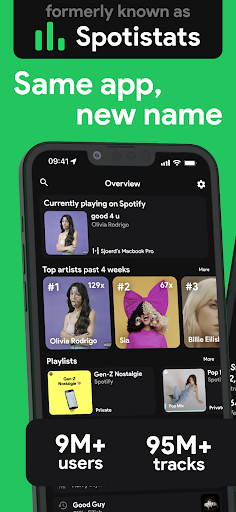
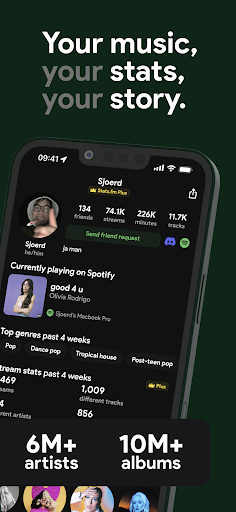
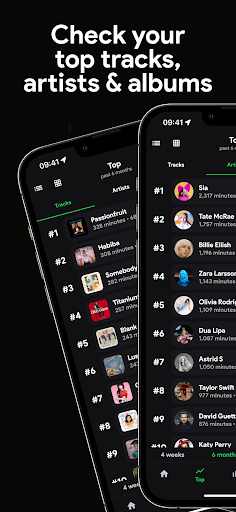
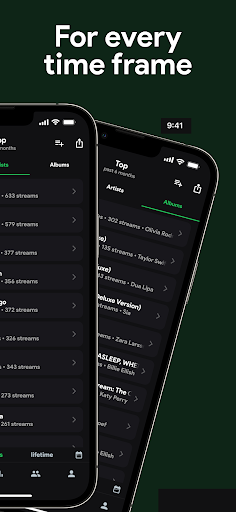
Your music, your stats, your story!
With over 10M+ users worldwide, 100M+ stats about tracks, 14M+ albums, and 6M+ artists, gain insights with stats.fm into your most listened songs and artists from every period you can imagine!
↪ stats.fm previously went by the name Spotistats
Don't feel like waiting until the end of the year to see your Spotify Wrapped? Or don't like the design and unuseful info given? No problem, stats.fm is here to show you everything you ever wanted and more!
With Plus it's even possible to view how many times you've listened to your favourite songs!
Discover your listening behavior insights!
All your listening history in one place:
• Your top tracks, top artists, top albums and even top genres
• When you listen (listening clock and more)
• How much you listen (playcounts, minutes/hours streamed)
• What type of music (lively, energetic, etc)
And many more stats and cool graphs
Flex on your friends
You can not only view stats for your own account, but you're even able to search and add your friends and compare your stats with them!
Your personal journey
Detailed & Accurate stats about your beloved songs, artists, or playlists:
• Playcount (how many times and minutes listened)
• How popular the song / artist / playlist is on Spotify
• For artists/albums you can see your top tracks
• What type of music it is (lively, energetic, danceable, instrumental etc)
• The top listeners (who listen to the song / artist / album the most)
• Your lifetime streaming history of that song / artist / album
And many more statistics
In short, Stats.fm for Spotify is the must-have Spotify companion.
Follow us for updates and fun stuff:
Twitter - twitter.com/spotistats
Discord - discord.gg/spotistats
Instagram - instagram.com/statsfm
TikTok - tiktok.com/@statsfm
Reddit - reddit.com/r/statsfm
Note: Some mentioned features require a one-time import of your lifetime streaming history, Spotify is a trademark of Spotify AB. StatsFM B.V. is in no way affiliated with Spotify AB.
Download stats.fm today and start your unforgettable journey!
stats.fm Terms & Conditions: https://stats.fm/terms
stats.fm Privacy Policy: https://stats.fm/privacy
और दिखाएं

1. MEmu इंस्टॉलर को डाउनलोड करें और इंस्टॉलेशन को पूरा करें

2. MEmu शुरू करें फिर होमपेज पर Google Play खोलें

3. Google Play में stats.fm for Spotify खोजें
Install
4. stats.fm for Spotify डाउनलोड कर इंस्टॉल करें
5. इंस्टॉल पूरा होने पर आइकन दबाएं

6. MEmu का उपयोग करके अपने कंप्यूटर पर stats.fm for Spotify का अनुभव करें
MEmu Play सबसे बेहतरीन मुफ़्त Android एमुलेटर है और 5 करोड़ लोग पहले ही इसके शानदार Android ऐप अनुभव का आनंद ले चुके हैं। MEmu 9 वर्चुअलाइज़ेशन तकनीक आपको अपने PC पर हज़ारों Android ऐप्स, यहाँ तक कि सबसे ज़्यादा ग्राफ़िक्स वाले ऐप्स भी, आसानी से चलाने की सुविधा देती है।
असीमित बैटरी या मोबाइल डेटा के साथ बेहतर ग्राफिक्स के साथ बड़ी स्क्रीन; लंबी अवधि।
कीबोर्ड और माउस या गेमपैड के उत्तम नियंत्रण के लिए संपूर्ण कीमैपिंग का समर्थन करता हैं।
एक ही पीसी पर मल्टी-इंस्टेंस मैनेजर के साथ एक समय में कई गेम खाते या कार्य कर सकते हैं।
Use stats.fm for Spotify on PC by following steps: