
Uber Lite
अपडेट किया गया
वर्तमान वर्शन
1732031205
संसाधन

Uber Lite पर अपनी मोबाइल डेटा सीमा पार करने को अलविदा कहें और छोटी स्क्रीन की सीमाओं से मुक्त होकर बड़े डिस्प्ले के लाभों का अनुभव करें। अब, आप अपने कीबोर्ड और माउस का उपयोग करके फुल-स्क्रीन मोड में टॉपर्स क्लैन की शक्ति का अनुभव कर सकते हैं। MEmu Play में वे सभी बेहतरीन सुविधाएँ हैं जिनकी आप अपेक्षा करते हैं: त्वरित इंस्टॉलेशन और आसान सेटअप, सहज नियंत्रण, बैटरी की आवश्यकता नहीं, और कोई डेटा या कॉल समय सीमा नहीं। नया MEmu 9 आपके कंप्यूटर पर Uber Lite का उपयोग करने के लिए सबसे अच्छा विकल्प है। हमारा मालिकाना मल्टी-इंस्टेंस मैनेजर एक साथ दो या अधिक खातों को चलाने का समर्थन करता है। इससे भी महत्वपूर्ण बात यह है कि हमारा अनूठा इम्यूलेशन इंजन आपके कंप्यूटर के प्रदर्शन का पूरा उपयोग करता है, जिससे एक सहज और निर्बाध अनुभव मिलता है।
और दिखाएं
डाउनलोड करें Uber Lite पीसी पर MEmu एंड्रॉयड एमुलेटर के साथ बड़े पर्दे पर खेलने का आनंद लें। Uber Lite is a new, simple way to request a ride.
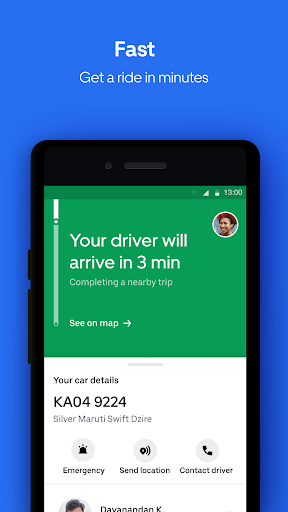
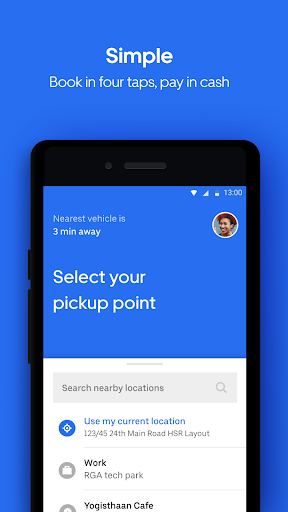
Uber Lite is a new, simple way to request a ride. This simpler version of the Uber app works on any android phone while saving storage space and data. Plus, it’s easy to learn and use, and it’s designed to work even in low connectivity areas.
What’s Uber Lite?
It’s Uber. Get the same reliable rides on a simple new app
It’s simple to learn and use. Call an Uber in 4 taps, with little or no typing, and pay in cash
It’s light. At just 5 MBs to download, the app is the size of a few selfies and is designed to work on any Android device
It’s reliable. You can download and use the app without wifi or a strong connection
It’s safe. The app has easy-to-use safety features, including the ability to share your trip status so loved ones can follow your ride in real time.
Requesting a personal ride has never been easier on Uber Lite— Here’s how it works in four steps:
Open the app
Confirm where you are and tap to select your destination
Choose a vehicle type
Confirm your ride
What happens after you request?
Your location and destination information is shared with your driver so they know where to pick you up and drop you off.
Once you've requested a ride, the app will show you all the information you need about your upcoming trip, including your driver’s name, picture, contact information, vehicle details, progress toward your destination, and their time to arrival.
When your trip is over, pay in cash. Uber Lite does not accept digital forms of payment at this time.
Affordable, Everyday Ride Options:
Choose a ride the suits your needs. Uber Lite will display upfront prices and auto-sort vehicles starting with the most affordable, at the time of your request.
Need a simple way to get from A to B quickly? Try UberGO or UberAuto, two of our most affordable ride options.
Want to elevate your experience? Take a high-end vehicle with Premier. There are even vehicle options for riders traveling with a big group or in need of a vehicle with accessibility features.
Uber Lite: A ride that goes anywhere, an app that works everywhere
See if Uber is available in your city at https://www.uber.com/cities
Follow us on Twitter at https://twitter.com/uber
Like us on Facebook at https://www.facebook.com/uber
Have a question? Visit uber.com/help
और दिखाएं

1. MEmu इंस्टॉलर को डाउनलोड करें और इंस्टॉलेशन को पूरा करें

2. MEmu शुरू करें फिर होमपेज पर Google Play खोलें

3. Google Play में Uber Lite खोजें
Install
4. Uber Lite डाउनलोड कर इंस्टॉल करें
5. इंस्टॉल पूरा होने पर आइकन दबाएं

6. MEmu का उपयोग करके अपने कंप्यूटर पर Uber Lite का अनुभव करें
MEmu Play सबसे बेहतरीन मुफ़्त Android एमुलेटर है और 5 करोड़ लोग पहले ही इसके शानदार Android ऐप अनुभव का आनंद ले चुके हैं। MEmu 9 वर्चुअलाइज़ेशन तकनीक आपको अपने PC पर हज़ारों Android ऐप्स, यहाँ तक कि सबसे ज़्यादा ग्राफ़िक्स वाले ऐप्स भी, आसानी से चलाने की सुविधा देती है।
असीमित बैटरी या मोबाइल डेटा के साथ बेहतर ग्राफिक्स के साथ बड़ी स्क्रीन; लंबी अवधि।
कीबोर्ड और माउस या गेमपैड के उत्तम नियंत्रण के लिए संपूर्ण कीमैपिंग का समर्थन करता हैं।
एक ही पीसी पर मल्टी-इंस्टेंस मैनेजर के साथ एक समय में कई गेम खाते या कार्य कर सकते हैं।
Use Uber Lite on PC by following steps: