UTS
अपडेट किया गया
वर्तमान वर्शन
15.1.41
संसाधन

UTS पर अपनी मोबाइल डेटा सीमा पार करने को अलविदा कहें और छोटी स्क्रीन की सीमाओं से मुक्त होकर बड़े डिस्प्ले के लाभों का अनुभव करें। अब, आप अपने कीबोर्ड और माउस का उपयोग करके फुल-स्क्रीन मोड में टॉपर्स क्लैन की शक्ति का अनुभव कर सकते हैं। MEmu Play में वे सभी बेहतरीन सुविधाएँ हैं जिनकी आप अपेक्षा करते हैं: त्वरित इंस्टॉलेशन और आसान सेटअप, सहज नियंत्रण, बैटरी की आवश्यकता नहीं, और कोई डेटा या कॉल समय सीमा नहीं। नया MEmu 9 आपके कंप्यूटर पर UTS का उपयोग करने के लिए सबसे अच्छा विकल्प है। हमारा मालिकाना मल्टी-इंस्टेंस मैनेजर एक साथ दो या अधिक खातों को चलाने का समर्थन करता है। इससे भी महत्वपूर्ण बात यह है कि हमारा अनूठा इम्यूलेशन इंजन आपके कंप्यूटर के प्रदर्शन का पूरा उपयोग करता है, जिससे एक सहज और निर्बाध अनुभव मिलता है।
और दिखाएं
डाउनलोड करें UTS पीसी पर MEmu एंड्रॉयड एमुलेटर के साथ बड़े पर्दे पर खेलने का आनंद लें। UTS on mobile app is an Indian Railways official android mobile ticketing app to book unreserved train tickets.
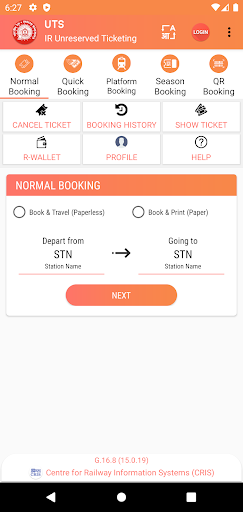
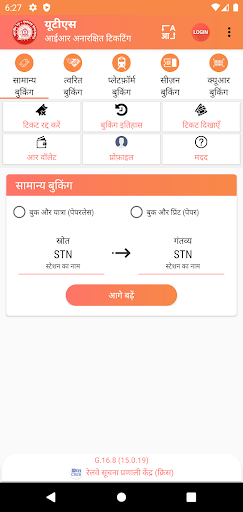
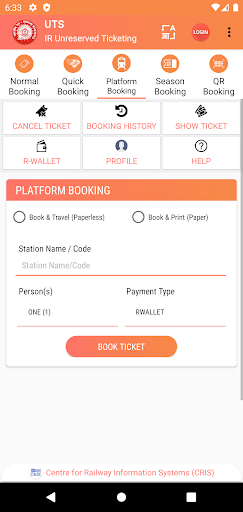
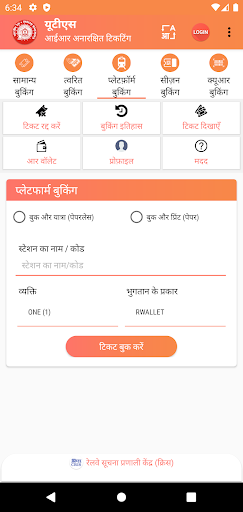
UTS on mobile app is an Indian Railways official android mobile ticketing app to book unreserved train tickets.
Who can use utsonmobile application?
The service is not available to a person under the age of Seventeen or previously suspended or removed from the services by Indian Railway.
By accepting the Terms & Conditions or by otherwise using the Service or the website, it would be deemed that the concerned person is at least Seventeen years of age and have not been previously suspended or removed from the Services by Indian Railway. The Person represents and warrants that he has the right, authority, and capacity to enter into this Agreement and to abide by all of the terms and conditions of this Agreement. The person shall not impersonate any other person or entity, or falsely state or otherwise misrepresent identity, age or affiliation with any other person or entity.
Pre-requisites to avail the utsonmobile app service:
Presently, utsonmobile app is available in Android, Windows & iOS versions.
The Smartphone should have good GPRS connectivity.
In order to avail paperless mode of tickets, the Smartphone should be GPS enabled.
Registration Process:
User Registration for availing the above services can be done through the utsonmobile app or the website (https://www.utsonmobile.indianrail.gov.in).
The passenger needs to provide information like Mobile Number, Name, Password, Gender, Date of Birth for the one time registration process.
The mobile application would send an OTP to the mobile number specified against the USER ID field to ensure the validity of the mobile number. After successful registration, an SMS will be sent informing the user about the successful registration. A zero-balance R-Wallet account would be activated.
Login Process:
After the registration, the passenger needs to enter the credentials in the login page for entering into the utsonmobile app.
Services offered by utsonmobile app:
1. Book Ticket:
Normal Booking(Journey and Return tickets)
Quick Booking (Journey and Return tickets)
Platform Ticket
Season Ticket
QR Booking (Platform Tickets, Journey and Return Tickets)
2. Cancellation of Ticket :-
Paper Ticket with booking amount greater then cancellation charges can be cancelled using utsonmobile app before printing of ticket. Cancellation of Paperless Ticket is not allowed.
3. Booking History
4. R-Wallet:
R-Wallet Balance
Recharge R-Wallet
History
Surrender R-Wallet
5. Profile:
Change city
Change Frequent travel Route
Change Journey Details
Change Password
Change Handset Request
Change Personal Details
Sync Ticket
6. Show Booked Ticket:
Using 'show ticket' feature the ticket can be showed to the TTE(Travelling Ticket Examiner) or TC. Off-line mode is also available to show the paperless ticket if Internet connection not available in the mobile.
Note:-
Paperless ticket booking(Book and Travel) is not allowed inside train or within station premises to avoid ticket booking just by seeing TTE(Travelling Ticket Examiner) or TC.
For booking of paperless ticket user should be away from Station premises/Railway track.
For Paper Ticket(Book and Print) mode of booking, It is mandatory to take printout of the ticket from ATVM/CoTVM kiosks or General Booking counters at station before boarding the Train.
और दिखाएं

1. MEmu इंस्टॉलर को डाउनलोड करें और इंस्टॉलेशन को पूरा करें

2. MEmu शुरू करें फिर होमपेज पर Google Play खोलें

3. Google Play में UTS खोजें
Install
4. UTS डाउनलोड कर इंस्टॉल करें
5. इंस्टॉल पूरा होने पर आइकन दबाएं

6. MEmu का उपयोग करके अपने कंप्यूटर पर UTS का अनुभव करें
MEmu Play सबसे बेहतरीन मुफ़्त Android एमुलेटर है और 5 करोड़ लोग पहले ही इसके शानदार Android ऐप अनुभव का आनंद ले चुके हैं। MEmu 9 वर्चुअलाइज़ेशन तकनीक आपको अपने PC पर हज़ारों Android ऐप्स, यहाँ तक कि सबसे ज़्यादा ग्राफ़िक्स वाले ऐप्स भी, आसानी से चलाने की सुविधा देती है।
असीमित बैटरी या मोबाइल डेटा के साथ बेहतर ग्राफिक्स के साथ बड़ी स्क्रीन; लंबी अवधि।
कीबोर्ड और माउस या गेमपैड के उत्तम नियंत्रण के लिए संपूर्ण कीमैपिंग का समर्थन करता हैं।
एक ही पीसी पर मल्टी-इंस्टेंस मैनेजर के साथ एक समय में कई गेम खाते या कार्य कर सकते हैं।
Use UTS on PC by following steps: