88rp game
Updated
Current Version
10.0
Offered By

With your passion for 88rp game, you shouldn’t have to limit yourself to the small screen of a phone. Play like a pro and take full control of the game using a keyboard and mouse. MEmu gives you everything you’re looking for. Download and play 88rp game on PC. Play as long as you want — no more worries about battery life, mobile data, or unexpected calls. The all-new MEmu 9 is the best way to play 88rp game on PC. With our expertly designed keymapping system, 88rp game feels just like a real PC game. The MEmu multi-instance manager lets you run two or more accounts on the same device at the same time. Most importantly, our exclusive emulation engine unlocks your PC’s full potential, delivering smooth and seamless performance.
Show more
Download 88rp game on PC with MEmu Android Emulator. Enjoy playing on big screen. A portrait color-flood garden puzzle.
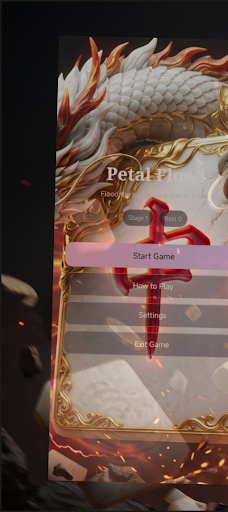
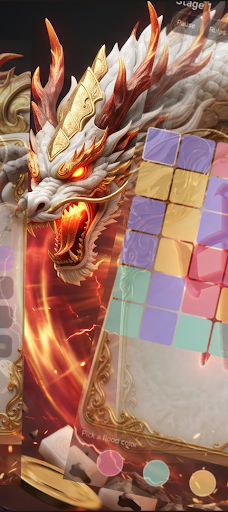
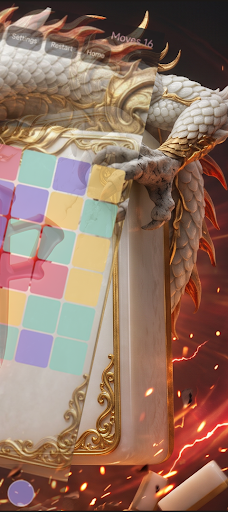

A portrait color-flood garden puzzle. The cream-outlined top-left petal is your flood seed. Tap a hue to recolor every connected petal that matches the seed’s current color. Keep flooding until the whole board shares one petal tone before your move budget ends.
Petal Flood is stage-driven: later gardens grow larger, introduce more hues, and tighten the move limit. Pause anytime, open rules or settings for sound and vibration, restart the stage, or return home through on-screen buttons. System back and swipe-back are disabled. Continue Game resumes your saved stage. Portrait layout, offline play, no account required.
How to Play:
1. After the short boot animation, choose Start Game or Continue Game. How to Play opens the rule card. Settings toggles sound and vibration. Exit Game closes the app.
2. Watch the outlined seed in the top-left corner. Tap a color button under the board to flood from that seed.
3. Each color tap costs one move. Fill every cell with the same color to win the stage.
4. If moves hit zero while colors remain mixed, the stage is lost. Retry or return home.
5. Pause, Rules, Settings, Restart, and Home are live controls. Home asks before leaving a stage.
6. On victory, advance or replay. On defeat, retry or return home.
Game Highlights:
- Color-flood from a fixed seed (not path drawing, tube pouring, catching, wall leaps, ring timing, or column matching).
- Config-driven stages: grid size, hue count, and move budget.
- Full closed loop: custom boot animation, own loading gate, home, board, pause, win and lose results, continue and retry.
- Soft rose-lilac garden palette in portrait.
Game Features:
- Offline play; no account required.
- Local stage progress and best cleared stage.
- Custom rule and settings cards (no system AlertDialog).
- Lightweight board layout for smooth devices.
This is not a gambling game. No real-money wagering. Suitable for casual puzzle sessions.
Show more

1. Download MEmu installer and finish the setup

2. Start MEmu then open Google Play on the desktop

3. Search 88rp game in Google Play
Install
4. Download and Install 88rp game
5. On install completion click the icon to start

6. Enjoy playing 88rp game on PC with MEmu
MEmu Play is the best Android emulator and 100 million people already enjoy its superb Android gaming experience. The MEmu virtualization technology empowers you to play thousands of Android games smoothly on your PC, even the most graphic-intensive ones.
Bigger screen with better graphics; Long duration, without limitation of battery or mobile data.
Full Keymapping support for precise control of keyboard and mouse or gamepad.
Multiple game accounts or tasks on single PC at one time with Multi-Instance manager.
Play 88rp game on PC by following steps: