AKA TO BLUE
Updated
Current Version
1.2.3
Offered By

With your passion for AKA TO BLUE, you shouldn’t have to limit yourself to the small screen of a phone. Play like a pro and take full control of the game using a keyboard and mouse. MEmu gives you everything you’re looking for. Download and play AKA TO BLUE on PC. Play as long as you want — no more worries about battery life, mobile data, or unexpected calls. The all-new MEmu 9 is the best way to play AKA TO BLUE on PC. With our expertly designed keymapping system, AKA TO BLUE feels just like a real PC game. The MEmu multi-instance manager lets you run two or more accounts on the same device at the same time. Most importantly, our exclusive emulation engine unlocks your PC’s full potential, delivering smooth and seamless performance.
Show more
Download AKA TO BLUE on PC with MEmu Android Emulator. Enjoy playing on big screen. ▼▼PLEASE READ RECOMMENDED DEVICES SECTION BEFORE PURCHASING▼▼.

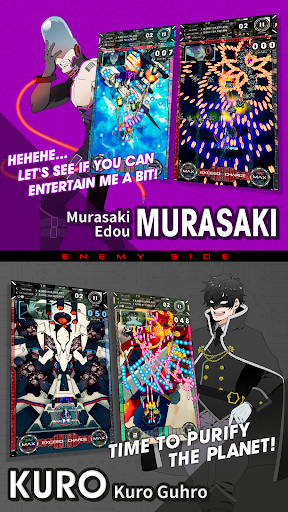
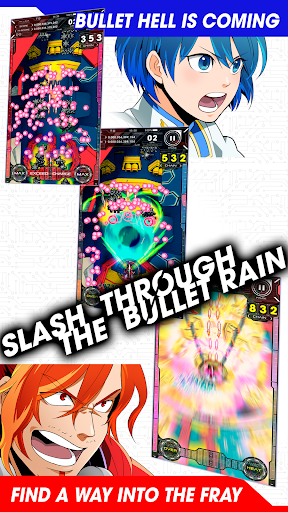
▼▼PLEASE READ RECOMMENDED DEVICES SECTION BEFORE PURCHASING▼▼
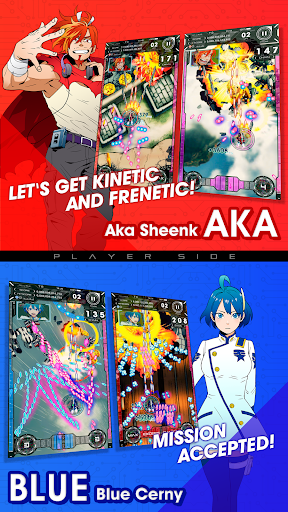
The first console-quality smartphone shooter! Glide with silky smooth controls through a sea of bullets!
SLASH THROUGH THE BULLET RAIN in this gripping vertical arcade-style bullet hell shooting game!
AKA TO BLUE
■■ SLASH THROUGH THE BULLET RAIN! DEFEND AND ASSAULT WITH YOUR BOMBS! ■■
Cut through the enemy's bullet nets with Bombs at the flick of your finger.
Dodge your way through 5 gripping shooter stages!
More bullets means more points!
Cancel enemy attacks with your bomb to earn high scores, and recharge it rapidly
to blow away the next group of enemies.
Don't dodge, bomb! The key to survival is at the tip of your fingers!
■■BEGINNER-FRIENDLY FEATURES ■■
Push through the enemy hordes with 3 lives per level, and a maximum of 3 regenerating auto-bombs!
Charge your Auto-Bomb to have it protect you if you get hit by enemy bullets.
Strategize your way through each stage while polishing your high score!
■■SIMPLE CONTROLS, POWERFUL ATTACKS ■■
Wind your way through the clouds of bullets with just one finger! Shoot down the incoming enemy squadrons!
Enjoy arcade and console-level shooter gameplay in the palm of your hand!
All you have to do to control your ship is swipe on the screen, or tap with two fingers to bombs away!
■■ IN-GAME VOICES ENHANCE THE ACTION ■■
A powerful cast of Japanese voice actors lends their talents to Aka & Blue, making each
stage that much more exciting!
CAST
AKA SHEENK
Shunsuke Takeuchi
BLUE CERNY
Kanade Koshino
MURASAKI EDOU
Hiroo Sasaki
KURO GUHRO
Wataru Komada
■■ HEAD-BANGING GUITAR ROCK SOUNDTRACK ■■
Rock out with your butt out to the hard-rocking sounds of game musician WASi303.
Ikedaminorock, General Manager of the Mikado Arcade, also lends his sharp guitar talents to
the soundtrack to add a frenetic and powerful shred to the bullet hell action.
■■ A SPECIAL MESSAGE FROM TANOSHIMASU ■■
Have fun propelling yourself through these 5 challenging stages! Fight your way through to the ending!
Oh and have a nice flight!
**************************************************************************
[IMPORTANT] PLEASE READ BEFORE PURCHASING
■■SUPPORTED DEVICES■■
Devices Tested: Xperia Z5、Xperia XZ、
Galaxy S6 edge, Galaxy S8+
ZenFone3(ZE520KL),
ZenPad3 8.0(Z581KL),
isai Beat LGV34,Pixel3,
Pixel3a,Pixel4a,Pixel4a(5G)
Devices With Consistent Performance: Xperia X Performance,
Xperia XZs, Galaxy S7 edge,
Galaxy S8, AQUOS R(SHV39)
Devices besides those listed as "Devices Tested" or "Devices with Consistent Performance" are not supported.
■■ CAUTION ■■
*The Android version of this application allows you to choose between Low and High Quality Settings. Note that the ""Low"" setting is set as default to prevent the chipset from over-heating.
We do not guarantee performance on all devices when the application is set to the "High" setting.
Please note that the screenshots included on this page were taken with the "High" Quality Setting.
*When playing on Xperia devices, please play with Stamina Mode and Location Services turned OFF (these settings are also recommended for non-Xperia devices)
We also do not guarantee application performance in the following cases:
・Playing while charging the battery
・Long, continuous play sessions
・Playing when the battery is less than 30%
Tanoshimasu recommends the specs below:
*Devices with Android 6.0 and up, Quadcore CPUs and more than 3GB of RAM
*However, these devices are not supported
**************************************************************************
Powered by "CRI ADX2 (TM) LE".
CRIWARE is a trademark of CRI Middleware Co., Ltd.
Show more

1. Download MEmu installer and finish the setup

2. Start MEmu then open Google Play on the desktop

3. Search AKA TO BLUE in Google Play
Install
4. Download and Install AKA TO BLUE
5. On install completion click the icon to start

6. Enjoy playing AKA TO BLUE on PC with MEmu
MEmu Play is the best Android emulator and 100 million people already enjoy its superb Android gaming experience. The MEmu virtualization technology empowers you to play thousands of Android games smoothly on your PC, even the most graphic-intensive ones.
Bigger screen with better graphics; Long duration, without limitation of battery or mobile data.
Full Keymapping support for precise control of keyboard and mouse or gamepad.
Multiple game accounts or tasks on single PC at one time with Multi-Instance manager.
Play AKA TO BLUE on PC by following steps: