BallSZN: Basketball Career
Updated
Current Version
1.7.1
Offered By

With your passion for BallSZN: Basketball Career, you shouldn’t have to limit yourself to the small screen of a phone. Play like a pro and take full control of the game using a keyboard and mouse. MEmu gives you everything you’re looking for. Download and play BallSZN: Basketball Career on PC. Play as long as you want — no more worries about battery life, mobile data, or unexpected calls. The all-new MEmu 9 is the best way to play BallSZN: Basketball Career on PC. With our expertly designed keymapping system, BallSZN: Basketball Career feels just like a real PC game. The MEmu multi-instance manager lets you run two or more accounts on the same device at the same time. Most importantly, our exclusive emulation engine unlocks your PC’s full potential, delivering smooth and seamless performance.
Show more
Download BallSZN: Basketball Career on PC with MEmu Android Emulator. Enjoy playing on big screen. Live your basketball career from high school to the pros in BallSZN, said "Ball Season".

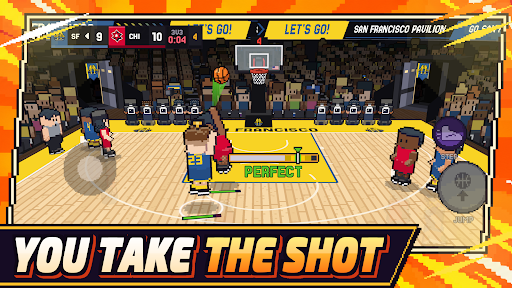

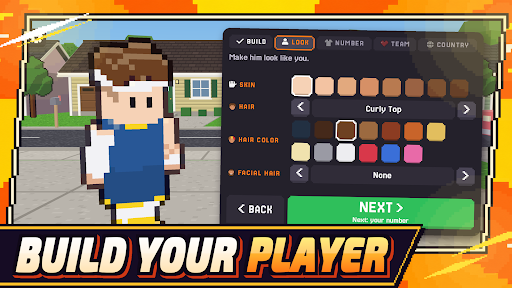
Live your basketball career from high school to the pros in BallSZN, said "Ball Season". Play real 3v3 basketball games, get recruited by colleges, hear your name on draft night and chase the Hall of Fame in a career simulator that plays fully offline.
HIGH SCHOOL TO THE PROS
Start in your parents' backyard with a ball and a hoop. Earn your recruiting stars in high school, pick your college on signing day and hear your name called on draft night. Make the league or fight your way up from the Development League, negotiate in free agency and chase a ring, all the way to the Hall of Fame.
REAL BASKETBALL GAMES, FAST
Every game day is a real 3v3 game with five a side: two 2-minute halves, 2s and 3s, a 12-second shot clock. Start on the bench, earn your minutes and stay on the floor by how you play. Move with your left thumb, hold SHOOT to rise and let go at the top of the jump on the timing meter. A game takes about five minutes and seasons are short, so you play the moments that matter, not 48-minute grinds.
HOW YOU PLAY DECIDES YOUR ROLE
After every game a teammate grade, A+ to F, judges what you did: the makes, the extra pass, the stops and the boards. It sets your XP and what your coach thinks of you, and teammates who trust you look for you more. Every teammate and opponent has his own game and his own numbers, and they grow, fade and move on between seasons.
BUILD YOUR PLAYER
Pick one of six player types, from Sharpshooter and Slasher to Playmaker and Iceman. Practice with the team, run the drills and watch your stats and OVR climb. Earn your role from the bench up to Star and Franchise Player.
LIFE AROUND THE COURT
Keep your coach, your teammates, the fans, your girlfriend and your sponsors happy, and see it all on the feed. Earn a salary and playoff bonuses, upgrade your home court from the backyard to your own facility, and save up for the house.
QUICK PLAY
Just want a game? Jump into a 1v1 or a 3v3 basketball game whenever you like.
FAIR BY DESIGN
- Plays offline, no wifi needed. No account, no sign-in.
- Your basketball career is saved on your device, so no server shutdown can ever take it away.
- No VC and no pay-to-win. No ads. The whole career is free, with one optional purchase: BallSZN Pro.
- No energy timers.
Teams are named only after real cities and states. No real leagues, team names, logos or players are used, and nothing is licensed from or endorsed by any league.
Privacy Policy: https://ballszn.com/privacy
Terms of Use: https://ballszn.com/terms
Support: https://ballszn.com/support
Contact: support@ballszn.com
Show more

1. Download MEmu installer and finish the setup

2. Start MEmu then open Google Play on the desktop

3. Search BallSZN: Basketball Career in Google Play
Install
4. Download and Install BallSZN: Basketball Career
5. On install completion click the icon to start

6. Enjoy playing BallSZN: Basketball Career on PC with MEmu
MEmu Play is the best Android emulator and 100 million people already enjoy its superb Android gaming experience. The MEmu virtualization technology empowers you to play thousands of Android games smoothly on your PC, even the most graphic-intensive ones.
Bigger screen with better graphics; Long duration, without limitation of battery or mobile data.
Full Keymapping support for precise control of keyboard and mouse or gamepad.
Multiple game accounts or tasks on single PC at one time with Multi-Instance manager.
Play BallSZN: Basketball Career on PC by following steps: