神來也麻將-麻將、麻雀
Updated
Current Version
19.5
Offered By

With your passion for 神來也麻將-麻將、麻雀, you shouldn’t have to limit yourself to the small screen of a phone. Play like a pro and take full control of the game using a keyboard and mouse. MEmu gives you everything you’re looking for. Download and play 神來也麻將-麻將、麻雀 on PC. Play as long as you want — no more worries about battery life, mobile data, or unexpected calls. The all-new MEmu 9 is the best way to play 神來也麻將-麻將、麻雀 on PC. With our expertly designed keymapping system, 神來也麻將-麻將、麻雀 feels just like a real PC game. The MEmu multi-instance manager lets you run two or more accounts on the same device at the same time. Most importantly, our exclusive emulation engine unlocks your PC’s full potential, delivering smooth and seamless performance.
Show more
Download 神來也麻將-麻將、麻雀 on PC with MEmu Android Emulator. Enjoy playing on big screen. 【台灣No.
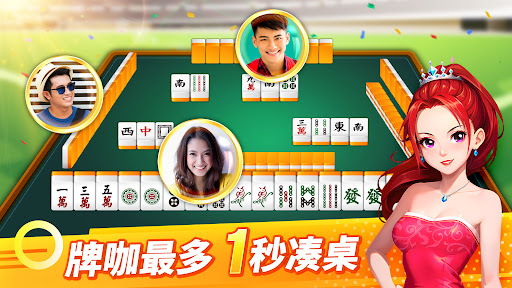

【台灣No.1 麻將 & 撲克遊戲品牌,最多人玩的真人麻將遊戲】
玩家五星好評!3,200萬名真人玩家,想打麻將只要1秒鐘,隨時隨地都能體驗胡牌快感!
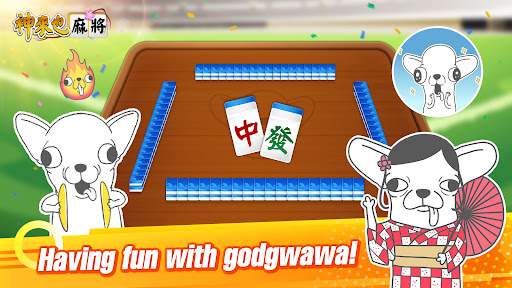
全新「插畫聯萌」模式上線!超人氣角色陪你上桌,體驗最萌牌局!
插畫聯萌模式-黃阿瑪、法鬥皮古、啾啾妹、小水豚豆仔登場!化身麻將牌咖,搭配專屬牌桌動態與表情包,打造療癒牌局!
超多遊戲一次玩:16張 麻將、多款機台/娛樂城、德州撲克、大老二、13支、接龍(排7)、鬥地主、鋤大D
首創一手局(1/4圈),3分鐘玩一局麻將,想玩就玩,不必坐整天!
畫面超級大-麻將牌面清楚、操作直覺流暢,手感真實,線上 麻將 首選!
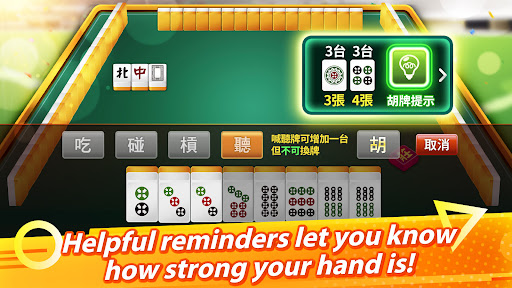
新手也免驚-智慧胡牌提示, 麻將 聽幾張聽幾台,通通告訴你!學打麻將趁現在!
刺激娛樂城-骰寶、捕魚機、老虎機、幸運轉金樂、Slots拉霸機台,賠率高包你發,不用去賭場就變身富豪神遊娛樂城!
區域爭霸賽-全台麻將賽縣市積分大比拚!愛輸贏,上桌拚排名!立刻成為麻將明星!
視訊好友桌-親朋好友隨時視訊同樂,打麻將邊聊天更好玩!
天天送獎勵-新會員下載就送神幣1,200,認證會員每日登入領幣888,免費玩到爽!
自訂牌桌風格-人物/大頭貼模式,想專心打牌或展現特殊服裝都OK,牌桌風格隨你切換!
遊戲畫面翻新-大牌動畫全面更新,視覺更震撼,胡牌爽度翻倍!
牌桌表情包-打麻將還能傳表情互嘴?!喜怒哀樂一鍵表達,讓牌局互動感滿點!
公平發牌認證-iTech Labs國際機構認證亂數配牌,絕對公平公正公開!
=============================
Gamesofa 5分鐘.想樂最輕鬆
=============================
想玩更多?
Gamesofa官網 http://www.gamesofa.com
更多神來也遊戲 http://www.gamesofa.com/mobile/
隱私權條款 https://www.gamesofa.com/mj/?op=private
Show more

1. Download MEmu installer and finish the setup

2. Start MEmu then open Google Play on the desktop

3. Search 神來也麻將-麻將、麻雀 in Google Play
Install
4. Download and Install 神來也麻將-麻將、麻雀
5. On install completion click the icon to start

6. Enjoy playing 神來也麻將-麻將、麻雀 on PC with MEmu
MEmu Play is the best Android emulator and 100 million people already enjoy its superb Android gaming experience. The MEmu virtualization technology empowers you to play thousands of Android games smoothly on your PC, even the most graphic-intensive ones.
Bigger screen with better graphics; Long duration, without limitation of battery or mobile data.
Full Keymapping support for precise control of keyboard and mouse or gamepad.
Multiple game accounts or tasks on single PC at one time with Multi-Instance manager.
Play 神來也麻將-麻將、麻雀 on PC by following steps: