藍色星原:旅謠
Updated
Current Version
1.0.0
Offered By

With your passion for 藍色星原:旅謠, you shouldn’t have to limit yourself to the small screen of a phone. Play like a pro and take full control of the game using a keyboard and mouse. MEmu gives you everything you’re looking for. Download and play 藍色星原:旅謠 on PC. Play as long as you want — no more worries about battery life, mobile data, or unexpected calls. The all-new MEmu 9 is the best way to play 藍色星原:旅謠 on PC. With our expertly designed keymapping system, 藍色星原:旅謠 feels just like a real PC game. The MEmu multi-instance manager lets you run two or more accounts on the same device at the same time. Most importantly, our exclusive emulation engine unlocks your PC’s full potential, delivering smooth and seamless performance.
Show more
Download 藍色星原:旅謠 on PC with MEmu Android Emulator. Enjoy playing on big screen. 【頂級美術實力,多人社交幻想世界】.
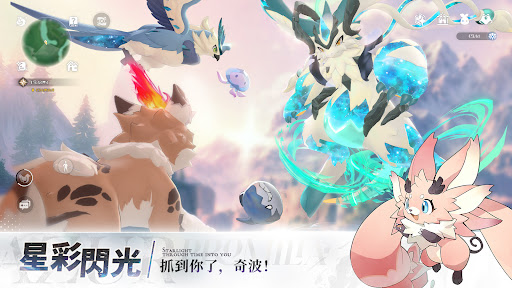
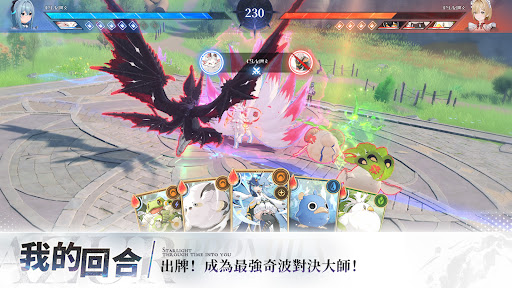
【頂級美術實力,多人社交幻想世界】
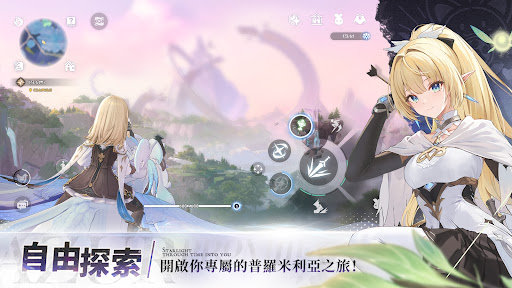
頂級的動漫風遊戲審美和美術實力,追求卓越、比肩動漫風遊戲旗艦的品質。細膩的建模、材質與光影,讓少女們的臉部表現、服裝設計和戰鬥姿態自然且鮮活;廣闊的大陸、有趣的奇波生態,充滿張力的劇情與演出,共同織就一幅可以自由探索的幻想畫卷。你可以深入遺蹟追尋古老傳說,也可以在群星之下駐足遠望,也可以叫上三五好友,在城市中合影聊天,一同分享美好時光。
【與美少女邂逅,踏上心動冒險之旅】
在這片名爲普羅米利亞的大陸上,你會在不同的故事裏邂逅衆多性格各異的少女。她們擁有不同的身份性格與故事,也將在這段旅途中與你相識同行、並肩迎敵。你們會共同穿越森林、城邦與古老遺蹟,最終在一次次冒險中逐漸瞭解彼此。每一次堅定同行、每一句珍貴約定,都將化作旅途中動人的回憶,譜寫出只屬於你的歌謠。
【收集奇波夥伴,領略豐富星原生態】
普羅米利亞各處都活躍着名爲「奇波」的生物,它們擁有不同的成長階段、獨一無二的特點和習性,共同構成了這片大陸的生態。你可以觀察到它們在原野、森林、水域甚至空中的生活,發現不同族群之間真實有趣的互動;也可以尋找可靠的夥伴,彼此認可進行星結。無論是探索未知還是與強敵交鋒,奇波都會成爲你不可或缺的夥伴,陪你領略這片大陸的奇幻旅程。
【打造專屬家園,置身其中享受治癒時光】
在家園中,你可以親手開墾土地、種植孵化和製作裝備,也可以和少女們進行溫馨互動。同時,奇波夥伴也可以入駐家園,它們可以幫助你進行種植、採集、製作與生產,陪你見證作物生長、資源積累和家園的日漸繁榮。暫別外界的喧囂,在家園度過的悠閒時光裡,感受每一次互動帶來的滿足,每一次耕耘帶來的豐收吧。
【超爽操作體驗,行雲流水的戰鬥節奏】
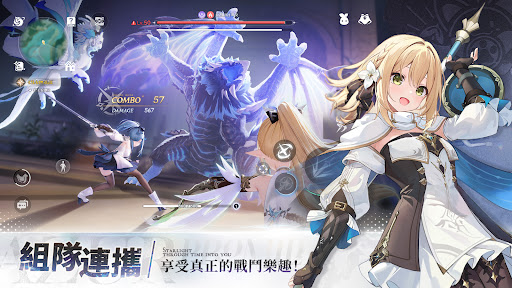
與少女們和奇波夥伴們並肩作戰,在快節奏的戰鬥中進行格擋、閃避、連攜等爽快操作。不同職業定位、屬性與奇波能力彼此呼應,讓隊伍搭配和臨場決策都擁有更多可能。另外,還可以與朋友們組隊挑戰,獲得不一樣的戰鬥體驗。相信所有反饋拉滿的打擊、富有張力的動作與爽快連貫的節奏,都能給你帶來酣暢淋漓的戰鬥體驗。
※香港商旺拓有限公司臺灣分公司爲《藍色星原:旅謠》在臺港澳地區的代理商。
※本遊戲内容涉性(僅部分角色穿著凸顯性特徴服飾)及暴力(但可爱人物打鬥或未描述角色傷亡细節之攻撃等而無血腥畫面),依遊戲歌體分級管理辦法分類為輔導12级,十二歳以上之人始得使用
※本遊戲爲免費使用,遊戲內另提供購買虛擬貨幣、物品等付費服務。
※請注意遊戲時間,避免沉迷。
Show more

1. Download MEmu installer and finish the setup

2. Start MEmu then open Google Play on the desktop

3. Search 藍色星原:旅謠 in Google Play
Install
4. Download and Install 藍色星原:旅謠
5. On install completion click the icon to start

6. Enjoy playing 藍色星原:旅謠 on PC with MEmu
MEmu Play is the best Android emulator and 100 million people already enjoy its superb Android gaming experience. The MEmu virtualization technology empowers you to play thousands of Android games smoothly on your PC, even the most graphic-intensive ones.
Bigger screen with better graphics; Long duration, without limitation of battery or mobile data.
Full Keymapping support for precise control of keyboard and mouse or gamepad.
Multiple game accounts or tasks on single PC at one time with Multi-Instance manager.
Play 藍色星原:旅謠 on PC by following steps: