
【OSHI NO KO】Puzzle Star
Updated
Current Version
Offered By

With your passion for 【OSHI NO KO】Puzzle Star, you shouldn’t have to limit yourself to the small screen of a phone. Play like a pro and take full control of the game using a keyboard and mouse. MEmu gives you everything you’re looking for. Download and play 【OSHI NO KO】Puzzle Star on PC. Play as long as you want — no more worries about battery life, mobile data, or unexpected calls. The all-new MEmu 9 is the best way to play 【OSHI NO KO】Puzzle Star on PC. With our expertly designed keymapping system, 【OSHI NO KO】Puzzle Star feels just like a real PC game. The MEmu multi-instance manager lets you run two or more accounts on the same device at the same time. Most importantly, our exclusive emulation engine unlocks your PC’s full potential, delivering smooth and seamless performance.
Show more
Download 【OSHI NO KO】Puzzle Star on PC with MEmu Android Emulator. Enjoy playing on big screen. 【OSHI NO KO】 first official game!
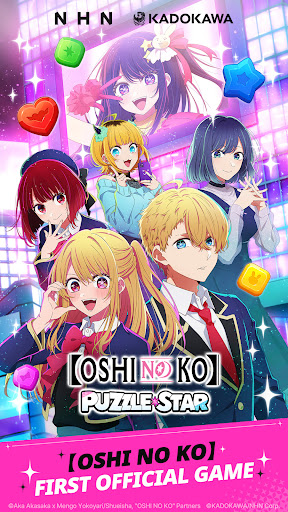

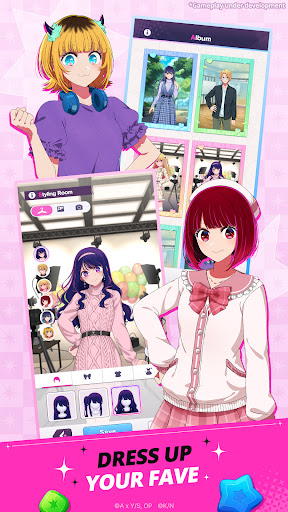
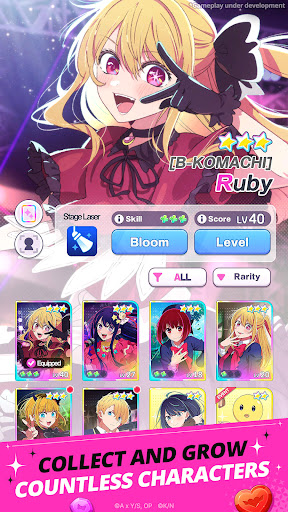
【OSHI NO KO】 first official game! Enjoy a refreshing match-3 puzzle game featuring your favorite characters.
《【OSHI NO KO】 First Official Game》
The first official 【OSHI NO KO】 game featuring the official anime voice cast is here!
Meet Ai, Aqua, Ruby, Kana Arima, Akane Kurokawa, and MEMcho in the game!
《A New and Refreshing Match-3 Game Using Character Cards》
Simple and refreshing! Experience an easy-to-play match-3 puzzle game that anyone can enjoy.
Connect three blocks of the same color to clear puzzle stages!
If you get stuck, use a variety of skills to clear stages more easily and spectacularly.
《Original Content Only Available In the Game》
Discover new looks and charms of the characters only in 【OSHI NO KO】Puzzle Star!
Includes new illustrations supervised by character designer and chief animation director Kanna Hirayama, along with original voice recordings from the official anime cast. Check out brand-new exclusive content!
《Relive the Anime's Most Memorable Moments》
Collect your favorite scenes from 【OSHI NO KO】!
From the first performance of the new B-KOMACHI, to young Kana Arima doing the bell pepper exercise, and even the long-awaited Tokyo Blade stage play.
Collect unforgettable scenes as Memory Boards and cards.
《Your One and Only Star》
Dress up 【OSHI NO KO】 characters however you like!
Use outfits and hairstyles obtained from stages to customize your characters in the Styling Room. Save your completed styles as photos and share them with other fans to create new memories.
《A Variety of Content to Enjoy Every Day》
Enjoy tons of new match-3 puzzle content every day!
Challenge the highest score within a time limit in Time Attack Mode, earn plenty of rewards by completing lines in Bingo, and compete with other players in Hot Trend to rank your star at the top!
Enjoy a fresh experience every day with multiple modes and ongoing events.
■Voice Cast
Ai: Rie Takahashi (高橋李依)
Aqua: Takeo Otsuka (大塚剛央)
Ruby: Yurie Igoma (伊駒ゆりえ)
Kana Arima: Megumi Han (潘めぐみ)
Akane Kurokawa: Manaka Iwami (石見舞菜香)
MEMcho: Rumi Okubo (大久保瑠美)
■Official Website
www.oshinoko-puzzle-global.com
©Aka Akasaka x Mengo Yokoyari/Shueisha, "OSHI NO KO" Partners
©KADOKAWA/NHN Corp.
[Optional Permissions]
- Camera: Required for taking photos or videos for CS inquiries.
- Storage: Required to upload photos, videos, and files for CS inquiries.
- Notifications: Required to send service-related notifications.
Show more

1. Download MEmu installer and finish the setup

2. Start MEmu then open Google Play on the desktop

3. Search 【OSHI NO KO】Puzzle Star in Google Play
Install
4. Download and Install 【OSHI NO KO】Puzzle Star
5. On install completion click the icon to start

6. Enjoy playing 【OSHI NO KO】Puzzle Star on PC with MEmu
MEmu Play is the best Android emulator and 100 million people already enjoy its superb Android gaming experience. The MEmu virtualization technology empowers you to play thousands of Android games smoothly on your PC, even the most graphic-intensive ones.
Bigger screen with better graphics; Long duration, without limitation of battery or mobile data.
Full Keymapping support for precise control of keyboard and mouse or gamepad.
Multiple game accounts or tasks on single PC at one time with Multi-Instance manager.
Play 【OSHI NO KO】Puzzle Star on PC by following steps: