混血のカレコレ ミラーラッシュ!
Updated
Current Version
Offered By

With your passion for 混血のカレコレ ミラーラッシュ!, you shouldn’t have to limit yourself to the small screen of a phone. Play like a pro and take full control of the game using a keyboard and mouse. MEmu gives you everything you’re looking for. Download and play 混血のカレコレ ミラーラッシュ! on PC. Play as long as you want — no more worries about battery life, mobile data, or unexpected calls. The all-new MEmu 9 is the best way to play 混血のカレコレ ミラーラッシュ! on PC. With our expertly designed keymapping system, 混血のカレコレ ミラーラッシュ! feels just like a real PC game. The MEmu multi-instance manager lets you run two or more accounts on the same device at the same time. Most importantly, our exclusive emulation engine unlocks your PC’s full potential, delivering smooth and seamless performance.
Show more
Download 混血のカレコレ ミラーラッシュ! on PC with MEmu Android Emulator. Enjoy playing on big screen. 「混血のカレコレ」が、手軽に遊べるタワーディフェンスRPGに!
「混血のカレコレ」が、手軽に遊べるタワーディフェンスRPGに!
カゲチヨたちを操作して、押し寄せる敵の大群をなぎ倒せ!
おなじみのキャラクターたちを育てて、編成して、さらに上のステージを目指そう。
簡単操作でどんどん進む、カジュアルなのにやり込める放置系タワーディフェンスゲームが登場!
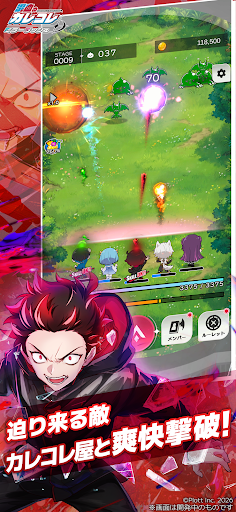
◆ 迫り来る敵を、カレコレ屋と爽快撃破
カゲチヨたちが迫り来る敵を自動で攻撃。タップすることで狙いたい敵に集中攻撃。
シンプルな操作で、敵の大群をなぎ倒せ!
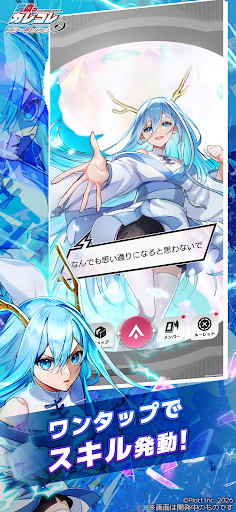
◆ ワンタップで必殺スキル発動
スキルゲージを貯めて、ここぞの場面でワンタップ。
派手なスキルカットインとともに、強力な効果で戦況が一気に変わる。
スキルの選択と発動タイミングが鍵を握る、シンプルだけど奥深いバトルシステム!
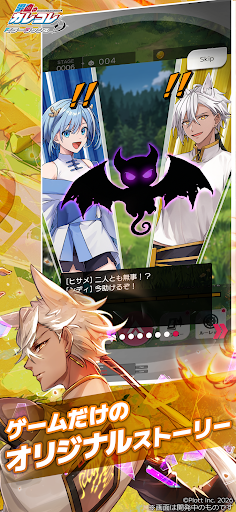
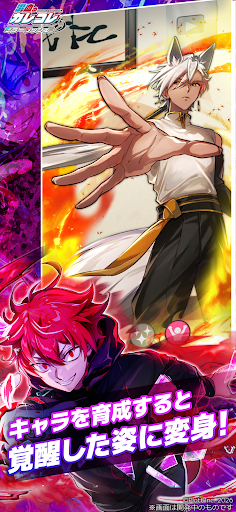
◆ 育てるほどに、キャラクターたちの新たな一面が解放
バトルで集めたアイテムを使ってキャラクターのステータスやスキルをどんどん強化しよう。さらに、キャラクターを育てることで、新たなボイスやイラストも解放。
より強くなった新たな姿のキャラと一緒に、さらに上のステージへ挑もう。
◆ スキマ時間でサクッと、じっくりやり込むのも自由
バトルはシンプル操作。さらに、いつでも好きなタイミングでゲームを中断・再開可能。
放置中も自動でステージが進むから、通勤・通学や休憩のちょっとした時間にもぴったり。
じっくりやり込みたい時はスキル発動のタイミングを狙い澄まして新しいステージに挑戦だ!
◆ こんな人におすすめ
・「混血のカレコレ」が好き
・放置系でコツコツ進むゲームが好き
・敵をまとめて倒す爽快感を味わいたい
・キャラ育成・編成を突き詰めたい
・スキマ時間で気軽に遊べるゲームを探している
さあ、鏡の世界へ。カゲチヨたちと一緒に、新たな冒険に踏み出そう!
Show more

1. Download MEmu installer and finish the setup

2. Start MEmu then open Google Play on the desktop

3. Search 混血のカレコレ ミラーラッシュ! in Google Play
Install
4. Download and Install 混血のカレコレ ミラーラッシュ!
5. On install completion click the icon to start

6. Enjoy playing 混血のカレコレ ミラーラッシュ! on PC with MEmu
MEmu Play is the best Android emulator and 100 million people already enjoy its superb Android gaming experience. The MEmu virtualization technology empowers you to play thousands of Android games smoothly on your PC, even the most graphic-intensive ones.
Bigger screen with better graphics; Long duration, without limitation of battery or mobile data.
Full Keymapping support for precise control of keyboard and mouse or gamepad.
Multiple game accounts or tasks on single PC at one time with Multi-Instance manager.
Play 混血のカレコレ ミラーラッシュ! on PC by following steps: