용사가 돌아왔다 키우기
Updated
Current Version
1.07.02
Offered By

With your passion for 용사가 돌아왔다 키우기, you shouldn’t have to limit yourself to the small screen of a phone. Play like a pro and take full control of the game using a keyboard and mouse. MEmu gives you everything you’re looking for. Download and play 용사가 돌아왔다 키우기 on PC. Play as long as you want — no more worries about battery life, mobile data, or unexpected calls. The all-new MEmu 9 is the best way to play 용사가 돌아왔다 키우기 on PC. With our expertly designed keymapping system, 용사가 돌아왔다 키우기 feels just like a real PC game. The MEmu multi-instance manager lets you run two or more accounts on the same device at the same time. Most importantly, our exclusive emulation engine unlocks your PC’s full potential, delivering smooth and seamless performance.
Show more
Download 용사가 돌아왔다 키우기 on PC with MEmu Android Emulator. Enjoy playing on big screen. "I want everyone to be as miserable as I am.
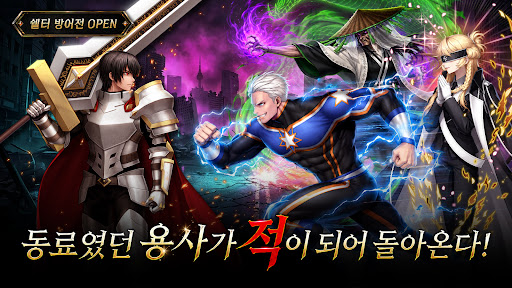
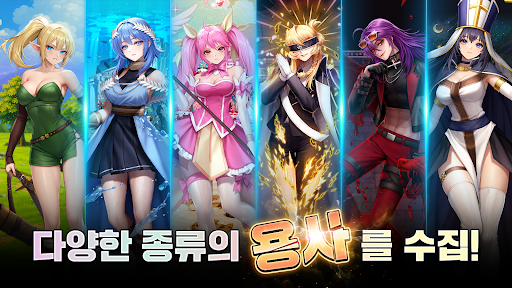
"I want everyone to be as miserable as I am."
Minsu Kim, the warrior who saved another world and came home.
The ending he chose was the destruction of Korea.
Shocking twists, breathtaking artwork!
"The Warrior Returns", the smash-hit NAVER WEBTOON series,
has finally arrived as an idle RPG.
No welcome. No salvation. Only cold reality.
Now, a new revenge begins in your hands.
----------------------------------------------------------------------
[Limited Launch Celebration Rewards]
Download now and start stronger than everyone else!
100% guaranteed for every player.
[3,333 Warrior Summon Tickets]
[77,700 Goddess Crystals]
[SSR Warrior Summon Box]
----------------------------------------------------------------------
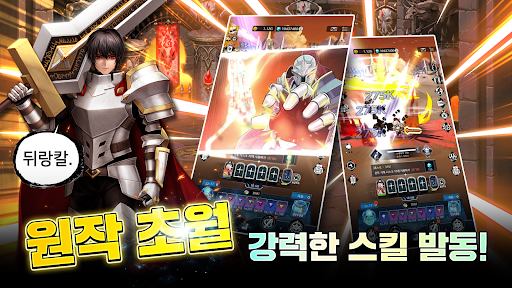
◼︎ Explosive Action That Shatters the Apocalypse
Dazzling skill effects that never let you catch your breath!
The brutal battles of the webtoon, recreated with game-only impact.
Experience overwhelming action that melts your stress away just by watching.
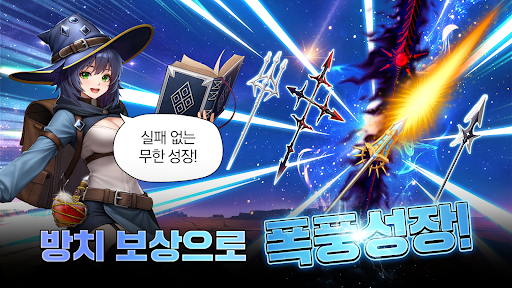
◼︎ Blazing Growth — Just by Breathing
The battle never stops, even after you log out!
Wake up to a flood of rewards and enjoy endless growth
through leveling, hero enhancement, and gear upgrades.
◼︎ Every Warrior From the Original! Build Your Ultimate Party
From Minsu Kim, the "Sword Warrior" who destroyed the world,
to Seongjun Lee, the "Regression Warrior" who turns back time.
Collect and combine the legendary warriors of the original series
to complete a strategic deck all your own.
◼︎ Dark Fantasy Where Despair Outruns Hope
"In the end, what I chose was not hope, but ruin."
The dark, deeply layered world of the original, preserved intact!
See the shocking story unfold for yourself.
"The Warrior Returns: AFK RPG"
At the end of despair, become a warrior once more.
Visit The Warrior Returns: AFK RPG Community
https://game.naver.com/lounge/The_Warrior_Returns_AFK/board
----------------------------------------------------------------------------------------------------
- Provider: STUDIO LICO Corp.
- Terms and period of use: In accordance with the details separately announced in-game
(If no period of use is indicated, the period is deemed to run until the service is terminated)
- Payment amount and method: In accordance with the payment amount and method separately announced for each product
(For payments in foreign currency, the actual billed amount may differ due to exchange rates, fees, etc.)
- Minimum OS requirement: Android 7.0
- Address: 7F, 131 Bundangnaegok-ro, Bundang-gu, Seongnam-si, Gyeonggi-do, Republic of Korea
- Business Registration No.: 687-88-00601
- Mail-Order Sales Registration No.: 2021-Seongnam Bundang A-0324
[Access Permissions Notice]
- Required permissions: None
- Optional permissions:
・Files and media: Used to save game screenshots and videos. (Only on devices running OS version 13.0 or higher)
・Photos and videos: Used to submit and respond to customer service inquiries, save game screenshots and videos, etc. (Only on devices running OS version 13.0 or higher)
・Notifications: Used to configure the receipt of in-game event notifications.
・Camera: Used to submit and respond to customer service inquiries.
※ You may use the service without consenting to the optional access permissions. However, some features may be restricted.
- Terms of Service: https://www.studiolico.com/game/terms
- Privacy Policy: https://www.studiolico.com/game/privacy
- Service Operation Policy: https://www.studiolico.com/game/policy
- Business email: game_support@studiolico.com
Show more

1. Download MEmu installer and finish the setup

2. Start MEmu then open Google Play on the desktop

3. Search 용사가 돌아왔다 키우기 in Google Play
Install
4. Download and Install 용사가 돌아왔다 키우기
5. On install completion click the icon to start

6. Enjoy playing 용사가 돌아왔다 키우기 on PC with MEmu
MEmu Play is the best Android emulator and 100 million people already enjoy its superb Android gaming experience. The MEmu virtualization technology empowers you to play thousands of Android games smoothly on your PC, even the most graphic-intensive ones.
Bigger screen with better graphics; Long duration, without limitation of battery or mobile data.
Full Keymapping support for precise control of keyboard and mouse or gamepad.
Multiple game accounts or tasks on single PC at one time with Multi-Instance manager.
Play 용사가 돌아왔다 키우기 on PC by following steps:







































![[3D Platformer] Super Bear Adventure PC](https://dl.memuplay.com/new_market/img/com.Earthkwak.Platformer.icon.2024-09-08-15-16-43.png)









