
De:Lithe Last Memories
Updated
Current Version
1.2.2
Offered By

With your passion for De:Lithe Last Memories, you shouldn’t have to limit yourself to the small screen of a phone. Play like a pro and take full control of the game using a keyboard and mouse. MEmu gives you everything you’re looking for. Download and play De:Lithe Last Memories on PC. Play as long as you want — no more worries about battery life, mobile data, or unexpected calls. The all-new MEmu 9 is the best way to play De:Lithe Last Memories on PC. With our expertly designed keymapping system, De:Lithe Last Memories feels just like a real PC game. The MEmu multi-instance manager lets you run two or more accounts on the same device at the same time. Most importantly, our exclusive emulation engine unlocks your PC’s full potential, delivering smooth and seamless performance.
Show more
Download De:Lithe Last Memories on PC with MEmu Android Emulator. Enjoy playing on big screen. This is a story of girls who throw themselves into battle for the reconstruction of Tokyo---.
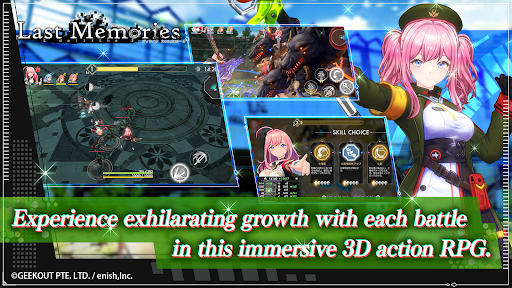


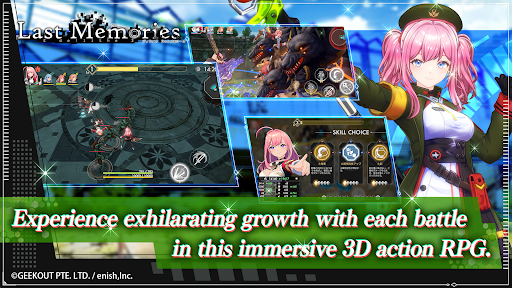
This is a story of girls who throw themselves into battle for the reconstruction of Tokyo---
◆ Synopsis
The story is set in a near-future Tokyo that has been devastated by the ""Great Collapse"". As a commander, the player will train and command the girls of the ""Doll Squad"", throwing themselves into battle together. The mysterious dreams the girls see, the mystery of the gate leading to another world, and the wishes of each girl.
Please enjoy the story of ""Tokyo's reconstruction and the intertwined feelings of the girls"" depicted in this work.
◆ Game Features
・A worldview set in a slightly future Tokyo than the present
・A ""rogue-like RPG"" that can be thoroughly played alone
・A pleasant play feeling where characters grow in a super short time
1st: "Seraphim"
Azumi Hongo (CV: Aina Suzuki)
Ritsu Ichimonji (CV: Izumi Yabune)
Wakana Minami (CV: Ayaka Kamimoto)
Kotoha Kazami (CV: Maki Yamaichi)
Komari Yuki (CV: Azumi Waki)
Suzuha Kazami (CV: Manaka Iwami)
2nd: "Thrones"
Miyako Sonozaki (CV: Rina Hidaka)
Natsuha Kisaragi (CV: Shiori Nakasaki)
Milia Kazuraba (CV: Ruka Yashiro)
Hina Hojo (CV: Nao Sasaki)
Aya Hino (CV: Misaki Ohashi)
Megumi Tenkuji (CV: Suzuko Mimori)
3rd: "Cherubim"
Luna Tsukuyomi (CV: Yoshino Aoyama)
Fuka Kagawa (CV: Yuka Takeuchi)
Setsuna Uozu (CV: Ikumi Hasegawa)
Nagisa Narumi (CV: Haruka Minami)
Nana Izumi (CV: Satomi Akesaka)
Yuki Banjo (CV: Aina Aiba)
4th: "Dominions"
Shiki Yaiba (CV: Yuki Harukawa)
Otoha Kamiyama (CV: Kokoro Omori)
Amano Shiranami (CV: Emi Nitta)
Mutsumi Sakurai (CV: Ami Mizuno)
Shizuku Fuwa (CV: Mariya Ise)
Tenka Amamiya (CV: Aimi)
5th: "Dynamis"
Sana Godai (CV: Yurie Igoma)
Hikari Kido (CV: Hazuki Ogino)
Ayaka Tsugami (CV: Ayana Taketatsu)
Nanami Kenzaki (CV: Maria Abo)
Mei Hidaka (CV: Akari Kito)
Rinoa Tendo (CV: Kana Asumi)
6th: "Exia"
Miko Ashihara (CV: Shuka Saito)
Rion Kaito (CV: Erina Koga)
Aoi Kamijo (CV: Ayasa Goto)
Momoka Asakura (CV: Shiori Tanaka)
Hotaru Akizuki (CV: Ai Kakuma)
Len Ruoxi (CV: Yu Serizawa)
◆ Official X Account
https://twitter.com/lastmemories_g
◆ Official Website
https://lastmemories.io/
◆ Official YouTube Account
https://www.youtube.com/@DeLithe_LastMemories
Show more

1. Download MEmu installer and finish the setup

2. Start MEmu then open Google Play on the desktop

3. Search De:Lithe Last Memories in Google Play
Install
4. Download and Install De:Lithe Last Memories
5. On install completion click the icon to start

6. Enjoy playing De:Lithe Last Memories on PC with MEmu
MEmu Play is the best Android emulator and 100 million people already enjoy its superb Android gaming experience. The MEmu virtualization technology empowers you to play thousands of Android games smoothly on your PC, even the most graphic-intensive ones.
Bigger screen with better graphics; Long duration, without limitation of battery or mobile data.
Full Keymapping support for precise control of keyboard and mouse or gamepad.
Multiple game accounts or tasks on single PC at one time with Multi-Instance manager.
Play De:Lithe Last Memories on PC by following steps:















































