Cabal Revolution
Updated
Current Version
1.0.0
Offered By

With your passion for Cabal Revolution, you shouldn’t have to limit yourself to the small screen of a phone. Play like a pro and take full control of the game using a keyboard and mouse. MEmu gives you everything you’re looking for. Download and play Cabal Revolution on PC. Play as long as you want — no more worries about battery life, mobile data, or unexpected calls. The all-new MEmu 9 is the best way to play Cabal Revolution on PC. With our expertly designed keymapping system, Cabal Revolution feels just like a real PC game. The MEmu multi-instance manager lets you run two or more accounts on the same device at the same time. Most importantly, our exclusive emulation engine unlocks your PC’s full potential, delivering smooth and seamless performance.
Show more
Download Cabal Revolution on PC with MEmu Android Emulator. Enjoy playing on big screen. CABAL Revolution.

CABAL Revolution
The Battle, Evolved
Experience CABAL with rebalanced classes, streamlined progression, revamped dungeons, and daily Nation Wars. Build your character through gameplay, manage your resources, and choose your own path to power.
Choose Your Class and Battle Role
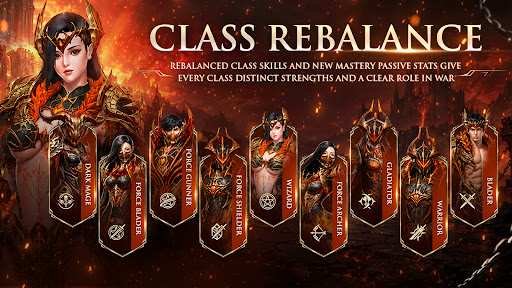
Choose from 9 classes, including Dark Mage. Rebalanced skills and enhanced Mastery Passives give each class a distinct identity and purpose in battle.
Master Combo Combat
Chain your skills and activate Combo Mode to keep attacking. Customize your character’s skills and equipment to match your playstyle.
Upgrade Your Equipment
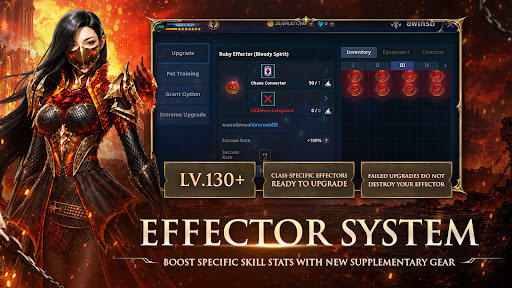
Strengthen your gear through multiple upgrade systems. Extreme Upgrade now reaches +15, while Chaos Upgrade reaches +25. Divine Upgrade has been adjusted to make enhancement easier. The returning Effector System lets you enhance its skill effects up to +12 through Chaos Upgrade.
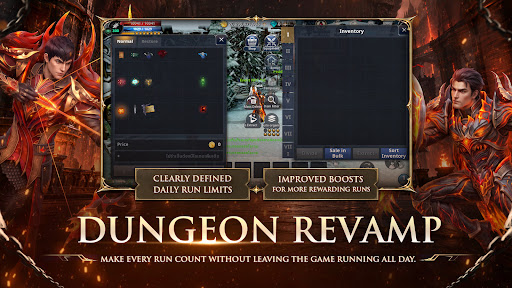
Take on Revamped Dungeons
The new Dungeon System allows up to 30 runs per day and provides a clear Daily Return. Clear higher-level dungeons as your character grows, or use Dungeon Boost to earn more items from each run.
Join Mission War
Fight for Capella or Procyon in 6 Mission War rounds per day, with 10× WEXP and AXP. The War Room is available to warriors at Level 200 or higher. Every Saturday, take part in Weekly Flag War and fight for rewards for your Nation.
Compete for Mission War Rewards
Weekly rankings are calculated from your 7 best Mission War matches. The top-ranked player in each Nation can earn the Bringer title and 100,000 Force Gems per week. The top-ranked player in each class can earn the Guardian title and 30,000 Force Gems per week.
For game news, events, and updates, visit: https://combocabalrevo.com/
Show more

1. Download MEmu installer and finish the setup

2. Start MEmu then open Google Play on the desktop

3. Search Cabal Revolution in Google Play
Install
4. Download and Install Cabal Revolution
5. On install completion click the icon to start

6. Enjoy playing Cabal Revolution on PC with MEmu
MEmu Play is the best Android emulator and 100 million people already enjoy its superb Android gaming experience. The MEmu virtualization technology empowers you to play thousands of Android games smoothly on your PC, even the most graphic-intensive ones.
Bigger screen with better graphics; Long duration, without limitation of battery or mobile data.
Full Keymapping support for precise control of keyboard and mouse or gamepad.
Multiple game accounts or tasks on single PC at one time with Multi-Instance manager.
Play Cabal Revolution on PC by following steps: