
Destiny 2 Companion
Updated
Current Version
17.0.5 build #562
Offered By

With your passion for Destiny 2 Companion, you shouldn’t have to limit yourself to the small screen of a phone. Play like a pro and take full control of the game using a keyboard and mouse. MEmu gives you everything you’re looking for. Download and play Destiny 2 Companion on PC. Play as long as you want — no more worries about battery life, mobile data, or unexpected calls. The all-new MEmu 9 is the best way to play Destiny 2 Companion on PC. With our expertly designed keymapping system, Destiny 2 Companion feels just like a real PC game. The MEmu multi-instance manager lets you run two or more accounts on the same device at the same time. Most importantly, our exclusive emulation engine unlocks your PC’s full potential, delivering smooth and seamless performance.
Show more
Download Destiny 2 Companion on PC with MEmu Android Emulator. Enjoy playing on big screen. The official Destiny 2 Companion app keeps you connected to your Destiny adventure wherever life takes you.
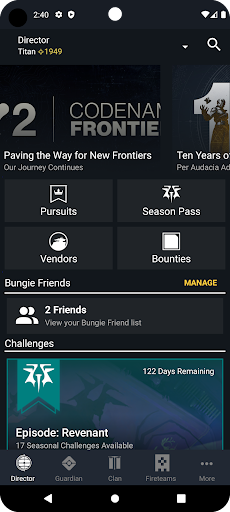
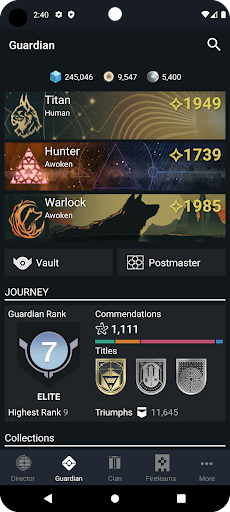
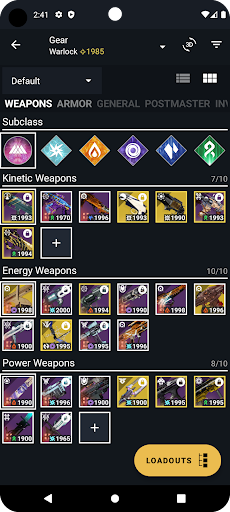
The official Destiny 2 Companion app keeps you connected to your Destiny adventure wherever life takes you. Sign in using PlayStation, Steam, Xbox, Epic Games, and Twitch.
DIRECTOR - See the latest featured content. Track your progress towards bounties, quests, and challenges. Discover what events and activities are live in the game. See your current rank for seasonal rewards, acquire bounties, claim rewards from the previous season, and inspect vendors for what they have available.
GUARDIAN - Inspect all of your favorite weapons and armor, view item stats and perks, and move your equipment between your characters and the vault. Retrieve lost items from the Postmaster without heading to the Tower! View your Triumphs, Collections, Stat Trackers, and Game History.
CLAN - Create and manage your Clan with its own unique shared identity - or browse for an existing clan to join. Track your clan level, progress, and all shared rewards. Stay connected with your clanmates through text chat on one or more clan specific channels.
FIRETEAMS - Search and filter fireteams by activity type and find a team to play with now or create your own. The fireteam leader can send invites to quickly get everyone in the fireteam together in game on any platform.
BUNGIE FRIENDS - Add your platform friends and other Destiny 2 players to your Bungie Friends list to stay in touch, see who's online, and join them in-game.
MORE - Provides access to your profile, messages, notifications and Forums, Creations, and more!
Show more

1. Download MEmu installer and finish the setup

2. Start MEmu then open Google Play on the desktop

3. Search Destiny 2 Companion in Google Play
Install
4. Download and Install Destiny 2 Companion
5. On install completion click the icon to start

6. Enjoy playing Destiny 2 Companion on PC with MEmu
MEmu Play is the best Android emulator and 100 million people already enjoy its superb Android gaming experience. The MEmu virtualization technology empowers you to play thousands of Android games smoothly on your PC, even the most graphic-intensive ones.
Bigger screen with better graphics; Long duration, without limitation of battery or mobile data.
Full Keymapping support for precise control of keyboard and mouse or gamepad.
Multiple game accounts or tasks on single PC at one time with Multi-Instance manager.
Play Destiny 2 Companion on PC by following steps: