Dungeon Merge!
Updated
Current Version
1.0.43
Offered By

With your passion for Dungeon Merge!, you shouldn’t have to limit yourself to the small screen of a phone. Play like a pro and take full control of the game using a keyboard and mouse. MEmu gives you everything you’re looking for. Download and play Dungeon Merge! on PC. Play as long as you want — no more worries about battery life, mobile data, or unexpected calls. The all-new MEmu 9 is the best way to play Dungeon Merge! on PC. With our expertly designed keymapping system, Dungeon Merge! feels just like a real PC game. The MEmu multi-instance manager lets you run two or more accounts on the same device at the same time. Most importantly, our exclusive emulation engine unlocks your PC’s full potential, delivering smooth and seamless performance.
Show more
Download Dungeon Merge! on PC with MEmu Android Emulator. Enjoy playing on big screen. Dominate the dungeon.
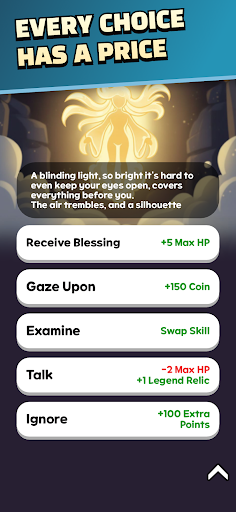
Dominate the dungeon. Or let it dominate you.
A turn-based deckbuilding roguelite — Dungeon Merge!
Every run, a different strategy. A different hero. A different ending.
■ Unique Heroes — Not just different stats. A completely different way to play.
Assassin: Double damage to a single target. Pick one. Make it count.
Engineer: Stack shields, then unleash devastating area attacks. Defense is offense.
Gambler: Free level-up rerolls. When luck becomes strategy.
Noble: +1 level-up choice, gold-powered leveling at shrines. Money is your weapon.
…Every hero demands a different strategy.
■ Diverse Skill Cards — Not collection. Combination. Your deck is your strategy.
Chain Lightning: Hit up to 3 enemies in a chain
Double Cast: Trigger the same skill twice in a row
Replicate: Copy any card in your deck on the spot
Skill grades: Common → Rare → Epic → Legendary
Upgrade cards mid-combat and discover powerful combinations.
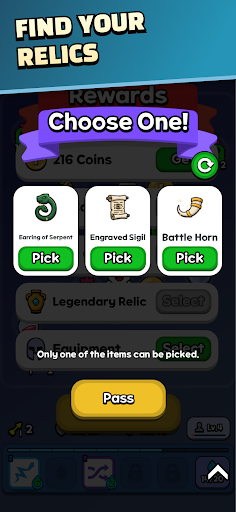
■ Powerful Relics — Sometimes a single relic changes everything.
Chalice: Revive once with 50% HP upon death
Shard of Collapse: For the next 3 battles, all non-boss enemies start with 1 HP
Shackles of Binding: +1 mana per turn, but shop prices increase by 25%
Sanctuary Lantern: Fully restore HP whenever you enter a shop
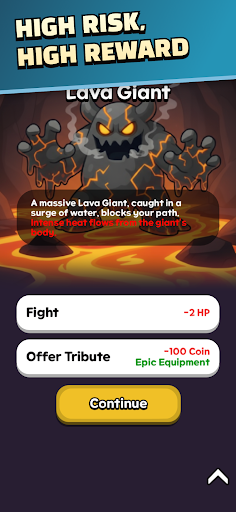
■ Distinct Enemies — Every battle is a new puzzle. Read the pattern or die.
Treasure Goblin: Escapes after 7 turns if you fail to defeat it
Snowman: Freezes you for 1 turn
Crow: Forces you to discard a random card from your hand
Face powerful bosses with unique attack patterns and multiple phases.
■ Seal System — The real challenge starts here.
Normal mode is only the beginning.
As you unlock more Seals, increasingly brutal challenges await.
Combine Trials and Contracts to design your own difficulty.
Only a handful of players will conquer the hardest combinations.
■ Challenge Mode — New rules. New competition. Every week.
Face rotating Grand Pacts and Trials each week.
Discover powerful builds under unfamiliar rules where old strategies may no longer work.
Compete with other players for the highest score and climb the weekly rankings.
Clear the final region of a Challenge to unlock Endless Battle.
How long can you survive against enemies that never stop growing stronger?
■ Endless Replayability
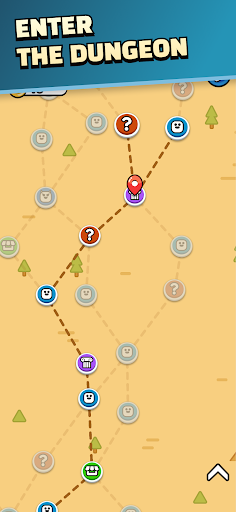
3 regions × 11 floors — procedurally generated every run
Battle, Event, Elite, Shrine, Shop — diverse room types
Different maps, enemy combinations, and card rewards every time
Even with the same hero, no two adventures are alike.
■ Features
Turn-based strategy + deckbuilding roguelite
Unique heroes, skills, relics, and enemies
Seal System — customize difficulty with Trials and Contracts
Challenge Mode — weekly rules and competitive rankings
Endless Battle — push your limits against endless enemies
Procedurally generated dungeons
Multiple languages supported
Cloud save
Tear the dungeon apart with your own strategy.
One run is never enough.
Show more

1. Download MEmu installer and finish the setup

2. Start MEmu then open Google Play on the desktop

3. Search Dungeon Merge! in Google Play
Install
4. Download and Install Dungeon Merge!
5. On install completion click the icon to start

6. Enjoy playing Dungeon Merge! on PC with MEmu
MEmu Play is the best Android emulator and 100 million people already enjoy its superb Android gaming experience. The MEmu virtualization technology empowers you to play thousands of Android games smoothly on your PC, even the most graphic-intensive ones.
Bigger screen with better graphics; Long duration, without limitation of battery or mobile data.
Full Keymapping support for precise control of keyboard and mouse or gamepad.
Multiple game accounts or tasks on single PC at one time with Multi-Instance manager.
Play Dungeon Merge! on PC by following steps: