
Echoes of the Stars
Updated
Current Version
Offered By

With your passion for Echoes of the Stars, you shouldn’t have to limit yourself to the small screen of a phone. Play like a pro and take full control of the game using a keyboard and mouse. MEmu gives you everything you’re looking for. Download and play Echoes of the Stars on PC. Play as long as you want — no more worries about battery life, mobile data, or unexpected calls. The all-new MEmu 9 is the best way to play Echoes of the Stars on PC. With our expertly designed keymapping system, Echoes of the Stars feels just like a real PC game. The MEmu multi-instance manager lets you run two or more accounts on the same device at the same time. Most importantly, our exclusive emulation engine unlocks your PC’s full potential, delivering smooth and seamless performance.
Show more
Download Echoes of the Stars on PC with MEmu Android Emulator. Enjoy playing on big screen. Echoes of the Stars is a stylized, single-player, story-focused action RPG developed by Alchimia Studios.
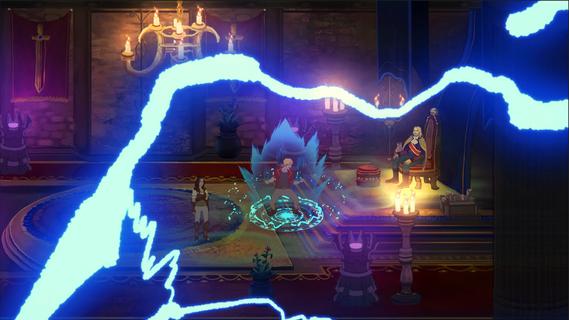

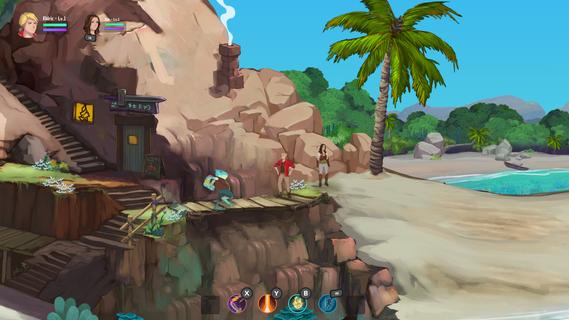
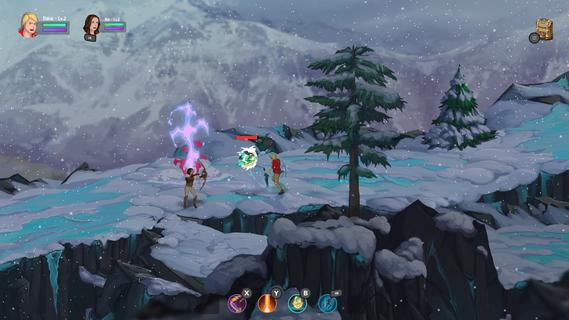
Echoes of the Stars is a stylized, single-player, story-focused action RPG developed by Alchimia Studios. The game invites players to confront fate and the gods themselves in a hand-painted 2D world. As Rin, a princess devoted to her nation, and Eldric, a humble blacksmith's apprentice with a mysterious past, players will embark on a journey that bridges time, space, and worlds unknown, delving into themes of the human condition and the perceived power of gods. The game features stylized action combat, allowing players to dodge and teleport out of harm's way with high mobility skills. Players can strategically switch between characters on the fly, enabling stylish ranged attacks and AoE magic as an archer or hone in for close-range melee combat and flashy quick fire abilities as a battlemage. Each character can be further customized with a tech tree and the ability to create custom combos. Echoes of the Stars boasts a diverse, hand-painted world filled with lush forests, dank sewers, and the blizzard-torn peaks of the Glacia mountains, representing just a small fraction of the biomes, cultures, and locals to discover. Players can step inside cozy inns, tea shops, and a variety of stores and houses scattered across the world. Almost all interiors are enterable, enhanced by a fully built 2D lighting system. The game draws heavily from fantasy and sci-fi elements while exploring a new take on the classic JRPG tropes typically found in the genre. The game can be played with a fully voiced cast or with text only for a classic experience. The game's soundtrack features over 50 hand-crafted tracks, inspired by the rich history of RPG soundtracks, that take players on an audible journey through the world. Mini-games and hidden items are sprinkled throughout the world, offering opportunities to become a sandwich artist, race to the finish, or seek out the world’s greatest treasures. Echoes of the Stars is currently in development and is planned for release in Q2 2025. A demo is available for download, and the game is also planned for release on Steam. The game supports Windows, and a controller is recommended but keyboard/mouse is supported. It features English language support and subtitles.
Show more

1. Download MEmu installer and finish the setup

2. Start MEmu then open Google Play on the desktop

3. Search Echoes of the Stars in Google Play
Install
4. Download and Install Echoes of the Stars
5. On install completion click the icon to start

6. Enjoy playing Echoes of the Stars on PC with MEmu
MEmu Play is the best Android emulator and 100 million people already enjoy its superb Android gaming experience. The MEmu virtualization technology empowers you to play thousands of Android games smoothly on your PC, even the most graphic-intensive ones.
Bigger screen with better graphics; Long duration, without limitation of battery or mobile data.
Full Keymapping support for precise control of keyboard and mouse or gamepad.
Multiple game accounts or tasks on single PC at one time with Multi-Instance manager.
Play Echoes of the Stars on PC by following steps:

















































