
Grumpy Kingdom
Updated
Current Version
Offered By

With your passion for Grumpy Kingdom, you shouldn’t have to limit yourself to the small screen of a phone. Play like a pro and take full control of the game using a keyboard and mouse. MEmu gives you everything you’re looking for. Download and play Grumpy Kingdom on PC. Play as long as you want — no more worries about battery life, mobile data, or unexpected calls. The all-new MEmu 9 is the best way to play Grumpy Kingdom on PC. With our expertly designed keymapping system, Grumpy Kingdom feels just like a real PC game. The MEmu multi-instance manager lets you run two or more accounts on the same device at the same time. Most importantly, our exclusive emulation engine unlocks your PC’s full potential, delivering smooth and seamless performance.
Show more
Download Grumpy Kingdom on PC with MEmu Android Emulator. Enjoy playing on big screen. WELCOME TO GRUMPY KINGDOM.

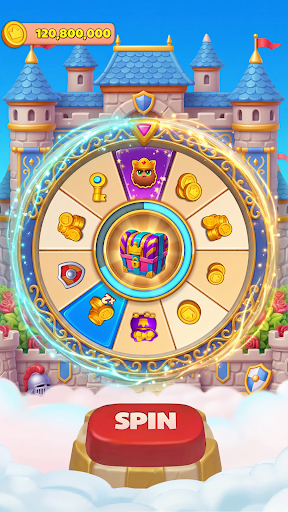
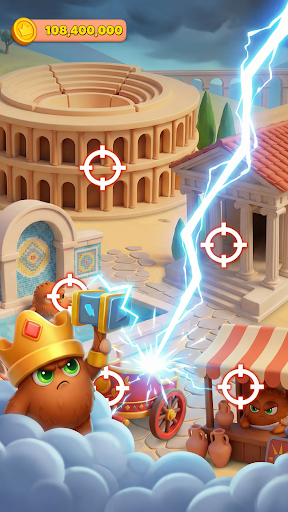
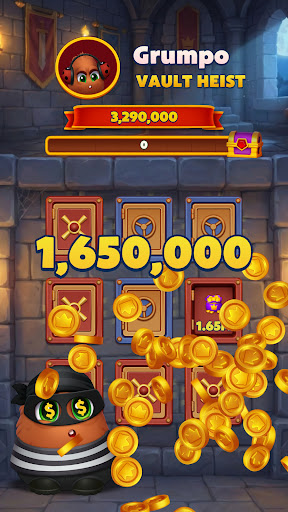
WELCOME TO GRUMPY KINGDOM
Spin your way into a world ruled by attitude, ambition, and big rewards. Grumpy Kingdom is a social, fast-paced adventure where every spin brings coins, chaos, and new opportunities to grow your empire. Meet the Grumps and begin your journey through a constantly expanding kingdom full of surprises.
SPIN FOR FORTUNE
The wheel is at the heart of Grumpy Kingdom. Spin to earn massive coin rewards, powerful boosts, shields, and special events that drive your progress forward. Every spin is a chance to strike it rich, protect your lands, or launch your next big move.
ATTACK, ROB, AND VAULT HEIST
Test your nerve and target other players to steal their coins. Launch attacks or trigger Vault Heists where you break into vaults and claim hidden treasure. Big risks lead to big rewards, but be ready to defend your kingdom when others come knocking.
BUILD HUNDREDS OF GRUMPY LANDS
Use your winnings to build and upgrade hundreds of unique Grumpy Lands. Each land brings new visuals, progression, and challenges as you advance through an ever-growing world. The bigger your kingdom, the greater your power and prestige.
SOLVE THOUSANDS OF TILE PUZZLES
Grumpy Kingdom features a deep, fully fledged tile puzzle game with thousands of levels. Master complex mechanics, overcome clever obstacles, and unleash boosters and powerups to keep the challenge fresh and rewarding. Puzzle progress fuels your kingdom growth and unlocks even more content.
TEAM UP AND COMPETE
Join teams, work together on events, and compete on global leaderboards. Earn rewards as a group or climb the ranks solo to prove you are the grumpiest ruler of them all. Cooperation and competition go hand in hand in the kingdom.
CUSTOMIZE YOUR GRUMP
Collect special outfits for your Grump to unlock gameplay bonuses and show off your style. Each outfit adds strategy and personality, helping you spin smarter, steal bigger, and progress faster.
ENDLESS EVENTS AND REWARDS
Enjoy a constant flow of events, challenges, and limited-time rewards. There is always something new to chase, build, or conquer in Grumpy Kingdom.
Grumpy Kingdom is free to play, with optional in-app purchases. An internet connection is required. Step into the kingdom, spin the wheel, and build your legacy.
Show more

1. Download MEmu installer and finish the setup

2. Start MEmu then open Google Play on the desktop

3. Search Grumpy Kingdom in Google Play
Install
4. Download and Install Grumpy Kingdom
5. On install completion click the icon to start

6. Enjoy playing Grumpy Kingdom on PC with MEmu
MEmu Play is the best Android emulator and 100 million people already enjoy its superb Android gaming experience. The MEmu virtualization technology empowers you to play thousands of Android games smoothly on your PC, even the most graphic-intensive ones.
Bigger screen with better graphics; Long duration, without limitation of battery or mobile data.
Full Keymapping support for precise control of keyboard and mouse or gamepad.
Multiple game accounts or tasks on single PC at one time with Multi-Instance manager.
Play Grumpy Kingdom on PC by following steps: