Idle Dot Shooter!
Updated
Current Version
30.0.11
Offered By

With your passion for Idle Dot Shooter!, you shouldn’t have to limit yourself to the small screen of a phone. Play like a pro and take full control of the game using a keyboard and mouse. MEmu gives you everything you’re looking for. Download and play Idle Dot Shooter! on PC. Play as long as you want — no more worries about battery life, mobile data, or unexpected calls. The all-new MEmu 9 is the best way to play Idle Dot Shooter! on PC. With our expertly designed keymapping system, Idle Dot Shooter! feels just like a real PC game. The MEmu multi-instance manager lets you run two or more accounts on the same device at the same time. Most importantly, our exclusive emulation engine unlocks your PC’s full potential, delivering smooth and seamless performance.
Show more
Download Idle Dot Shooter! on PC with MEmu Android Emulator. Enjoy playing on big screen. Blast dots.
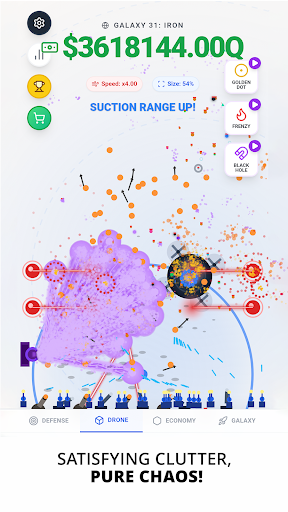
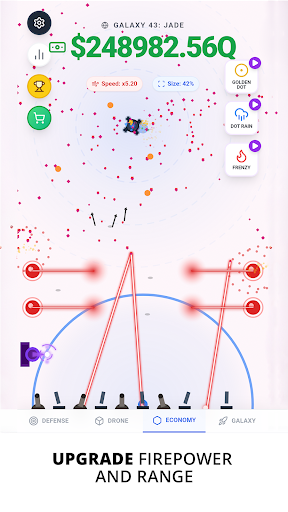
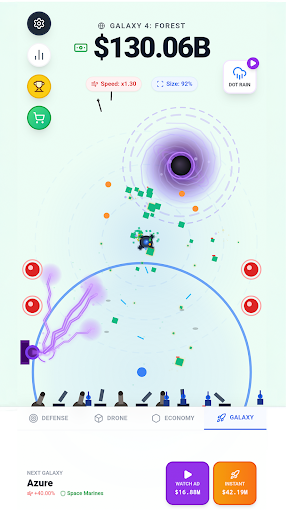

Blast dots. Stack upgrades. Trigger chaos.
Idle Dot Shooter is a minimalist idle shooter built for incremental idle progress. Your turret auto-fires into drifting targets while you build an upgrade engine that turns tiny pops into massive gains. Add a drone, boost suction, and unleash bullet hell abilities when you want chaos. Pure idle dot shooter gameplay - a true idle bullet hell experience.
What you do:
Shoot dots to earn cash. Spend it on Defence, Drone, and Economy upgrades. Travel to new galaxies with tougher targets. Push your personal best as the top dot shooter on the global leaderboard. This is bullet hell reimagined as an idle shooter - a single turret holding the line against an endless tide of dots.
Why Idle Dot Shooter is satisfying:
You're always one upgrade away from a new rhythm. Faster fire rate, bigger damage, denser spawns, stronger suction, higher value... then you watch the screen erupt into chaos as your earnings climb. That's the incremental idle loop every idle shooter fan craves.
Features:
Idle auto-shooting turret
Clean, minimalist visuals over true idle shooter gameplay. Tap in, upgrade, tap out, come back richer. Tower defense distilled to its purest form: one turret, infinite dots, endless upgrades.
Defence upgrades
Push fire rate and damage to bullet hell levels. Watch your dot shooter scale from a popgun into a wall of auto-fire destruction. Real depth without the map clutter.
Drone upgrades
Boost speed, suction, agility, and size. Your drone vacuums up earnings while your turret shoots - the perfect idle shooter companion for hands-off incremental idle play.
Economy upgrades
Stack capacity, value, spawn rate, and luck. Every upgrade multiplies into the next, fueling the incremental idle engine that makes Idle Dot Shooter so addictive. The loop every idle shooter fan comes back for.
Bullet hell abilities
Frenzy, Dot Rain, and Black Hole. Trigger them to break the idle rhythm and unleash full idle bullet hell chaos. Pure bullet hell energy.
Command Centre stats
Track dots destroyed, shots fired, crits, time active, damage distribution, and more. Optimise your build like a true dot shooter strategist. Every great run starts with reading the numbers.
Global leaderboard
Climb the ranks for most dots destroyed. Prove you're the best idle shooter player out there. Compete with bullet hell and tower defense fans worldwide.
Galaxy progression
Move beyond the void toward new destinations. Each galaxy brings new modifiers and new ways to scale your incremental idle empire. The further you push, the harder the screen gets.
Rewarded boosts
Optional rewarded ads for extra cash and ability charges. Your idle dot shooter run, your call. Pure incremental idle freedom.
What makes Idle Dot Shooter different:
Most idle shooter games drown you in menus. Most tower defense games chain you to a fixed map. Idle Dot Shooter borrows tower defense pacing without the lane-following clutter. It strips everything down: one screen, one turret, one beautiful idle bullet hell waiting to unfold. The incremental idle progression hits harder because nothing distracts from it. Every upgrade shows up immediately on screen - more bullets, more dots, more chaos, more cash.
It's the crossover the idle shooter genre has been missing - a true incremental idle game where your build is your tactic and your screen is your battlefield.
Think tower defense pacing with bullet hell intensity.
Built for fans of:
Idle shooter and idle dot shooter mechanics
Bullet hell action and arcade scaling
Tower defense strategy and incremental progression
Incremental idle games with deep upgrade systems
Minimalist arcade games and auto-shooter loops
Jump in, start popping, and see how far your dot shooter can scale. Idle Dot Shooter is the idle bullet hell incremental game built for anyone who loves clean visuals, deep upgrades, and progress that never stops. Trigger the chaos.
Show more

1. Download MEmu installer and finish the setup

2. Start MEmu then open Google Play on the desktop

3. Search Idle Dot Shooter! in Google Play
Install
4. Download and Install Idle Dot Shooter!
5. On install completion click the icon to start

6. Enjoy playing Idle Dot Shooter! on PC with MEmu
MEmu Play is the best Android emulator and 100 million people already enjoy its superb Android gaming experience. The MEmu virtualization technology empowers you to play thousands of Android games smoothly on your PC, even the most graphic-intensive ones.
Bigger screen with better graphics; Long duration, without limitation of battery or mobile data.
Full Keymapping support for precise control of keyboard and mouse or gamepad.
Multiple game accounts or tasks on single PC at one time with Multi-Instance manager.
Play Idle Dot Shooter! on PC by following steps: