IGI: Going In
Updated
Current Version
0.6
Offered By

With your passion for IGI: Going In, you shouldn’t have to limit yourself to the small screen of a phone. Play like a pro and take full control of the game using a keyboard and mouse. MEmu gives you everything you’re looking for. Download and play IGI: Going In on PC. Play as long as you want — no more worries about battery life, mobile data, or unexpected calls. The all-new MEmu 9 is the best way to play IGI: Going In on PC. With our expertly designed keymapping system, IGI: Going In feels just like a real PC game. The MEmu multi-instance manager lets you run two or more accounts on the same device at the same time. Most importantly, our exclusive emulation engine unlocks your PC’s full potential, delivering smooth and seamless performance.
Show more
Download IGI: Going In on PC with MEmu Android Emulator. Enjoy playing on big screen. Enter the world of elite tactical warfare in IGI: Going In, an intense tactical shooter and realistic FPS shooting game built for players who love stealth, strategy, and action-packed combat.
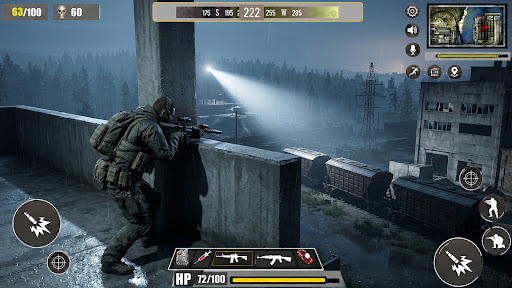
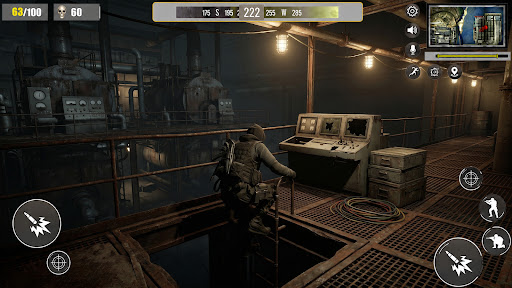
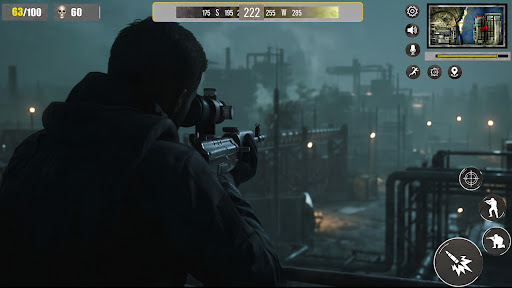
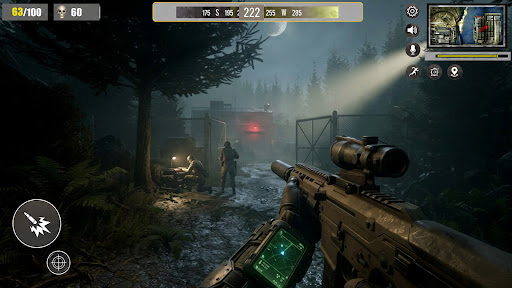
Enter the world of elite tactical warfare in IGI: Going In, an intense tactical shooter and realistic FPS shooting game built for players who love stealth, strategy, and action-packed combat. Experience the thrill of an IGI style game with dangerous covert missions, realistic gunfights, and high-risk military operations.
Become an elite soldier in this immersive military shooter where every mission tests your survival skills, shooting accuracy, and tactical decision-making. From silent infiltrations to explosive battlefield attacks, this action shooting game delivers nonstop excitement for fans of hardcore FPS combat.
Take control of a highly trained army commando and complete dangerous commando missions across enemy territories. Use stealth, strategy, and powerful weapons to eliminate threats in this modern stealth action and survival shooter experience.
Whether you love offline FPS gameplay, realistic shooting mechanics, or cinematic covert operations, IGI: Going In is designed to deliver the ultimate first person shooter experience on mobile.
GAME FEATURES
• Realistic tactical FPS gameplay
• Exciting secret mission game objectives
• Immersive stealth shooting mechanics
• Intense sniper shooting game action
• Challenging covert ops missions
• High-quality graphics and realistic environments
• Multiple modern weapons and sniper rifles
• Strategic enemy AI and stealth combat
• Offline gameplay with smooth controls
• Thrilling military warfare experience
COMPLETE HIGH-RISK MISSIONS
Fight as an elite operative in dangerous spy mission and infiltration game scenarios. Sneak into enemy bases, rescue hostages, destroy secret facilities, and survive deadly ambushes in this action-packed military action game.
Use advanced tactics in close-range gunfights or become a silent assassin with sniper precision. Every mission requires focus, strategy, and survival instincts.
REALISTIC FPS COMBAT
Enjoy authentic fps combat with tactical movement, stealth attacks, realistic weapon sounds, and intense firefights. Fans of special forces game missions and realistic military simulations will love the immersive gameplay.
Battle through warzones, survive enemy attacks, and complete dangerous battlefield missions in this thrilling tactical war game.
STEALTH & SNIPER ACTION
Master stealth combat techniques and become the ultimate silent operative. Eliminate enemies quietly, avoid detection, and complete strategic objectives in this realistic military stealth game.
Use sniper rifles for long-range eliminations in exciting sniper ops missions and dominate the battlefield with tactical precision.
Download now and experience the next generation of tactical military shooting action with stealth operations, modern warfare combat, and elite commando missions.
Show more

1. Download MEmu installer and finish the setup

2. Start MEmu then open Google Play on the desktop

3. Search IGI: Going In in Google Play
Install
4. Download and Install IGI: Going In
5. On install completion click the icon to start

6. Enjoy playing IGI: Going In on PC with MEmu
MEmu Play is the best Android emulator and 100 million people already enjoy its superb Android gaming experience. The MEmu virtualization technology empowers you to play thousands of Android games smoothly on your PC, even the most graphic-intensive ones.
Bigger screen with better graphics; Long duration, without limitation of battery or mobile data.
Full Keymapping support for precise control of keyboard and mouse or gamepad.
Multiple game accounts or tasks on single PC at one time with Multi-Instance manager.
Play IGI: Going In on PC by following steps: