ハイキュー!! ALL Challengers
Updated
Current Version
Offered By

With your passion for ハイキュー!! ALL Challengers, you shouldn’t have to limit yourself to the small screen of a phone. Play like a pro and take full control of the game using a keyboard and mouse. MEmu gives you everything you’re looking for. Download and play ハイキュー!! ALL Challengers on PC. Play as long as you want — no more worries about battery life, mobile data, or unexpected calls. The all-new MEmu 9 is the best way to play ハイキュー!! ALL Challengers on PC. With our expertly designed keymapping system, ハイキュー!! ALL Challengers feels just like a real PC game. The MEmu multi-instance manager lets you run two or more accounts on the same device at the same time. Most importantly, our exclusive emulation engine unlocks your PC’s full potential, delivering smooth and seamless performance.
Show more
Download ハイキュー!! ALL Challengers on PC with MEmu Android Emulator. Enjoy playing on big screen. ▼アニメ『ハイキュー!


▼アニメ『ハイキュー!!』とは?
集英社「週刊少年ジャンプ」に2012年2月から8年半に渡って連載され、コミックスの累計発行部数は7500万部を突破!バレーボールに懸ける高校生たちの熱い青春ドラマが人気を博したスポーツ漫画の金字塔、古舘春一による『ハイキュー‼』。
この傑作を原作とするテレビアニメシリーズは2014年からスタートし、2020年12月までにシリーズ第4期まで制作・放送され、原作読者のみならず国内外のアニメファンを熱狂と感動に巻き込んだ。
それから4年、「ハイキュー!!」の次なる舞台は劇場版へ!
2024年2月に『劇場版ハイキュー!! ゴミ捨て場の決戦』が公開され、烏野高校と因縁のライバルである音駒高校の対決が繰り広げられた本作は、世界興行収入200億円を超える大ヒットを記録!また『日本アカデミー賞』優秀アニメーション作品賞を受賞し、いま最も勢いのあるスポーツアニメとして話題となった。
そして待望の続編となる『劇場版ハイキュー!! VS 小さな巨人』、スペシャルアニメ「ハイキュー!! バケモノたちの行くところ」の制作が決定!烏野VS鴎台、梟谷学園高校VS狢坂高校の熱き準々決勝の劇的瞬間を見逃すな!
▼あなたの手で「最強の選手」を育てよう!!
『ハイキュー!!』が、本格育成ゲームとして新登場!
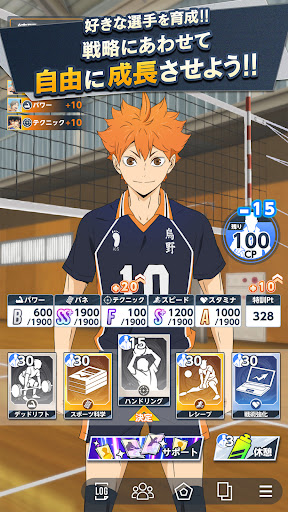
1人の選手にスポットを当て、限られた期間の中で練習やイベントをこなしながら、能力を自由にカスタマイズしていく「選手育成システム」を採用!
あなたの手で選手を育てる、新しい育成シミュレーションゲームを楽しもう!
・日々の「練習」メニューを選んで、選手の能力を特訓!
・ストーリーの合間に発生するイベントによって、習得できるスキルや成長度度が大きく変化!
・コンディション管理や仲間との絆が、選手としての覚醒の鍵を握る!
お馴染みの原作キャラクターたちをあなた好みに育てるのはもちろん、お気に入りの選手たちを自由に組み合わせた、自分だけの「最強チーム」で全国の頂点を目指そう!
▼ここでしか読めない!!充実のオリジナルストーリー
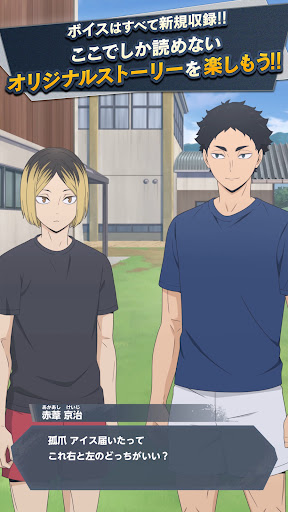
原作の熱い軌跡をたどるだけでなく、本作だけの「オリジナルストーリー」を多数収録!
学校の垣根を越えたキャラクター同士の意外な交流や、合宿での知られざるエピソードなど、ファン必見のドラマも…!?
▼新録ボイスを多数収録!!
ストーリーや育成中のイベント、そして白熱の試合シーンを彩るキャラクターボイスは、すべて豪華声優陣による完全新録!
コート上で響き渡る熱い叫び、仲間との掛け合い、そして心に刺さるあの名言の数々を、臨場感あふれるボイスで体感しよう!
▼ハイキュー!! ALL Challengers(オルチャレ)はこんな方にもおすすめ!!
・ハイキュー!!の原作マンガ・アニメを観た
・ハイキュー!!の映画アニメを観た
・ハイキュー!!の演劇を観た
・ハイキュー!!出演声優が好き
・新しいバレーボールゲームで遊びたい
・バレーボールチームを育成するゲームで遊びたい
・バレーボールをやっていた
・アニメゲームが好き
・スポーツゲームが好き
・育成シミュレーションゲームが好き
▼最新情報
ゲーム情報やキャンペーンは下記よりご確認ください。
公式サイト:https://haikyu-allchallengers.jp/
公式X:https://x.com/haikyu_ALLC
公式TikTok:https://www.tiktok.com/@haikyu_allchallengers
公式Youtubeチャンネル:https://www.youtube.com/@haikyu_allchallengers
©古舘春一/集英社・「ハイキュー!!」製作委員会 © TOHO CO., LTD.
Show more

1. Download MEmu installer and finish the setup

2. Start MEmu then open Google Play on the desktop

3. Search ハイキュー!! ALL Challengers in Google Play
Install
4. Download and Install ハイキュー!! ALL Challengers
5. On install completion click the icon to start

6. Enjoy playing ハイキュー!! ALL Challengers on PC with MEmu
MEmu Play is the best Android emulator and 100 million people already enjoy its superb Android gaming experience. The MEmu virtualization technology empowers you to play thousands of Android games smoothly on your PC, even the most graphic-intensive ones.
Bigger screen with better graphics; Long duration, without limitation of battery or mobile data.
Full Keymapping support for precise control of keyboard and mouse or gamepad.
Multiple game accounts or tasks on single PC at one time with Multi-Instance manager.
Play ハイキュー!! ALL Challengers on PC by following steps: